EasyManua.ls Logo

RightAngle 4 Series - User Manual

RightAngle 4 Series
8 pages
Print Icon
To Next Page IconTo Next Page
Loading...
Instruction #53591 • Dated: 01/13/2016
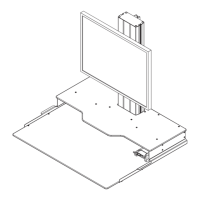
Series 4 Hover Helium Desk Top
Gas Lift Assembly Instructions
Warranty: raproducts.com/warranty
Question and Answer IconNeed help?

Do you have a question about the RightAngle 4 Series and is the answer not in the manual?

Summary

Series 4 Hover Helium Desk Top Gas Lift Assembly Instructions

Tools Required for Assembly

Lists the necessary tools for assembling the desk, including screwdrivers and Allen wrenches.

Monitor Operation and Adjustment

Monitor Height Adjustment

Instructions on how to loosen T-screws to adjust the monitor bracket vertically on the column.

Desk Movement Controls

Details on how to grasp the desk to raise or lower it and press the lever for desk movement.

Dual Monitor Configuration

Dual Monitor Mounting

Steps and parts for mounting dual monitors to the desk assembly.

Overview

The Rightangle Series 4 Hover Helium Desk Top Gas Lift is a versatile and ergonomic solution designed to transform a traditional desk into a sit-stand workstation. This gas lift assembly allows users to easily adjust the height of their monitor and desktop, promoting better posture and reducing the strain associated with prolonged sitting. The device is primarily intended for desktop use, providing a stable and adjustable platform for monitors, keyboards, and other work essentials.

Function Description:

The core function of the Series 4 Hover Helium Desk Top Gas Lift is to provide dynamic height adjustment for a desktop setup. It utilizes a gas lift mechanism, which allows for smooth and effortless vertical movement of the attached desktop and monitor. This enables users to switch between sitting and standing positions throughout their workday, improving comfort and productivity. The system is designed to be mounted on an existing desk surface, effectively converting it into a height-adjustable workstation without the need for a completely new desk.

The assembly includes a central column that houses the gas lift, a desktop surface that attaches to the column, and a monitor mounting bracket. The monitor bracket can be adjusted independently along the column, allowing for optimal monitor placement regardless of the desktop height. A release paddle or lever is integrated into the design for easy activation of the gas lift mechanism, enabling quick and precise height changes.

The device supports both single and dual monitor configurations, offering flexibility to users with varying display needs. For single monitor setups, a standard VESA mount is provided. For dual monitors, additional components are included to extend the mounting capabilities, allowing two screens to be positioned side-by-side.

Important Technical Specifications:

While specific load capacities are not explicitly detailed in the provided manual, the inclusion of robust fasteners and structural components suggests a design capable of supporting typical desktop monitors, keyboards, and mice. The assembly utilizes various screws and nuts, including:

  • 53097 x4: Likely for securing primary structural components.
  • 53580 x4: Used in conjunction with nuts for strong connections.
  • 53648 x4: Nuts that pair with specific screws for secure fastening.
  • 53565 x12: Smaller screws, possibly for attaching lighter components or for initial loose fitting.
  • 51625 x1: A single component, potentially a specialized fastener or tool.
  • 52127 x4 Single / x8 Dual: Screws specifically for monitor mounting, indicating different quantities for single vs. dual monitor setups.
  • 53679 x2: Additional screws for dual monitor configurations.

The main structural components include:

  • 801336: The primary gas lift column and base assembly.
  • 801329: A support plate or bracket.
  • 801520: The desktop surface.
  • 801500 / 801501: Side rails or support beams for the desktop.
  • 53545: A bracket or component, possibly related to the monitor mount.
  • 53615: A component for dual monitor setups.

The assembly requires common tools for installation: a screwdriver and an Allen wrench (hex key). The Allen wrench is specifically identified as part A in the tools required section.

Usage Features:

  • Easy Height Adjustment: The primary usage feature is the effortless height adjustment facilitated by the gas lift mechanism. A release paddle or lever allows users to raise or lower the desktop and monitor to their desired ergonomic position.
  • Sit-Stand Functionality: Designed to promote a healthier work environment by enabling users to easily transition between sitting and standing throughout the day.
  • Monitor Height Adjustment: The monitor bracket can be independently adjusted vertically along the column by loosening two T-screws, allowing for optimal eye-level positioning of the display(s).
  • Single and Dual Monitor Support: The system is adaptable for users with one or two monitors. Specific components (52127 screws, 53615, 53679) are provided for dual monitor configurations, allowing for a wider display setup.
  • Desktop Surface: Provides a stable platform for a keyboard, mouse, and other desktop accessories, moving in conjunction with the monitor for a cohesive workstation.
  • Cable Management (Implied): While not explicitly detailed, the design of the central column and desktop often incorporates channels or openings for routing cables, helping to maintain a tidy workspace.
  • Sturdy Construction: The use of multiple fasteners and robust components suggests a stable and durable design, capable of withstanding daily adjustments and supporting the weight of typical office equipment.

Maintenance Features:

The manual primarily focuses on assembly instructions, with limited explicit details on ongoing maintenance. However, based on the design and common practices for such devices:

  • Regular Fastener Checks: It is good practice to periodically check all screws and nuts for tightness, especially after initial assembly and during regular use, to ensure the stability and safety of the workstation. The instructions emphasize "Loosely insert all four screws, then tighten" for certain steps, indicating the importance of proper tightening.
  • Gas Lift Care: While gas lifts are generally maintenance-free, keeping the column clean and free of obstructions can help ensure smooth operation. Avoid applying excessive force or attempting to disassemble the gas lift mechanism.
  • Cleaning: The surfaces of the desktop and column can be cleaned with a damp cloth and mild cleaner as needed, avoiding abrasive materials that could damage the finish.
  • Warning Regarding Release Paddle: The manual explicitly states, "WARNING! Do not depress the release paddle. The column could rise up quickly." This highlights a safety feature and implies that the gas lift is under pressure, requiring careful handling during assembly to prevent unintended movement. This also suggests that the gas lift itself is a sealed unit not intended for user maintenance.
  • Warranty Information: The manual directs users to "raproducts.com/warranty" for warranty information, indicating that any significant issues or malfunctions should be addressed through the manufacturer's support channels rather than user-attempted repairs.

In summary, the Rightangle Series 4 Hover Helium Desk Top Gas Lift is a well-designed, user-friendly solution for creating an adjustable sit-stand workstation. Its focus on ergonomic adjustability, support for multiple monitor configurations, and straightforward assembly makes it a practical choice for enhancing workplace comfort and productivity.

RightAngle 4 Series Specifications

General IconGeneral
BrandRightAngle
Model4 Series
CategoryLifting Systems
LanguageEnglish