EasyManua.ls Logo

Riken Keiki FI-21 - User Manual

Riken Keiki FI-21
28 pages
Print Icon
To Next Page IconTo Next Page
Loading...
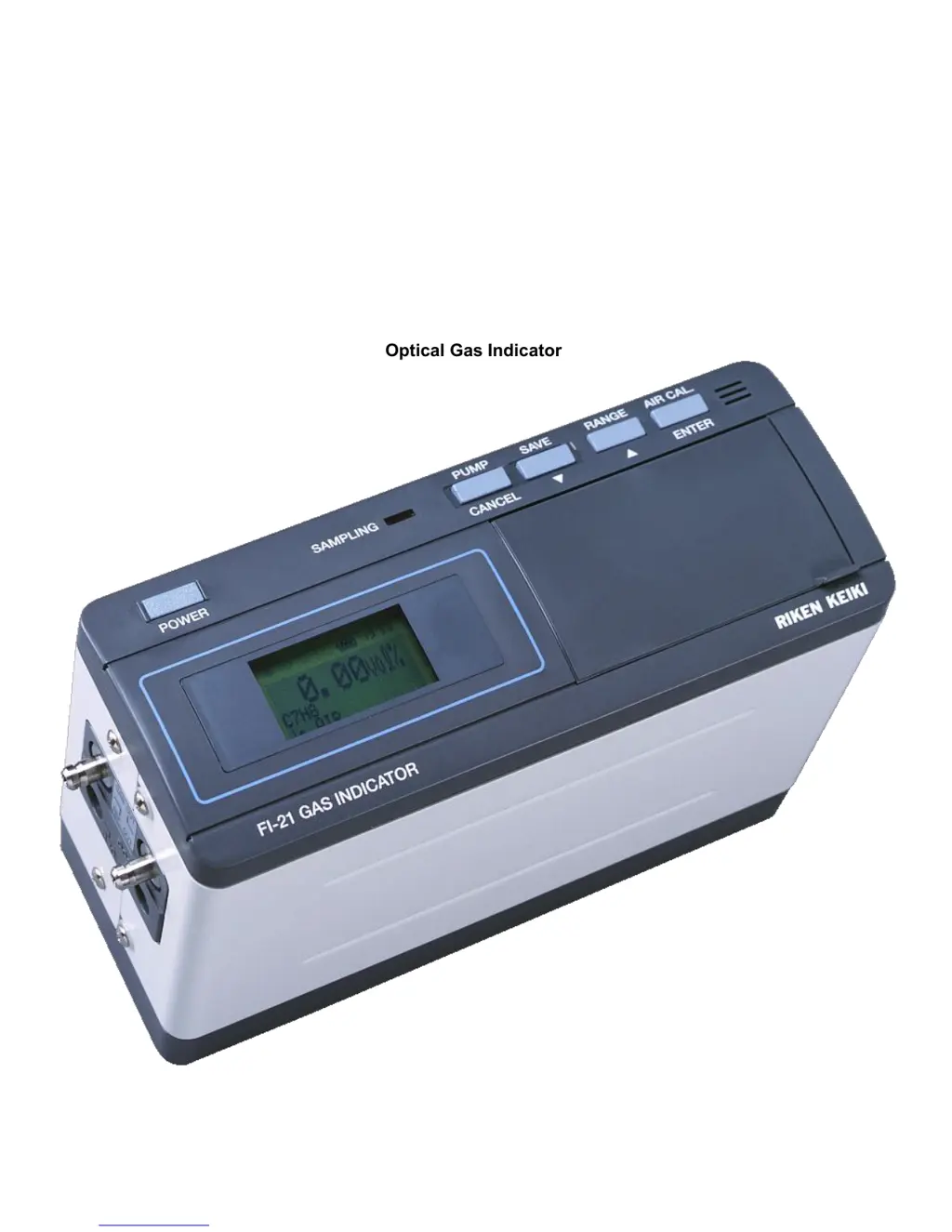
FI-21
Operator’s Manual
Optical Gas Indicator

Questions and Answers

  • D
    David VegaAug 3, 2025
    Why is my Riken Keiki Touch Panel reading incorrect?
    • K
      khannaAug 3, 2025
      Incorrect readings on your Riken Keiki Touch Panel may occur if the AIR CAL was not performed correctly, the wrong “Measuring Gas” or “Base Gas” is selected, interference gas is present in the sample, or there's a sudden pressure change at GAS IN, GAS OUT, or REF. OUT. Also, ensure the pressure at GAS IN, GAS OUT, and REF. OUT is at atmospheric pressure. To resolve this: * Ensure the instrument samples enough fresh air, then stop the pump and press the AIR CAL key. * Select the correct “Measuring Gas” and “Base Gas”. * Note that target gas containing interference gas cannot be measured. Perform AIR CAL again. * Set GAS IN, GAS OUT, and REF. OUT under atmospheric pressure.
  • A
    Amanda CampbellAug 13, 2025
    How to turn on a Riken Keiki Touch Panel if it doesn't power on?
    • A
      Angela PetersAug 13, 2025
      If your Riken Keiki Touch Panel doesn't turn on, it could be due to several reasons: missing batteries, disconnected AC adapter, incorrect battery polarity, or insufficient time pressing the POWER key. Here's how to troubleshoot: * Insert batteries or connect the AC adapter. * Ensure the batteries are inserted in the correct direction. * Keep pressing the POWER key until the buzzer beeps.
  • A
    abigailmejiaAug 23, 2025
    What to do if Riken Keiki Touch Panel reading increases after AIR CAL with no gas?
    • A
      Alexander GonzalesAug 23, 2025
      If the reading on your Riken Keiki Touch Panel increases after performing AIR CAL, even when no gas is being fed, it could be due to molecules detaching from the chamber or tubing inside the instrument. This causes the concentration in the chamber to increase. To fix this, let the instrument sample enough fresh air and check if it displays the AIR CAL value.

Summary

Warning

Warranty Information

FI-21 Overview and Introduction

1.0 Parts and Function

POWER Key and LCD Display

Explains the POWER key function and LCD display elements.

Control Keys Explanation

Details the operation of PUMP, SAVE, RANGE, and AIR CAL keys.

Instrument Connections and Tubing Structure

Describes the gas inlet, outlets, and overall tubing layout.

2.0 Measuring Mode Operations

Basic Display and Explanation

Describes the standard display elements during measurement mode.

Power ON to Measurement Procedure

Step-by-step guide for operating the instrument from startup.

Saving Data and Initial Display

Covers data saving methods and the self-diagnostic display.

AIR CAL Caution and Procedure

Important precautions and steps for Air Calibration.

Effects of Pressure on Measurement

Discusses how ambient pressure affects measurement accuracy.

3.0 Setting Mode Operations

Changing Measuring Gas

Guide to select and configure the target gas for measurement.

Adjusting Time and Date Settings

Instructions for setting the instrument's internal clock.

Viewing and Clearing Saved Data

Procedures for accessing and deleting stored measurement data.

Starting Measurement from Setting Mode

How to initiate measurement after configuring settings.

4.0 Maintenance and Care

Replacing the Batteries

Step-by-step guide for safely replacing the instrument's batteries.

Confirming Sensitivities and Daily Checks

Recommended checks for instrument performance and daily operation.

Parts Replacement Frequency Guidelines

Information on the typical lifespan and replacement schedule for parts.

5.0 Disposing the Instrument

6.0 Trouble Shooting Guide

Power and Reading Issues

Solutions for common problems like power failure or incorrect readings.

Calibration and Pressure Troubleshooting

Addresses issues with AIR CAL and pressure-related measurement errors.

7.0 Caution of Usage

Safety and Operational Precautions

Essential warnings and cautions for safe and effective instrument use.

8.0 Definition of Terms

Technical Terminology Explained

Definitions of key terms and units used in the manual.

9.0 Instrument Specifications

General Specifications Overview

Key technical specifications of the FI-21 instrument.

Standard Accessories Included

Lists the items provided with the instrument.

10.0 Measuring Principle

Optical Interferometer Method

Explains the underlying optical technology used for gas measurement.

11.0 TYPE-01 SPECIFICATIONS

Vol% Solvent Gases Applications

Specific gas types and measurement ranges for Type-01 models.

12.0 TYPE-02 SPECIFICATIONS

%LEL Solvent Gases Applications

Specific gas types and measurement ranges for Type-02 models.

13.0 TYPE-03 SPECIFICATIONS

Fumigation Gases Applications

Specific gas types and measurement ranges for Type-03 models.

14.0 TYPE-04 SPECIFICATIONS

Gas Purity Applications

Specific gas types and measurement ranges for Type-04 models.

15.0 TYPE-05 SPECIFICATIONS

Anaesthetic Gases Applications

Specific gas types and measurement ranges for Type-05 models.

Riken Keiki FI-21 Specifications

General IconGeneral
BrandRiken Keiki
ModelFI-21
CategoryTouch Panel
LanguageEnglish