Need help?
Do you have a question about the ring Bridge and is the answer not in the manual?
Download the Ring app to guide you through setting up and managing your Bridge.
Place your Ring Bridge near the Smart Lighting area for best wireless range, ideally by a window.
Connect the provided power supply into an outlet.
Connect the power supply to your Bridge with the included USB cable.
In the app, tap 'Set Up a Device', select Smart Lights, and follow the in-app instructions.
Once the Bridge is set up, add your Ring Smart Lights following app instructions.
The Ring Bridge Smart Lighting device is a central component designed to connect Ring Smart Lights to the Ring app and other Ring devices, thereby enabling smart home integration and control over lighting. Its primary function is to act as a bridge, facilitating communication between your smart lighting system and the broader Ring ecosystem.
The Ring Bridge serves as a hub for Ring Smart Lighting products. It allows users to control their Ring Smart Lights through the Ring app, integrate them with other Ring devices (such as security cameras or doorbells), and manage their smart lighting system remotely. By connecting the Smart Lights to the Ring app, users can customize settings, create schedules, and receive notifications related to their lighting. For instance, lights can be set to turn on when motion is detected by a Ring camera, or to illuminate pathways at specific times. The Bridge is essential for enabling the "smart" features of Ring Smart Lighting, as it provides the necessary wireless connectivity and integration capabilities. Without the Bridge, the Smart Lights would operate as basic lights without the advanced control and automation features offered by the Ring ecosystem.
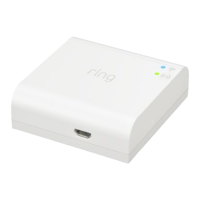
While specific technical specifications like processor speed, RAM, or detailed wireless protocols are not explicitly listed in the provided manual pages, the manual does highlight key operational aspects. The device connects to a power supply via a USB cable, indicating it likely uses a standard USB power input (e.g., 5V DC). It features indicator lights (blue and green) which likely communicate status such as power, network connectivity, or operational mode. The device is designed for wireless communication, connecting Ring Smart Lights to the Ring app and other Ring devices. This implies it utilizes wireless communication standards such as Wi-Fi to connect to the home network and potentially other proprietary wireless protocols (e.g., Zigbee or Z-Wave, though not specified) to communicate with the Smart Lights themselves. The compact, white rectangular form factor suggests it is designed to be unobtrusive and easily placed within a home environment.
The provided manual pages do not explicitly detail maintenance features such as cleaning instructions, firmware update procedures, or troubleshooting steps beyond initial setup. However, as a smart home device, it is implied that:
In summary, the Ring Bridge Smart Lighting device is an essential component for integrating Ring Smart Lights into a comprehensive smart home system, offering convenient app-based control, seamless integration with other Ring devices, and a user-friendly setup process. Its design prioritizes ease of use and effective wireless communication to enhance the functionality and convenience of smart lighting.
 General
| Brand | ring |
|---|---|
| Model | Bridge |
| Category | Lighting Equipment |
| Language | English |

 To Next Page