
 Need help?
Do you have a question about the RingCentral Avaya IX J159 and is the answer not in the manual?
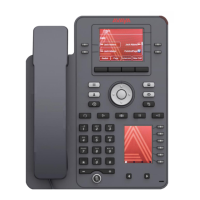
Describes the Beacon LED, Line Keys, and their visual alert functions.
Explains the Phone Key, Voicemail, Headset, Speaker, and Mute buttons for basic call handling.
Details Soft Keys, Menu, Contacts, Redial, and Recents buttons for phone operation.
Covers Volume control, Transfer, Conference, and Hold buttons for call management.
Steps to initiate a call by dialing a number after lifting handset or pressing headset/speaker.
Procedures to end a call using the handset, headset, or speaker button.
How to answer incoming calls using the handset, headset, or speaker button.
Explains announcing calls before transfer (Talk) versus direct transfer (Now).
Steps to transfer calls using softkeys, contacts, or dialing numbers.
Procedure to transfer calls directly to a user's voicemail using *0 and extension number.
Procedure to park an active call using the More and Park softkeys.
Method to retrieve a parked call by entering the park retrieval code.
Steps to add another party to a call using the Conference button or softkey.
Procedure to join a participant after they answer the call.
Process to create contacts for frequent call numbers via the Contacts menu.
Option to change the icon displayed next to a contact's name.
Allows calling contacts by pressing a dial pad digit (1-9) for one second.
Steps to assign contacts to speed dial entries via phone settings.
How to program buttons to show other users' presence status.
Steps to program buttons for frequently used external autodials.
 General
| Brand | RingCentral |
|---|---|
| Model | Avaya IX J159 |
| Category | IP Phone |
| Language | English |

 To Next Page