4. Operating the Firefly
To turn on the Firefly: Press the round black button on top of the battery once. If the battery is working,
an LED light next to the button will quickly cycle through red, green, and blue colors, then remain a solid
red, green, or blue, indicating the battery's charge level. Then press and hold, for two seconds, the right-
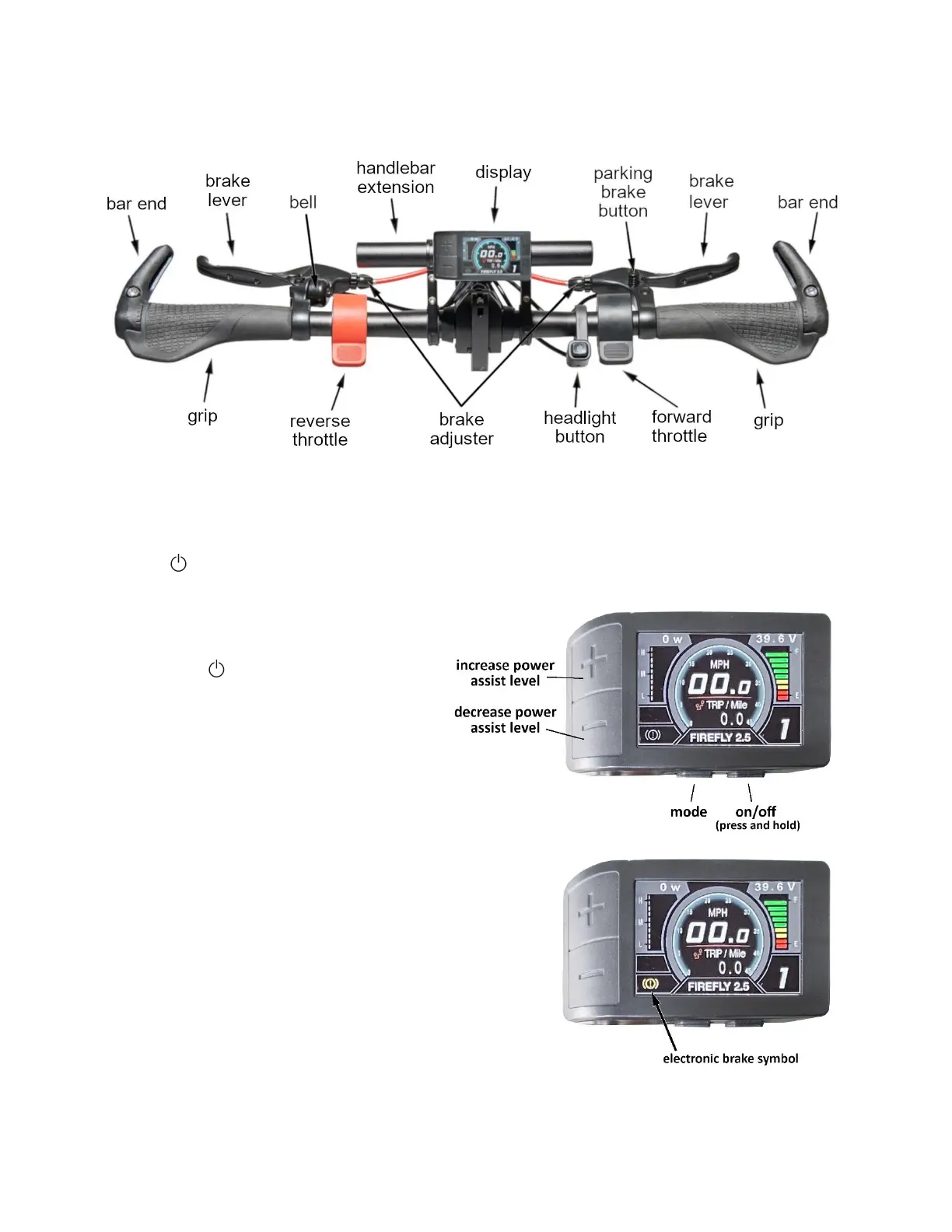
hand button of the two buttons on the bottom of the display, which is labeled with the power on/off
symbol: . When the Rio mobility logo appears, the unit is on and ready to use.
To turn off the Firefly: Press and hold, for two
seconds, the right-hand button of the two
buttons on the bottom of the display (the
power on/off button). Alternatively, press
and hold, for three seconds, the button on top
of the battery.
To move forward: Press and hold down the
flat part of the (black) forward throttle,
located on the right side of the handlebar just
to the left of the right-hand brake lever.
To move in reverse: Press and hold down the flat part of the
(red) reverse throttle, located on the left side of the
handlebars, just to the right of the left-hand brake lever.
To stop: Pull both brake levers until the Firefly stops moving.
The right brake handle operates the right brake, and the left
brake handle operates the left brake. When either brake
lever is pulled, an “electronic brake” shuts of the motor.
When the electronic brake is active, the motor cannot turn
on, and a symbol appears in bright yellow in the lower-left
corner of the display.


 To Next Page