5
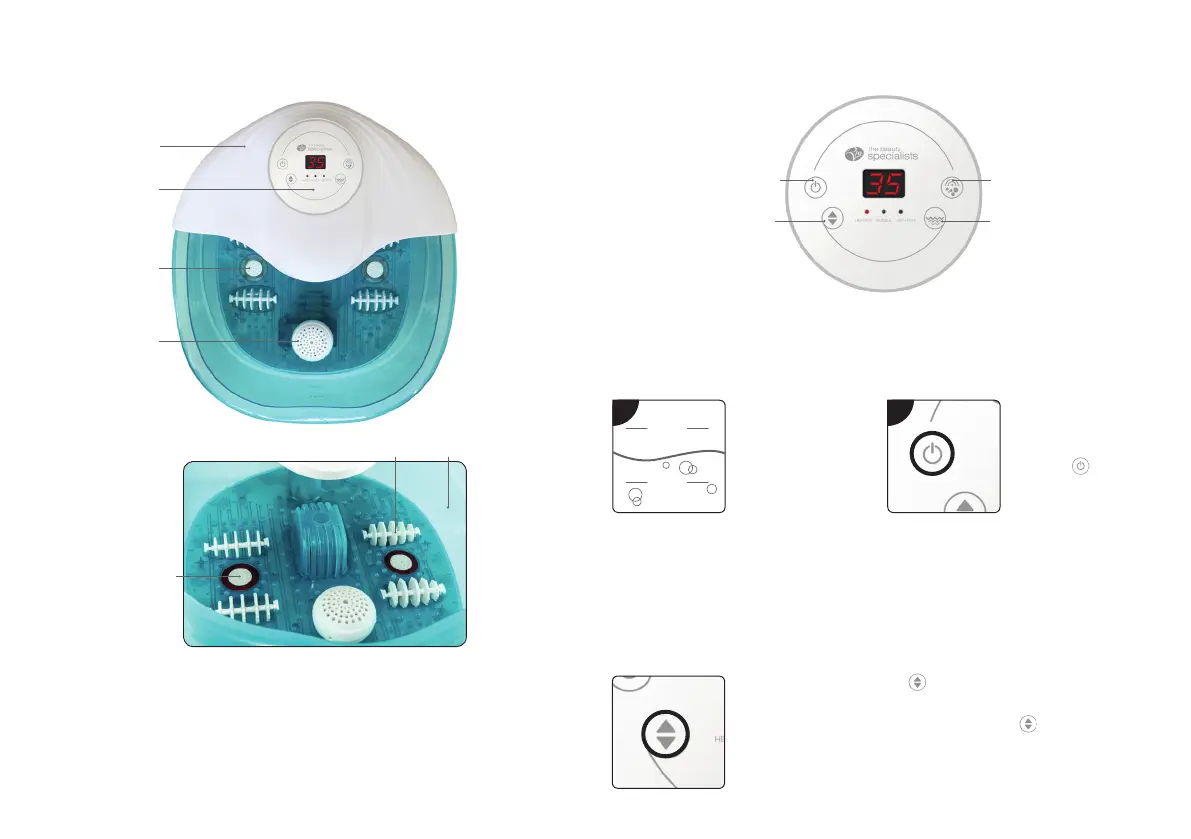
YOUR UNIT
1
2
3
4
76
5
1
Anti-splash cover
5
Hydrotherapy jets
2
Control panel
6
Reflexology foot massagers
3
Red light treatment
7
Water reservoir
4
Aromatherapy diffuser
CONTROL PANEL
SET UP
Place on a steady surface before use and make sure the unit is switched OFF and
unplugged.
1
MAX.
MIN.
Using a jug fill the
water reservoir with
warm water.
Ensure the water
level is between
the maximum and
minimum water level
marks indicated on
the inner wall.
2
Plug into the mains.
Place your feet in the
water.
Press the
button
to turn the unit ON.
Note: The unit will
automatically switch
off after 60 minutes.
SETTING THE WATER
TEMPERATURE
To heat the water, press the button. The display will
automatically show the water temperature.
To increase temperature, repeatedly press the
button. You can
select between 35˚C– 48˚C and once you click past 48˚C, the
display will return to 35˚C. The unit will beep twice when the water
reaches the selected temperature.
To turn off the heating, switch off the power.
Vibration massage
Red light treatment/
Bubble massage
Water
heater
ON/OFF


 To Next Page