4
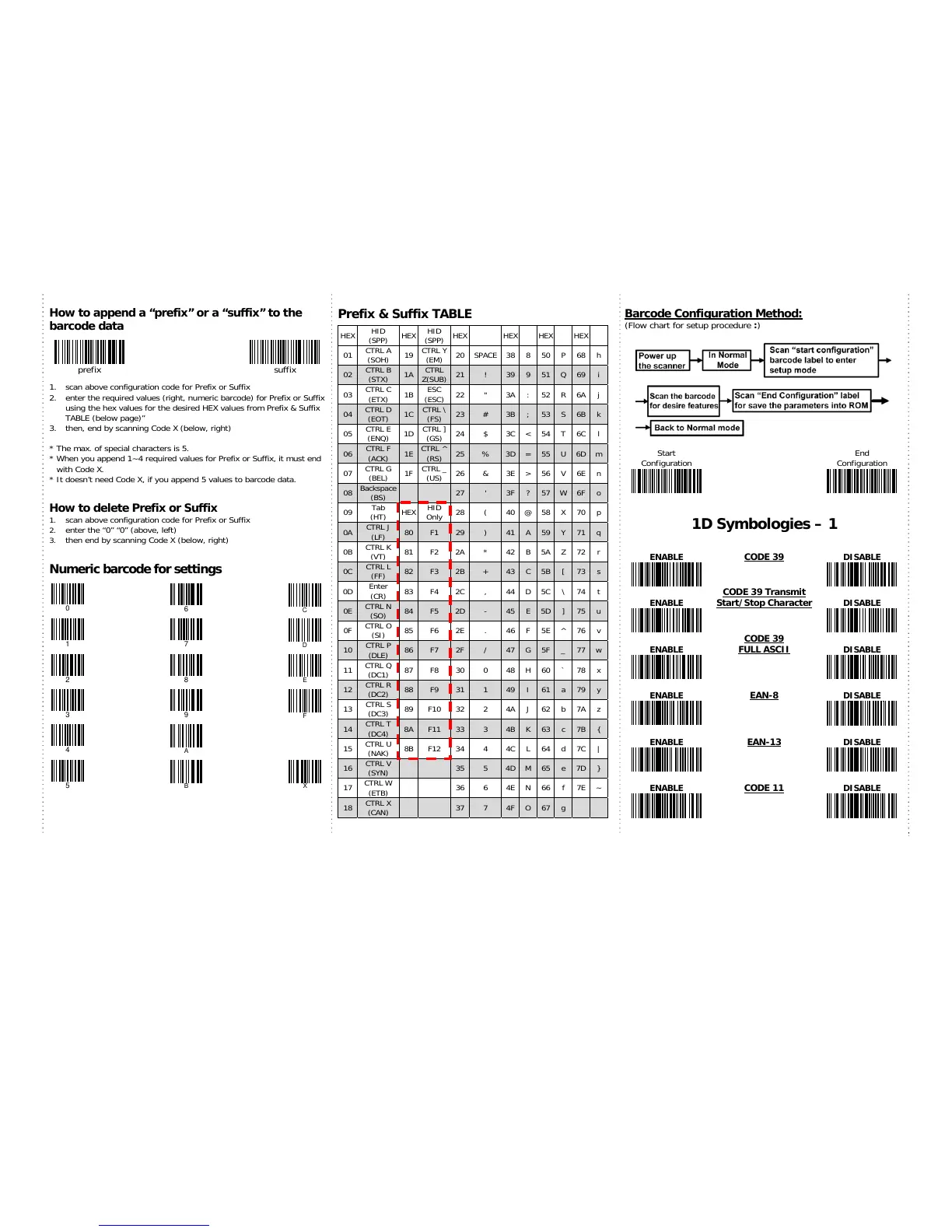
How to append a “prefix” or a “suffix” to the
barcode data
prefix suffix
1. scan above configuration code for Prefix or Suffix
2. enter the required values (right, numeric barcode) for Prefix or Suffix
using the hex values for the desired HEX values from Prefix & Suffix
TABLE (below page)”
3. then, end by scanning Code X (below, right)
* The max. of special characters is 5.
* When you append 1~4 required values for Prefix or Suffix, it must end
with Code X.
* It doesn’t need Code X, if you append 5 values to barcode data.
How to delete Prefix or Suffix
1. scan above configuration code for Prefix or Suffix
2. enter the “0” “0” (above, left)
3. then end by scanning Code X (below, right)
Numeric barcode for settings
0
6
C
1
7
D
2
8
E
3
9
F
4
A
5
B
X
Prefix & Suffix TABLE
HEX
HID
(SPP)
HEX
HID
(SPP)
HEX HEX HEX HEX
01
CTRL A
(SOH)
19
CTRL
(EM)
20 SPACE 38 8 50 P 68 h
02
CTRL B
(STX)
1A
CTRL
Z(SUB)
21 ! 39 9 51 Q 69 i
03
CTRL C
(ETX)
1B
ESC
(ESC)
22 " 3A : 52 R 6A j
04
CTRL D
(EOT)
1C
CTRL \
(FS)
23 # 3B ; 53 S 6B k
05
CTRL E
(ENQ)
1D
CTRL ]
(GS)
24 $ 3C < 54 T 6C l
06
CTRL F
(ACK)
1E
CTRL ^
(RS)
25 % 3D = 55 U 6D m
07
CTRL G
(BEL)
1F
CTRL _
(US)
26 & 3E > 56 V 6E n
08
Backspace
(BS)
27 ' 3F ? 57 W 6F o
09
Tab
(HT)
HEX
HID
Only
28 ( 40 @ 58 X 70 p
0A
CTRL J
(LF)
80 F1 29 ) 41 A 59 Y 71 q
0B
CTRL K
(VT)
81 F2 2A * 42 B 5A Z 72 r
0C
CTRL L
(FF)
82 F3 2B + 43 C 5B [ 73 s
0D
Ente
(CR)
83 F4 2C , 44 D 5C \ 74 t
0E
CTRL N
(SO)
84 F5 2D - 45 E 5D ] 75 u
0F
CTRL O
(SI)
85 F6 2E . 46 F 5E ^ 76 v
10
CTRL P
(DLE)
86 F7 2F / 47 G 5F _ 77 w
11
CTRL Q
(DC1)
87 F8 30 0 48 H 60 ` 78 x
12
CTRL R
(DC2)
88 F9 31 1 49 I 61 a 79 y
13
CTRL S
(DC3)
89 F10 32 2 4A J 62 b 7A z
14
CTRL T
(DC4)
8A F11 33 3 4B K 63 c 7B {
15
CTRL U
(NAK)
8B F12 34 4 4C L 64 d 7C |
16
CTRL


 To Next Page
 Loading...