EasyManua.ls Logo

RiteAid deluxe automatic - 4.2-4.3. Initial Configuration: Date, Time, and Cuff Connection

RiteAid deluxe automatic
60 pages
Print Icon
To Next Page IconTo Next Page
To Previous Page IconTo Previous Page
Loading...
7
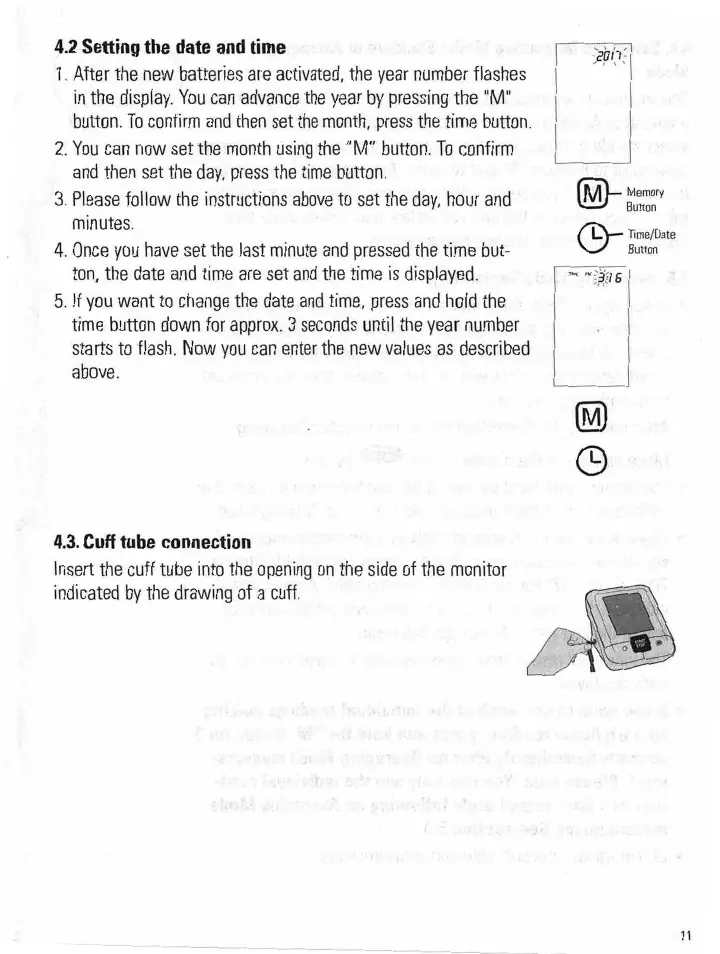
4.2
Setting
the
date
and
time
-
1.
After
the
new
batteries
are
activated,
the
year
number
flashes
in
the
display.
You
can
advance
the
year
by
pressing
the
"M.“
button.
To
confirm
and
then
set
the
month,
press
the
time
button;
2'.
You
can
now
set
themonth
using
the
”M"
button.
To
confirm
_
and
then
set
the
day,
press
the
time
button.
13.
Please
follow
the
instructions
above
to
set
the
day,
hour
and
minutes.
4.
Once
you
have
set
the
last
minute
and
pressed
the
time
bUt-
ton,
the
date
and
time
are
set
and
the
time
is
displayed.
.5.
If
you
want
to
change
the
date
and
time,
press
and
hold
the
:
time
button
down
for
approx,
3
seconds
until
the
year
number
starts
to
flash.
Now
you
can
enter
the
new
values
as
described
above.
4.3.
Cuff
tube
connection
Insert
the
cuff
tube
into
the
opening
on
the
side
of
the
monitor-
indicated
by
the
drawing
of
a
cuff.
"
I,I
.4.
\
@—
Time/Date
Button
1
5‘?
@—
Memory
Button
1911