Need help?
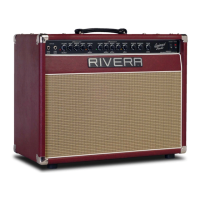
Do you have a question about the Rivera Knucklehead Reverb KR 100 T and is the answer not in the manual?
Instructions for unpacking the amplifier and saving packing materials for safe transit.
Essential safety warnings regarding voltages, moisture, and proper handling of the amplifier.
Recommended settings for the high gain input for a starting point.
Recommended settings for the low gain input for a starting point.
Recommended settings for a clean tone using the low gain input.
Recommended settings for an Austin Blues tone using the high gain input.
Recommended settings for an 80's scoop tone using the high gain input.
Recommended settings for a fast aggressive tone using the high gain input.
Recommended settings for a new metal crunch tone using the high gain input.
Recommended settings for a lead tone using the high gain input.
Explanation of High Gain and Low Gain inputs and Channel 1 features.
Details Gain, Treble, Middle, Bass, Master, and Channel 2 controls.
Explains Channel 3, Gain, Bass, Middle, Treble, and Master controls.
Explains Sub Level, Focus, Presence, Standby, and Power controls.
Details the MIDI IN, OUT/THRU, and RIVERA MIDI PEDAL ONLY connectors and their functions.
Discusses MIDI cable types, non-standard connectors, and MIDI input usage.
Explains the rotary switch numbering and its relation to MIDI channels.
Guide on connecting and adjusting levels for external effects processors.
Describes Sub Woofer, Recording Outputs, and how to set the Impedance Selector.
Explains the effect of the Vintage-Modern switch on output power and tone.
Details the High Tension fuse and its purpose in protecting the output section.
Lists amplifier functions that can be controlled via MIDI commands.
Lists amplifier functions not controllable via MIDI commands.
Explains MIDI command types for controlling multiple or single functions.
Table showing MIDI program changes for Channel 1 settings.
Table showing MIDI program changes for Channel 2 settings.
Table showing MIDI program changes for Channel 3 settings.
Illustrates connecting a single extension speaker cabinet to the amplifier.
Illustrates connecting two extension speaker cabinets to the amplifier.
Shows how to connect two amplifiers in parallel without a Y-cord.
Explains using one amplifier to control another via the effects loop.
Details connecting a signal processor into the amplifier's effects loop.
Illustrates using a stereo processor with two amplifiers for stereo sound.
Shows connecting a stereo processor to a stereo power amp for a full stereo setup.
Explains sending a direct signal from the amplifier to PA or recording equipment.
Provides advice on keeping the amplifier in good condition and basic maintenance practices.
Offers solutions for common amplifier issues like no power, no sound, or unexpected shutdowns.
Details tube types, their locations, and factory specifications for the amplifier.
Describes how to identify and test for microphonic tubes in the amplifier.
Provides a method to find faulty preamp tubes by tapping them.
Explains how to diagnose issues with the amplifier's power amp tubes.
Provides detailed information on EL-34 and 6L6GC output tubes used in the amplifier.
Step-by-step guide for biasing the amplifier's output tubes for optimal performance.
Outlines the owner's responsibilities for warranty claims and service.
Lists conditions and actions that may void the amplifier's warranty.
 General
| Power Output | 100 Watts |
|---|---|
| Power Tubes | 4 x 6L6GC |
| Preamp Tubes | 5 x 12AX7 |
| Type | Tube Amplifier |
| Channels | 2 |
| Reverb | Spring Reverb |
| EQ | Bass, Middle, Treble |
| Footswitch | Yes, Channel Switching and Reverb On/Off |
| Effects Loop | Yes |
| Speaker Outputs | 2 x 8 Ohm, 1 x 16 Ohm |

 To Next Page