EasyManua.ls Logo

Road Angel RA8100 - User Manual

Road Angel RA8100
11 pages
Print Icon
To Next Page IconTo Next Page
Loading...
Page 1 of 11
RA8100 v1.0 EN 07.20
RA8100
RA8100
User & Installation
Guide
Question and Answer IconNeed help?

Do you have a question about the Road Angel RA8100 and is the answer not in the manual?

Summary

RA8100 User & Installation Guide

About this guide

Caution and Important Notice

Important safety warnings and recommendations for installation and use.

Product Specifications

Parts Description

Installation Guide

Installation Preparation

Essential items and checks required before beginning the installation process.

Wiring and Troubleshooting

Connections

Details on how to connect the power and video cables of the camera.

Troubleshooting

Solutions for common issues like no image or inverted image display.

Limited Warranty Overview

What this Limited Warranty Covers

Defines the period of coverage and what defects are included in the warranty.

Warranty Policies

Total Satisfaction Returns Policy

Information on returning the product for a refund within 30 days of purchase.

Warranty Claim Procedure

Steps to follow for making a warranty claim and obtaining service.

Warranty Exclusions and Disclaimers

What This Limited Warranty Does Not Cover

Lists conditions and product types excluded from warranty coverage.

Disclaimer of Warranties

States limitations on express, implied, and statutory warranties.

Liability Limitations

Limitation of Damages

Limits Road Angel's liability for indirect, consequential, or special damages.

Limitation of Liability

Addresses liability for product information and online services.

Contact Information

Overview

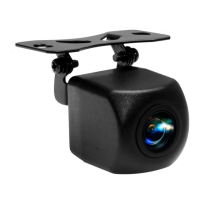
This document serves as the User & Installation Guide for the Road Angel RA8100 High Definition Reversing Camera. It provides essential information regarding the device's specifications, installation procedures, and warranty details.

The Road Angel RA8100 is a high-definition reversing camera designed to assist drivers by providing a clear view of the area behind their vehicle. Its primary function is to display a video feed on a compatible monitor or head unit when the vehicle is in reverse gear, thereby enhancing safety during parking and maneuvering. The camera is equipped with features that allow for customization of the displayed image, such as parking line guides and image mirroring.

Important Technical Specifications:

  • TV System: PAL
  • Sensor: 1/3" CMOS PC1058 Chipset
  • Resolution: 800 TVLINES
  • Video Output: 1Vp-p, 75 Ohm
  • S/N Ratio: Better than 52dB
  • Current Consumption: Up to 300mA
  • Power Supply: 12V DC
  • Operating Temperature: -20℃ to +70°C (RH95%Max.)
  • Storage Temperature: -40°C to +85°C (RH95%Max.)
  • Lens Angle: 128° Vertical
  • Horizontal Angle: 170° Horizontal
  • Water-proof Rating: IP68
  • Minimum Luminance: Min 0.8lux/f1.2(ir)

These specifications highlight the camera's capability to provide a wide-angle, high-resolution image in various environmental conditions, including low light, thanks to its minimum luminance rating and IP68 waterproof certification. The wide horizontal angle of 170° ensures a comprehensive view of the rear surroundings.

Usage Features:

The RA8100 offers several features to optimize its utility:

  • Parking Line Guides: The camera can display parking line guides on the monitor, which can be enabled by cutting the "Green" loop on the wiring. These guides assist drivers in accurately judging distances and positioning the vehicle while reversing.
  • Image Mirroring: The image displayed by the camera can be mirrored by joining the "White" loop on the wiring. This feature is useful for ensuring the displayed image corresponds correctly to the driver's perspective, especially if the camera is mounted in a way that would otherwise invert the view.
  • Manual Control Option: For advanced users, the camera can be manually controlled via a switch, rather than solely relying on engaging reverse gear. This requires connecting the red wire on the RCA cable to the red wire on the camera power cable, and then connecting the opposite end to a fused positive supply via a user-supplied switch. This allows the camera feed to be accessed on demand.
  • High Definition Output: The 800 TVLINES resolution ensures a clear and detailed image, which is crucial for identifying obstacles and navigating tight spaces.

Maintenance Features:

While the manual does not explicitly detail maintenance features, it does provide troubleshooting steps that implicitly guide users on how to address common issues:

  • Troubleshooting Image Display: If the image is not displayed, users are advised to check video cable connections, ensure the camera receives power when the vehicle is in reverse gear (with ignition on), and verify the configuration/settings of the head unit. This suggests that proper connection and power supply are key to the camera's operation.
  • Troubleshooting Image Clarity: If the image is unclear, the first step is to check if the camera lens is dirty or scratched. This highlights the importance of keeping the lens clean for optimal performance.
  • Troubleshooting Image Inversion: If the image is inverted, users should check the camera orientation. This implies that correct physical installation and alignment are necessary for the camera to function as intended.

Installation Guide and Important Notices:

The installation process is detailed, emphasizing the need for professional installation due to the complexity of vehicle wiring and potential risks. Key points include:

  • Professional Installation Recommended: The guide strongly recommends professional installation to prevent damages such as power short circuits, vehicle battery damage, or in-car decoration damage.
  • Pre-installation Checks: Users are instructed to ensure all components are present and to read the guide thoroughly before starting.
  • Safety Precautions: It is crucial to switch off the engine and accessory power before proceeding with installation. Caution is advised when installing/removing cables, avoiding movable parts (air bags, screws, seat rails), and heat sources (heater/AC pipes and ducts). Cables should not be twisted.
  • Wiring Connections:
    • Red Cable: Connects to the switched positive on the reversing lamp, ensuring the camera is live only when the ignition is on and the vehicle is in reverse.
    • Black Cable: Connects to the metal body of the vehicle (earth).
    • RCA Cable (yellow): Connects to the Video-in of the monitor or head unit.
  • Tools Required: The manual lists essential tools such as the vehicle's user manual, trim removal tools, wire cutters, screwdriver, and a circuit tester.

The product comes with a Limited Warranty from In Phase International Ltd. (ROAD ANGEL) covering defects in materials and workmanship for one year from the date of original retail purchase. The warranty details outline the conditions for claims, exclusions (e.g., damage from improper installation, abuse, or acts of God), and limitations of liability. A "Total Satisfaction Returns Policy" allows for a full refund within thirty days of purchase if the original purchaser is not satisfied.

Overall, the Road Angel RA8100 is presented as a robust and user-friendly high-definition reversing camera, designed for enhanced vehicle safety and maneuverability, with a strong emphasis on proper installation and care to ensure optimal performance.

Road Angel RA8100 Specifications

General IconGeneral
BrandRoad Angel
ModelRA8100
CategoryAutomobile Accessories
LanguageEnglish

Related product manuals