
 Need help?
Do you have a question about the Road Top CarPlay Smart Link System and is the answer not in the manual?
Provides toggle switch settings for Lexus models with rotary knob control.
Provides toggle switch settings for Lexus models with touchpad control.
Specific toggle switch settings for 12.3-inch screens with remote touch.
Settings for 12.3-inch screens with remote touch and a clock display.
Specific toggle switch settings for 10.25-inch screens with remote touch.
Instructions on configuring the audio output for the CarPlay system.
How to access the main interface of the CarPlay decoder.
Step-by-step guide for establishing a wired CarPlay connection.
Guide to setting up a wireless CarPlay connection using Wi-Fi and Bluetooth.
Instructions for connecting via AirPlay mirroring from an Apple device.
Steps to connect an Android phone using wired Autolink.
Steps to connect an Android phone using wired Android Auto.
Guide for establishing a wireless Android Auto connection.
Details the connection of aftermarket rear and front view cameras.
Instructions for connecting a DVR device.
Configuration settings for the original 360 surround view camera.
Configuration settings for aftermarket 360 surround view cameras.
Adjusts language, brightness, contrast, saturation, and hue settings.
Customizes audio parameters like volume, EQ, and microphone settings.
Configures reverse camera, line detection, track display, and radar.
Manages WiFi channels, drive modes, interface options, and software updates.
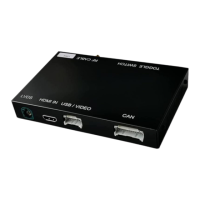
The Road Top CarPlay Smart Link System is a sophisticated in-car entertainment upgrade designed to integrate full CarPlay and Android Auto functionality into your existing OEM screen, specifically for Lexus vehicles. This user manual, tailored for the Remote Touch Version, outlines the installation, setup, and various functions of the device, emphasizing its commitment to enhancing the driving experience with top-level multimedia entertainment.
The core function of the Road Top system is to seamlessly add Apple CarPlay and Android Auto to your Lexus, allowing you to access smartphone features directly on your car's original display. This includes navigation (Apple Maps, Google Maps, Waze), music streaming (Spotify, Apple Music), making and receiving calls, sending and replying to text messages via voice commands (Siri, Google Assistant), and other compatible applications. The system is designed to retain all original OEM features of your car, ensuring that existing functionalities are not lost.
A key aspect of its functionality is the support for various control methods. Whether your Lexus is equipped with a Knob control, Touchpad, or steering wheel controls, the Road Top system integrates these to provide an intuitive and familiar user experience. This means you can navigate through CarPlay or Android Auto menus, select options, and control media playback using the same input devices you're accustomed to.
The system supports both wired and wireless connections for CarPlay and Android Auto. For wired connections, you simply connect your iPhone or Android phone to the CarPlay decoder via a USB cable. For wireless CarPlay, the system leverages your iPhone's Wi-Fi and Bluetooth capabilities. After pairing via Bluetooth, the CarPlay interface appears on your screen, and Siri functions can be activated using your car's voice button on the steering wheel. Similarly, wireless Android Auto also utilizes Wi-Fi and Bluetooth, requiring the Android Auto software to be installed on your phone and the phone's language set to English.
Beyond smartphone integration, the Road Top system offers additional multimedia and camera functionalities. It includes a USB/Media port, allowing you to insert a USB flash drive to play media files directly. The device also supports aftermarket rear view and front view cameras, as well as DVR connections, enhancing safety and recording capabilities. For vehicles with original 360 surround view cameras, the system provides specific settings to ensure proper integration. It also offers settings for aftermarket 360 surround view cameras, accommodating both all-in-one and double-host camera configurations.
The sound output of the CarPlay system is routed through the car's original multimedia system via the AUX interface. This ensures that the audio quality is maintained, and you can switch between the CarPlay audio and other car audio sources as needed.
The Road Top system is designed for ease of use, starting with its installation and setup. The manual provides QR codes that link directly to Road Top YouTube installation guidance videos for specific Lexus models (NX and ES), simplifying the physical installation process.
Once installed, entering the CarPlay Decoder interface is straightforward: a long press of the "MENU" button on your car's remote touch control, knob control, or touchpad activates the system. The main interface displays clear icons for WirelessDev, Airplay, WireAuto, Autolink, USB, Camera, HDMI, and Setup, making it easy to navigate to desired functions.
For sound, the system requires the original multimedia system to be set to the AUX interface. This is a one-time setup that ensures all audio from CarPlay or Android Auto is played through the car's speakers.
Connecting your smartphone is intuitive. For wired CarPlay, a simple USB connection and allowing CarPlay access on your phone are sufficient. For wireless CarPlay, the process involves opening Wi-Fi and Bluetooth on your iPhone, searching for and pairing with the CarPlay decoder's Bluetooth, and then allowing synchronization. The CarPlay logo will then appear on your screen, ready for use. Wireless AirPlay connection involves finding the device's SSID in your phone's Wi-Fi settings, inputting a password, and then selecting AirPlay Mirroring from your iPhone's control center.
Wired Autolink and Android Auto connections follow a similar pattern, requiring the respective software on your Android phone and a USB connection. Wireless Android Auto, while requiring specific Android phone models and software versions, also relies on opening Wi-Fi and Bluetooth, pairing with the decoder's Bluetooth, and then selecting the Android Auto option from the decoder's main menu.
The system offers extensive customization through its "Setting" menu. Users can adjust language, display brightness, contrast, saturation, and hue. Audio settings include volume, EQ, loudness, microphone volume, preamp levels, and delay. Camera settings are particularly detailed, allowing users to configure reverse camera types (original or aftermarket), reverse line detection, display track, radar, and front view time. These settings ensure that the camera features are optimized for the specific vehicle and user preferences.
The toggle switch setup is crucial for initial configuration, with different switch positions required based on the car's control type (rotary knob or touchpad) and screen size (7", 8", 10.25", or 12.3"). The manual provides clear tables and diagrams to guide users through this setup, ensuring compatibility and optimal performance.
While the manual doesn't explicitly detail routine maintenance, it provides features that contribute to the system's longevity and adaptability. The "Software update" option in the settings menu indicates that the system can receive updates for its MCU, logo images, and CarPlay icons. This allows the device to stay current with new features, bug fixes, and compatibility improvements, ensuring continued optimal performance and support for evolving smartphone operating systems.
The detailed camera settings, including options for original and aftermarket cameras, and the ability to adjust various display parameters, suggest a robust and flexible system that can be reconfigured if camera components are changed or upgraded. This adaptability reduces the need for complete system overhauls in case of component modifications.
The "Hot Line of Post Sales Engineer" section, encouraging users to contact via the purchase platform for help, highlights the availability of support. This is a crucial maintenance feature, as it provides a channel for troubleshooting and resolving any issues that may arise, ensuring users can keep their system running smoothly.
Overall, the Road Top CarPlay Smart Link System is designed to be a comprehensive and user-friendly upgrade for Lexus owners, offering modern smartphone integration with a focus on retaining OEM functionality and providing a customizable, adaptable, and supported user experience.
 General
| Control Method | Touch, Voice |
|---|---|
| Connectivity Technology | Bluetooth |
| Compatible Devices | iPhone, Android |
| Wireless Technology | Wi-Fi, Bluetooth |
| Special Features | Wireless CarPlay |
| Connection | USB |
| Functions | Navigation, Music, Calls |
| Installation | USB Plug and Play |
| Power Supply | 12V |
| Display | Via existing car stereo screen |

 To Next Page