This document describes the Road Top CarPlay decoder box for Mercedes-Benz vehicles equipped with NTG 4.5/4.7 systems, specifically focusing on cable connection, sound setup, and camera integration.
Function Description:
The Road Top CarPlay decoder box allows users to integrate Apple CarPlay and Android Auto functionalities into their Mercedes-Benz NTG 4.5/4.7 infotainment system. This upgrade provides access to navigation, audio streaming, phone calls, and other smartphone features directly on the car's original screen. The system is designed to switch seamlessly between the original NTG system and the CarPlay interface via a long press of the "C" button on the car's center console knob control. It supports both 5.8-inch and 7-inch car screens, requiring a specific toggle switch setup based on the screen size. The device also facilitates the connection of aftermarket reverse and front cameras, enhancing the vehicle's safety features.
Important Technical Specifications:
- Compatibility: Designed for Mercedes-Benz vehicles with NTG 4.5/4.7 systems.
- Screen Size Support: Compatible with both 5.8-inch and 7-inch car screens.
- Connectivity: Utilizes LVDS cables for video signal, power cable harness for power, USB-AV cable for USB and AV input, AMI audio cable for sound integration, and a WiFi antenna for wireless CarPlay/Android Auto.
- Camera Inputs: Supports aftermarket reverse camera (back video in) and front camera.
- Audio Integration: Sound is routed through the car's AMI AUX function, requiring the AMI audio cable to be connected to the car's AMI port in the central console box.
- Control Interface: Integrates with the car's original center console knob control and supports specific steering wheel control buttons (voice control, Tel button, volume "+", and "-"). Other steering wheel buttons are not supported.
- Wireless Connectivity: Features a WiFi antenna for wireless CarPlay/Android Auto. The antenna should not be placed close to metal objects to avoid signal loss.
- Software Version: The device has a software version that can be checked in the CarPlay decoder menu under "Setting" -> "System Version". This includes SDK Version, CUST Version, MCU Version, and HW Version.
Usage Features:
- Toggle Switch Setup: Before installation, users must select the correct toggle switch setup (dial setup 1 for 5.8-inch screens, dial setup for 7-inch screens) on the decoder box based on their car's screen size. Incorrect setup can lead to issues like black screen, flash screen, half-screen, or dashboard alarms.
- Cable Connection:
- Power Cable: The new cable harness connects to the OEM original power cable and the head unit. If the car has a fiber optic cable, it must be moved from the OEM power cable to the new power cable harness.
- LVDS Cable: One new LVDS cable connects to the "LVDS" port on the head unit, and another new LVDS cable connects to the original OEM LVDS cable.
- USB-AV Cable: Connects to the USB/VIDEO port on the decoder box.
- WiFi Antenna: Connects to the RF CABLE port on the decoder box.
- AMI Audio Cable: Connects to the car's AMI port in the central console box for sound output.
- System Switching: Long press the "C" button on the car's center console knob control to switch between the original NTG system and the CarPlay system.
- Sound Setup:
- Disconnect Bluetooth between the phone and the car.
- Connect the decoder AMI audio cable to the car's AMI port.
- Set the original NTG system to the AUX interface to enable sound from the CarPlay system.
- Camera Integration:
- Original Camera Setting: In the decoder menu ("Setting" -> "Reverse"), set "Reverse Camera" to "Original". Ensure "Reverse line detect", "Reverse display track", and "Reverse display radar" are set to "off".
- Aftermarket Camera Setting: After connecting aftermarket cameras, in the decoder menu ("Setting" -> "Reverse"), set "Reverse Camera" to "Aftermarket". Ensure "Reverse line detect", "Reverse display track", and "Reverse display radar" are set to "off". For the front view camera, set the front view time between 1 to 15 seconds.
- Siri Activation: Siri can be activated either by using the voice control button on the steering wheel or by long-pressing the confirm button on the knob control.
Maintenance Features:
- Troubleshooting Toggle Switch Issues: If a wrong toggle switch setup causes display problems (black screen, flash screen, half-screen, dashboard alarm), contact Road Top for the correct setup code. After changing the toggle switch setup, the car engine needs to be restarted, and the CAN cable reconnected.
- Troubleshooting CarPlay Sound Issues: If there is no sound from the CarPlay system after setting AUX, move the original fiber optic cable to the CarPlay source power cable.
- Troubleshooting Call Sound Issues:
- No sound during call: Disconnect Bluetooth between the phone and the car.
- Echo sound during call: In the Audio setting, set "Mic Echo PreConfig" to "C", then restart the engine.
- Contact Support: For assistance, users are advised to contact Road Top via the purchase platform or WhatsApp. When contacting support, provide the order ID, car model, year, screen size, toggle switch setup, pictures of the LVDS cable connection, and the software version of the CarPlay decoder.
- Installation Location: The CarPlay interface decoder box should be placed behind the head unit host or on the OEM head unit, or in the glove box.

 Need help?
 General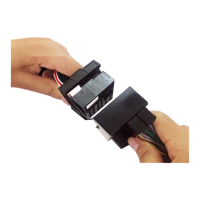

 To Next Page
