EasyManua.ls Logo

Roadstar PCD-435CD User Manual

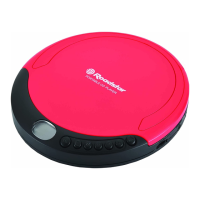
Roadstar PCD-435CD
7 pages
To Next Page IconTo Next Page
Page #1 background imageLoading...
Page #1 background image
PCD-435CD
SLIM PORTABLE CD PLAYER WITH LCD
DISPLAY
Instruction manual
Bedienungsanleitung
English Page 1
Deutsch Seite 7
INDEX
Ihr neues Get wurde unter Beachtung der strengen
ROADSTAR-Qualitätsvorschriften gefertigt.
Wir danken Ihnen r den Kauf unseres Produktes und
wünschen Ihnen optimalen Hörgenuss. Bitte lesen Sie
diese Bedienungsanleitung durch, und heben Sie sie
auf, um jederzeit darin nachschlagen zu können.
Your new unit was manufactured and assembled un-
der strict ROADSTAR quality control.
Thank-you for purchasing our product for your music
enjoyment.
Before operating the unit, please read this instruction
manual carefully. Keep it also handy for further future
references.
(10)
(9)
(12)
(11)
(7)
(6)
(5)
(2)
(8)
(3/4)
(1)
Battery Compartment
www.roadstar.com
Roadstar management SA, via Passeggiata 7 CH 6883 Novazzano (Switzerland)
Question and Answer IconNeed help?

Do you have a question about the Roadstar PCD-435CD and is the answer not in the manual?

Roadstar PCD-435CD Specifications

General IconGeneral
BrandRoadstar
ModelPCD-435CD
CategoryCD Player
LanguageEnglish

Summary

Portable CD Player Controls and Functions

Volume Adjustment

Press to adjust the volume level.

DC Power Input and Battery Compartment

Connect external power or use the battery compartment.

Headphone Jack

Socket for stereo earphones.

CD Door Operation

Open or close the CD compartment door.

Playback Controls

Play, pause, stop, and skip/search tracks.

Mode Selection

Select playback modes like repeat or random.

Programmed Playback

Set a custom track playback order.

Safety Warnings and Precautions

General Safety Alerts

Warning signs for electric shock, laser radiation, and moisture.

Hearing Protection Advisory

Warning about potential hearing damage from high volume.

Product Functions and Controls

Power Supply Installation

Instructions for inserting regular batteries.

Earphones Connection

Connect stereo earphones to the Phones jack.

CD Playback Operation

Steps to load, play, pause, and stop a CD.

Locating Tracks

How to skip between tracks or search within a track.

Playback Modes

Setting repeat play, intro play, and random play.

Programmed Playback Setup

Sequence tracks for custom playback order.

Maintenance and Specifications

Auto Power Off Feature

Automatic shutdown after 30 seconds of inactivity.

Unit Cleaning Instructions

Wipe the unit surface with a soft, moistened cloth.

CD Handling Guidelines

Proper care to preserve compact discs and ensure playback.

Product Technical Specifications

Details on audio conversion, frequency response, and dimensions.

Correct Product Disposal

Guidelines for environmentally safe disposal of electronic waste.
Related product manuals