
 Need help?
Do you have a question about the ROBBE-Futaba FX-32 and is the answer not in the manual?
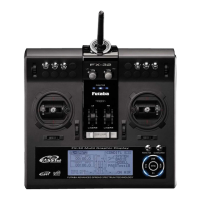
Details the primary controls: sticks, sliders, buttons, switches, trims, volume, LCD, and power switch.
Covers adjusting stick lever length, tension, and angle for personalized feel.
Instructions for installing and removing the HT6F1800B transmitter battery.
Covers safety precautions for installing receivers, servos, and related components.
Details the process and precautions for charging the 7.4V/3,400mAh LiPo transmitter battery.
Guides on the correct procedure for turning the transmitter power on and off.
Describes the layout and interactive elements of the transmitter's home screen.
Step-by-step guide for linking the transmitter (FX-32) with the receiver (R7008SB).
Instructions for performing a ground range check before flying to ensure proper function.
Details how to access and navigate the System Menu and its functions.
Covers H/W reverse, stick mode, stick calibration, and switch settings.
Detailed procedures for calibrating sticks and configuring switch functions.
Detailed steps for performing a rotation range check before flight.
Guides on setting up S.BUS/S.BUS2 servos, including ID number and parameter adjustments.
Covers adding, selecting, copying, and deleting model memories.
Initial setup steps for airplanes/gliders, including linkage and throttle cut.
Guides for setting up helicopter models, including type selection and flight conditions.
Introduces the Linkage Menu, its functions, and model-dependent selections.
Explains how to use the servo monitor for testing servo movement and positions.
Functions for adding, calling, deleting, copying, and renaming models.
Guides on selecting model types (airplane, glider, helicopter) and their associated configurations.
Covers changing system type, receiver linking, and battery fail-safe voltage setup.
Procedure for setting the neutral position of each servo using sub-trim.
Explains how to reverse the throw direction of individual servos.
Setting up fail safe positions for lost signals and low battery conditions.
Covers adjusting servo travel, limit points, and servo speed for precise control.
Enables safe engine stopping via switch operation at idle throttle.
Adjusts swash plate for linkage correction, AFR, and mixing rates for control accuracy.
Displays receiver battery voltage and allows setting alarms for voltage drops.
Shows altitude data from an altitude or GPS sensor, with alarms for altitude changes.
Displays variometer information from altitude/GPS sensors, with ascent/descent alarms.
Displays voltage data from the receiver battery and allows alarm setup.
Monitors external battery voltage, with alarms for voltage deviations.
Displays distance to aircraft from GPS sensor, with alarms for distance deviations.
Displays aircraft speed from GPS sensor, with alarms for speed variations.
Shows GPS altitude, variometer, and position data, including receiving accuracy.
Guides on registering and assigning slots for various telemetry sensors.
Introduces common functions like AFR, mixing, dual rate, and servo monitor for all model types.
Lists functions specific to helicopters, including PIT, THR, ACCEL, THR HOLD, SWASH MIX, etc.
Adjusts the pitch operation curve for optimal flight state relative to throttle stick movement.
Adjusts throttle curve for optimum engine speed and hover trim for delicate operation.
Adjusts pitch and throttle rise characteristics for acceleration/deceleration.
Sets throttle cut or idling position for auto-rotation or training, selectable by switch.
Instructions for updating the FX-32 transmitter program using an SD card.
 General
| Channels | 18 |
|---|---|
| Telemetry | Yes |
| Transmission | 2.4 GHz |
| Frequency Range | 2.4 GHz |
| Modulation | FASST, S-FHSS |
| Display | LCD |
| Battery Type | LiPo |
| Power Supply | 7.4V |

 To Next Page