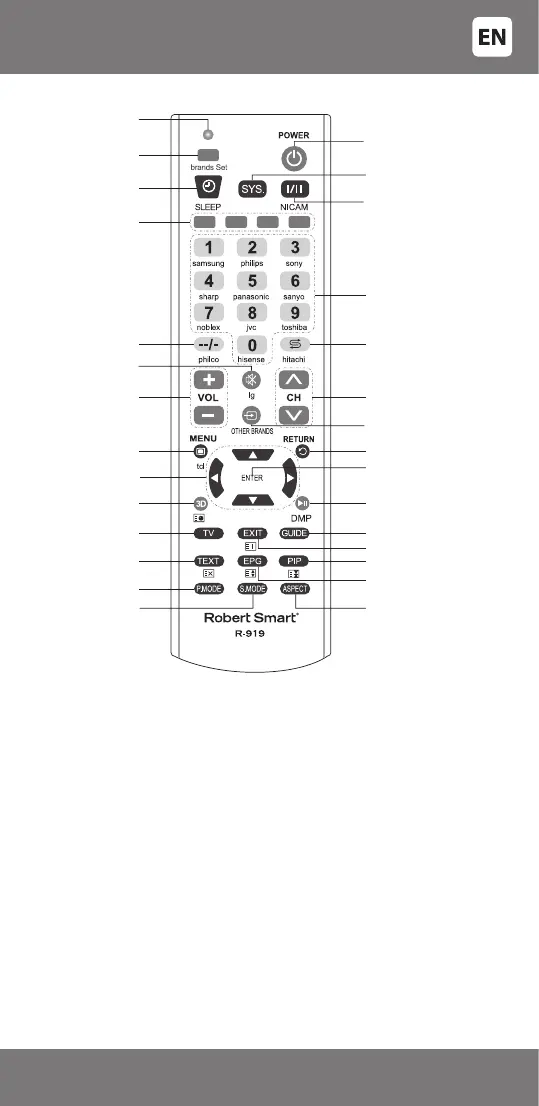
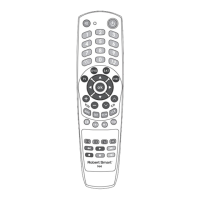
TV CONTROL KEYS AND CORRESPONDING FUNCTIONS
INSTRUCTIONS FOR CORRECT USE
Avoid sharp impacts to the remote, strong vibration, excess heat (over
40°C). Do not allow the remote to come into contact with uids, perfumes,
and alcohol. Do not let the batteries leak.
Technical data
Operation distance of the remote control: approximately 8 meters
(depends on the controlled
device parameters).
Battery type: AAA (R03) 1,5V 2 pcs
Subject to technical changes without warning.
RESTORING FACTORY SETTINGS
If your remote control does not work properly, you can perform a factory reset:
Press and hold [Set], while also pressing [0], then wait for the indicator
light to come on. When the indicator light ashes two times, the factory
settings on your remote control have been restored.
Indicator light
[brands Set] –
Setup mode on
[POWER] - TV On/O
[SLEEP] -
Clock/Sleep mode
Function/
Teletext keys
Two-three-
digit input mode
Mute
Volume up/down
[MENU] - Menu
[3D] - 3D mode
[TV] - TV mode
[TEXT] - Teletext
[P.MODE] -
Picture modes
[ENTER] - Enter
(Select/Conrm)
DMP - Play/Pause
(digital audio/video player)
NICAM modes
[SYS.] - The colour system
(PAL/NTSC)
Channel keys and
numeric keys
Return to the
previous channel
Switch channels
‘forward/backward’
TV input switch
[RETURN] - Return
[GUIDE] - Guide
[EXIT] - Exit/Cancel
[PIP] - Picture-in-picture mode
[ASPECT] - Change image
format (3:4, 16:9, etc.)
[S.MODE] -
Sound modes
[EPG] - Electronic
programme guide
Navigation keys
- 7 -
34-500


 To Next Page