EasyManua.ls Logo

Roberts Gemini 46 RD-46 - User Manual

Roberts Gemini 46 RD-46
20 pages
Print Icon
To Next Page IconTo Next Page
Loading...
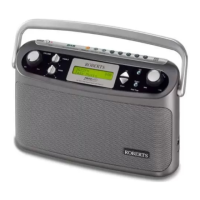
FM RDS/DAB digital radio
Please read this manual before use
ROBERTS
Sound for Generations
RD-46
Question and Answer IconNeed help?

Do you have a question about the Roberts Gemini 46 RD-46 and is the answer not in the manual?

Summary

Front Controls Overview

On;Off Button

Controls the power state of the radio.

Rear Controls Overview

Battery Usage and Maintenance

Inserting Batteries

How to correctly insert four LR20 (D size) batteries.

AC Adaptor Powering

Connecting the Adaptor

Insert plug into DC IN socket and connect to mains.

DAB Radio Operation

Powering On and Initial Scan

Press On/Off; radio performs quick DAB channel scan.

DAB Station Selection

Tuning and Selecting Stations

Use Tuning buttons to scroll, Select button to confirm station.

Finding New DAB Stations

Performing Station Scans

Conduct quick or full scans for new DAB stations using Auto Tune.

DAB Signal Strength

DAB Manual Tuning

Manual DAB Tuning Process

Tune directly to specific DAB channels using Tuning buttons.

DAB Autoselect Function

Autoselect Functionality

Automatically select stations using Tuning and Select buttons.

DAB Dynamic Range Control (DRC)

DRC Setting Adjustment

Adjust DRC levels for noisy environments via Info/Tuning buttons.

FM Radio Operation

FM Autotuning

Scan the FM band automatically for available stations.

FM Manual Tuning

Manual FM Tuning Process

Tune FM stations directly using Tuning buttons in 50kHz steps.

Station Presetting

Recalling Preset Stations

System Reset Procedure

Performing a System Reset

Reset radio to factory defaults, erasing all settings and presets.

General Safety and Usage

Guarantee Information

Guarantee Terms and Conditions

12-month warranty, coverage, exclusions, and claim procedure.

Summary

Front Controls Overview

On;Off Button

Controls the power state of the radio.

Rear Controls Overview

Battery Usage and Maintenance

Inserting Batteries

How to correctly insert four LR20 (D size) batteries.

AC Adaptor Powering

Connecting the Adaptor

Insert plug into DC IN socket and connect to mains.

DAB Radio Operation

Powering On and Initial Scan

Press On/Off; radio performs quick DAB channel scan.

DAB Station Selection

Tuning and Selecting Stations

Use Tuning buttons to scroll, Select button to confirm station.

Finding New DAB Stations

Performing Station Scans

Conduct quick or full scans for new DAB stations using Auto Tune.

DAB Signal Strength

DAB Manual Tuning

Manual DAB Tuning Process

Tune directly to specific DAB channels using Tuning buttons.

DAB Autoselect Function

Autoselect Functionality

Automatically select stations using Tuning and Select buttons.

DAB Dynamic Range Control (DRC)

DRC Setting Adjustment

Adjust DRC levels for noisy environments via Info/Tuning buttons.

FM Radio Operation

FM Autotuning

Scan the FM band automatically for available stations.

FM Manual Tuning

Manual FM Tuning Process

Tune FM stations directly using Tuning buttons in 50kHz steps.

Station Presetting

Recalling Preset Stations

System Reset Procedure

Performing a System Reset

Reset radio to factory defaults, erasing all settings and presets.

General Safety and Usage

Guarantee Information

Guarantee Terms and Conditions

12-month warranty, coverage, exclusions, and claim procedure.

Roberts Gemini 46 RD-46 Specifications

General IconGeneral
DisplayLCD
Power SourceMains/Battery
Battery LifeUp to 20 hours
Headphone SocketYes
TypeDAB/DAB+/FM
Presets20
Frequency RangeDAB: 174-240 MHz, FM: 87.5-108 MHz
Output Power3W
Additional FeaturesSleep timer

Related product manuals