
EasyManua.ls Logo

Robertshaw Paragon 9145 - User Manual

Robertshaw Paragon 9145
12 pages
Print Icon
To Next Page IconTo Next Page
Loading...
1
UDT - Universal Defrost Timer
Universal Defrost Timer (UDT)
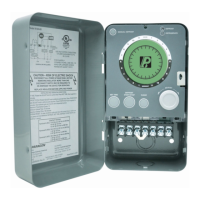
The Universal Defrost Timer family consists of two models: electric defrost and off-cycle defrost. Both models can
be wired directly to 120V AC, 208V AC or 240V AC power sources. The timers can be used in place of traditional
electromechanical defrost time clocks. Users should review this document, including terminal specifications, to ensure
compatibility with the application.
The timer maintains and displays the current time and each defrost cycle. The user can glance at the display and
immediately determine what time it is as well as see the defrost settings (start time and duration). In
addition, colored LEDs indicate the current system mode (refrigeration or defrost).

Questions and Answers

  • E
    Elizabeth JamesAug 4, 2025
    What to do if all the display segments and LEDs are flashing on my Robertshaw Paragon 9145 Timer?
    • G
      greenjamesAug 4, 2025
      If all the display segments and LEDs are flashing, it indicates the control has detected a catastrophic or programming failure. To resolve this, first, ensure the correct voltage is applied to the appropriate terminals. Next, check the device's wiring. Then, perform a PROGRAM RESET. If the issue resolves, reprogram the device. However, if the flashing continues, the timer should be replaced.
  • M
    Megan AndradeAug 11, 2025
    What does it mean if the display is flashing a G during normal operation on my Robertshaw Timer?
    • M
      Michelle ColemanAug 11, 2025
      A flashing 'G' on the display during normal operation indicates a shorted defrost termination switch on Terminal G. To fix this, check the wiring of the defrost termination switch and verify the switch operation. Replace the defrost termination switch if needed. Once the switch operates normally, the flashing 'G' will automatically reset, possibly after one defrost cycle.
  • J
    Janet JohnsonAug 19, 2025
    What to do if the display segments and backlight are not on Robertshaw Paragon 9145?
    • K
      Karen LambertAug 19, 2025
      If the display segments and backlight are not on, first verify that the proper voltage is applied to the correct terminals. If the issue persists, perform a PROGRAM RESET. If neither of these steps resolves the problem, the timer should be replaced.
  • P
    Peter SmallAug 27, 2025
    How to turn on the backlight on a Robertshaw Paragon 9145 Timer?
    • D
      dickersonkennethAug 27, 2025
      The display backlight will activate when the ADJUST knob is turned and will stay on for 10 seconds following the last activity.

Summary

Universal Defrost Timer (UDT) Overview

Operation and Functions

Advanced Features

Features beyond traditional timers, including LED indicators, manual defrost, and diagnostics.

Key Features and Benefits

Highlights advantages like universal voltage, electronic interface, program carryover, and status indicators.

Agency Listings and Compliance

Details on UL listing, FCC compliance, and certifications for the device.

Installation Instructions

Mounting the Device

Guidance on how to mount the control to a wall or flat surface.

Wiring Installation Procedure (Model 9045)

Control Wiring Details

Terminal Connections (Model 9045)

Details on terminal layout and wiring for the 9045 model.

Wiring Procedure (Model 9145)

Steps for connecting refrigeration/defrost equipment for the 9145 model.

Technical Specifications

Terminal Connections (Model 9145)

Details on terminal layout and specifications for the 9145 model.

Wiring Conversion Guide

Instructions for converting wiring from older 8000 series to 9000 series models.

Terminal Ratings

Graphic Description and Dimensions

Display Layout Overview

Explanation of the product's display elements and their functions.

System Status Indicators

Description of LED indicators for system status (refrigeration or defrost).

Lighted Display Function

Details on how the display backlight functions.

Direct Connect Line Voltage

Information on direct connection of line voltage to the device.

Programming the Timer

Program Reset Procedure

How to reset all programmed defrost cycles and return the clock to default.

Setting the Current Time

Instructions for setting the correct time of day on the timer.

Programming a Defrost Cycle

Steps to set the start time and duration for defrost cycles.

Clearing Defrost Cycles

How to remove or partially delete programmed defrost cycles.

Manual Defrost Operation

Initiating a manual defrost cycle and its interaction with automatic cycles.

Operational Features and Troubleshooting

Short Cycle Protection

Ensures minimum compressor ON and OFF times to prevent damage.

Program Carryover

Maintains programmed settings and time during power loss.

Troubleshooting Common Issues

Identifies and provides solutions for common problems and error indicators.

Robertshaw Paragon 9145 Specifications

General IconGeneral
BrandRobertshaw
ModelParagon 9145
CategoryTimer
LanguageEnglish