EasyManua.ls Logo

Robic 1000W - Countdown Timer Setup; Setting the Countdown Time; Using the Countdown Timer

Default Icon
6 pages
Print Icon
To Next Page IconTo Next Page
To Previous Page IconTo Previous Page
Loading...
Countdown
T
i
me
Sett
i
ng
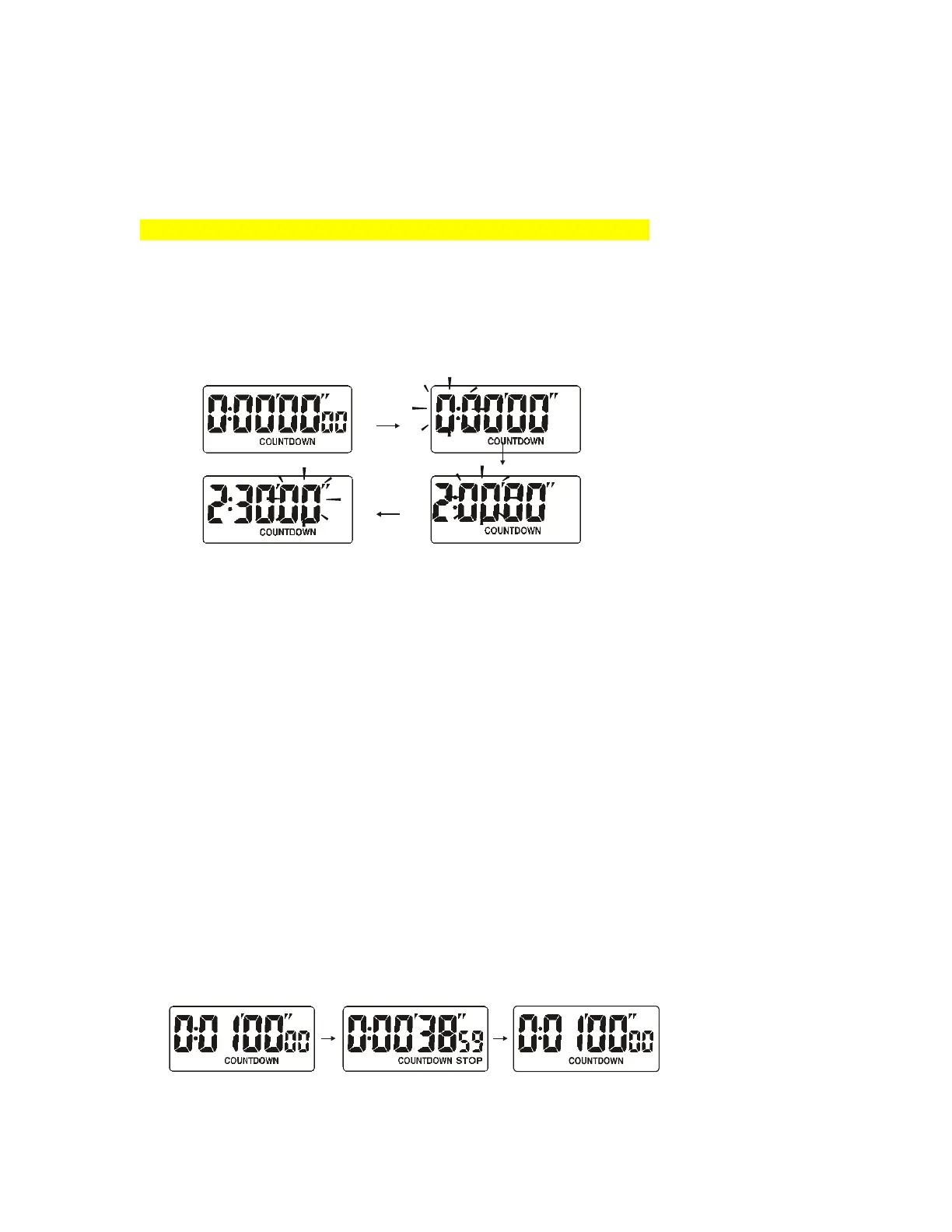
You must enter a countdown time for the timer to operate.
1
.
Press
bu
tt
on
B
t
o
en
t
er
t
he
coun
t
down
t
imer
mode
.
2
.
Press
bu
tt
on
B
f
or
2
seconds
un
t
il
hour
digi
t
s
t
ar
t
s
f
lashing
,
press
bu
tt
on
C
t
o
adjus
t
i
t
s
value
.
3
.
Press
bu
tt
on
A
t
o
selec
t
minu
t
e
digi
t,
press
bu
tt
on
C
t
o
adjus
t
i
t
s
value
.
4
.
Press
bu
tt
on
A
t
o
selec
t
second
digi
t,
press
bu
tt
on
C
t
o
adjus
t
i
t
s
value
.
Coun
t
down mode
Second se
tt
ing
Hour se
tt
ing
Minu
t
e se
tt
ing
5
.
To
exi
t t
his
se
tt
ing
mode
,
press
bu
tt
on
B
.
Note:
1
.
The
coun
t
down
t
ime
se
tt
ing
range
is
f
rom
1
second
t
o
9
hours
59
minu
t
es
59
seconds
.
2
.
While
t
he
coun
t
down
t
ime
is
approaching
t
o
0
,
i
t
will
alarm
wi
t
h
t
wo
beeps
i
f
t
he
se
t t
ime
is
less
t
han
30
seconds
,
or
i
t
will
alarm
wi
t
h
f
ive
beeps
in
t
he
las
t
5
seconds
i
f t
he
se
t t
ime
is
more
t
han
30
seconds
.
3
.
After
t
i
mer
i
s
comp
l
eted
count
i
ng
down
,
the
1000W
w
ill
beg
i
n
count
i
ng
up
as
descr
i
bed
i
n
the
Sp
li
t
t
i
me
stopwatch
descr
i
bed
above
.
How
to
Use
the
Countdown
T
i
mer
1
.
Se
t t
he
coun
t
down
t
ime
as
described
in
t
he
previous
sec
t
ion
.
2
.
Press
bu
tt
on
C
t
o
s
t
ar
t t
he
coun
t
down
t
imer
.
3
.
Press
bu
tt
on
C
t
o
s
t
op
t
he
coun
t
down
t
imer
.
4
.
Press
bu
tt
on
A
while
s
t
opped
t
o
rese
t t
he
coun
t
down
t
imer
t
o
t
he
prese
t
coun
t
down
t
ime
.
Start
Stop
Reset

Related product manuals