19
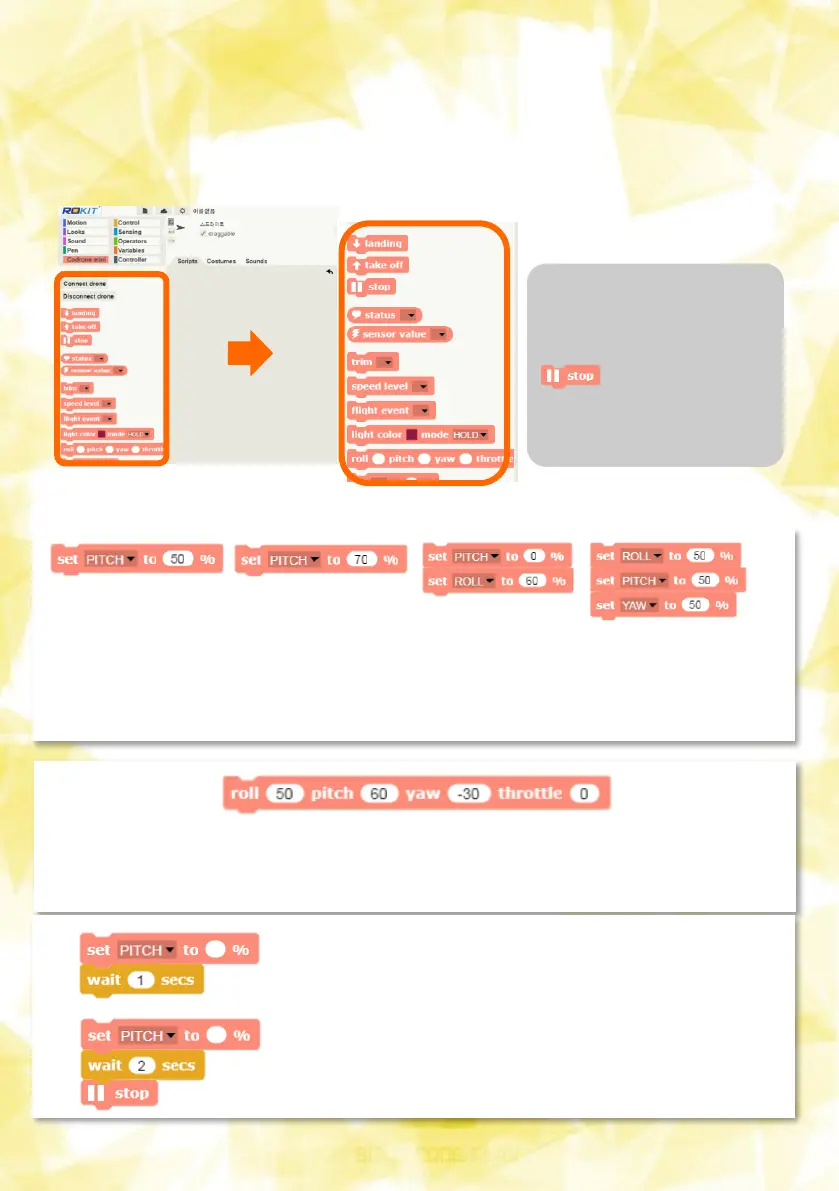
1.CoDrone Mini Block Description:Motion Block
Connecting a board from the CoDrone tab results in CoDrone
blocks that can control the CoDrone.
If the drone doesn't
stop at a strange
direction, press the
button at any
time to stop the
motion.
If multiple blocks are difficult to use over time, you can change
several values at the same time to one block below. Values left blank
without input are considered zero.
And when you add a waiting block (delay block), the specified control
value is maintained for a specified period of time before the next
block is operated.
: With the pitch value set to 50%, it
remains intact regardless of the wait
block below (no trailing blocks)
: Set pitch to 50% and continue for 2
seconds before the drone stops working


 To Next Page