6
4. Connection between Rokit Brick and CoDrone
If you have connected your PC and remote control, please make
sure your USB drive is installed successfully.
After installing the drive and verifying the COM number, run Rokit
Brick for Codrone (RBCodrone, Rokit Brick CoDrone).
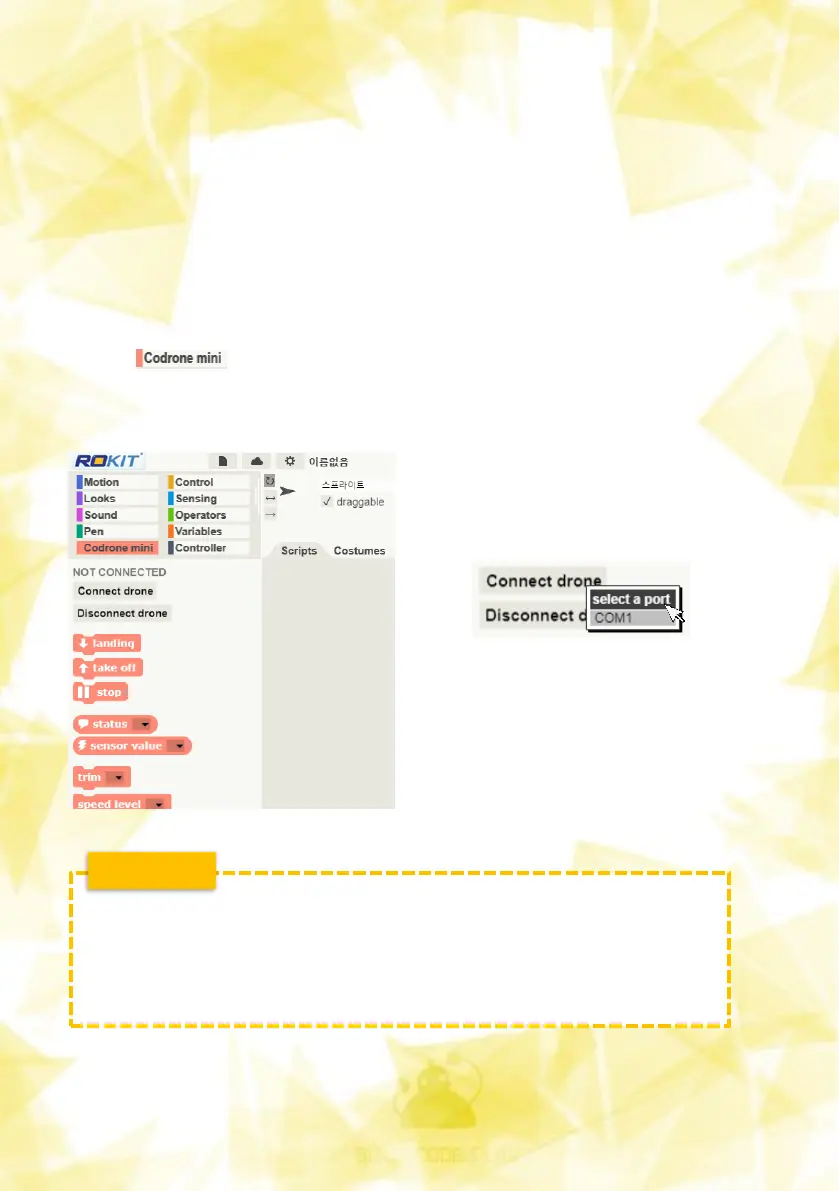
Click on the bottom left palette to see the drone control
blocks and check the two buttons
Connect the controller to the PC,
then press the 'Connect to drone'
button to connect the PC and the
drone.
Even if the drone is turned off by
removing the battery during use,
there is no need to disconnect the
drone, and it is automatically
connected when the drone is
switched back on.
CAUTION !
• Before pressing the Connect to Drone button, the drones
and controllers must be paired!
• If you have too many ports to connect to, check Device
Manager.


 To Next Page