S2 - Safe Digital Lock PS300/E31 USER MANUAL
Changing the Master Code [PIN1]
4.1
[ON] [Enter] [1] [Enter]
[PIN1] [Enter]
[new PIN1] [Enter]
[repeat new PIN1] [Enter]
Checking the new Master code:
[ON][new PIN1][Enter]
Changing the User Code [PIN2] with the 4.2
Master Code [PIN1]
[ON] [Enter] [2] [Enter]
[PIN1] [Enter]
[new PIN2] [Enter]
[repeat new PIN2] [Enter]
Checking the new User code:
[ON][new PIN2][Enter]
Changing the User Code [PIN2] without the 4.3
Master Code
[ON] [Enter] [3] [Enter]
[PIN2] [Enter]
[new PIN2] [Enter]
[repeat new PIN2] [Enter]
Checking the new User Code:
[ON][new PIN2][Enter]
Deleting the User Code 4.4
[ON] [Enter] [0] [Enter]
[PIN1] [Enter]
5 Servicing
Changing the Battery 5.1
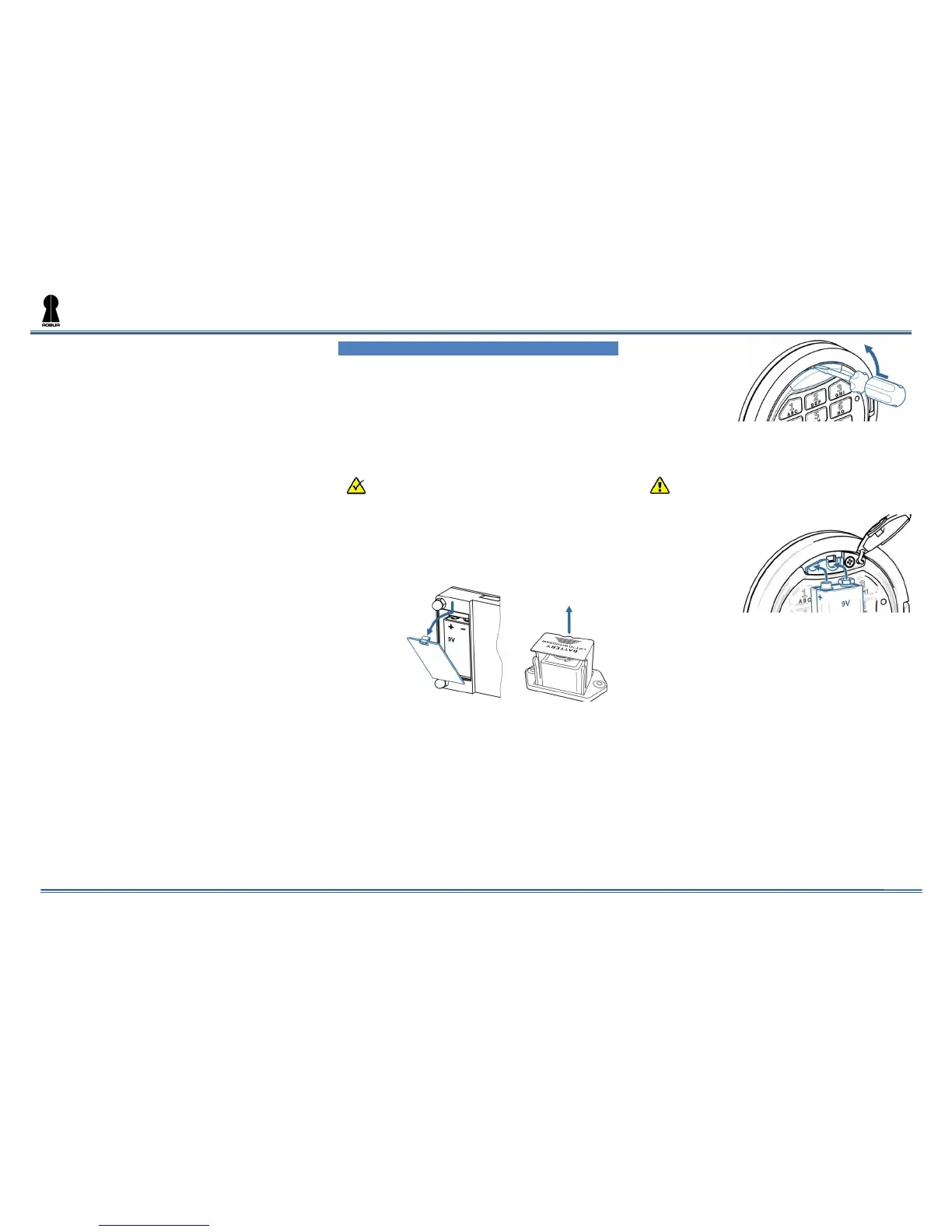
The battery is located on the inner side
of the door. Depending on the safe
model, battery could be either inside
the lock battery compartment (image
5.1a) or in a special pull-out battery box
(image 5.1b).
The exact location of the battery
compartment or the batter box could be
different depending on the safe model.
Take out the cover of the battery
compartment of the lock (see Image
5.1a. or pull out the box (see Image
5.1b).
Image 5.1 a. b.
Install a new battery (9V, type 6LF22).
Take the cover or the box back to their
location.
Opening the lock when the Battery is 5.2
Discharged
Take a new battery (9V, type 6LF22).
Take out the plastic cover for
emergency power (5), see Image 5.2.
Image 5.2
Press the new battery to emergency
power pins and fix it in this position
(see Image 5.3).
Do not make the battery’s contacts to the
metal parts of the lock in order to prevent
possible discharging of the battery.
Image 5.3
Enter the valid code on the keypad
(1).
Disconnect the emergency battery,
open the door and change the
discharged battery, see par. Fel!
Hittar inte referenskälla..
Edition 3/1 as of 07.11.2014


 To Previous Page
 Loading...