S2 - Safe Digital Lock PS300/E31 USER MANUAL
S2-Safe - Digital Lock PS300/E31
USER MANUAL
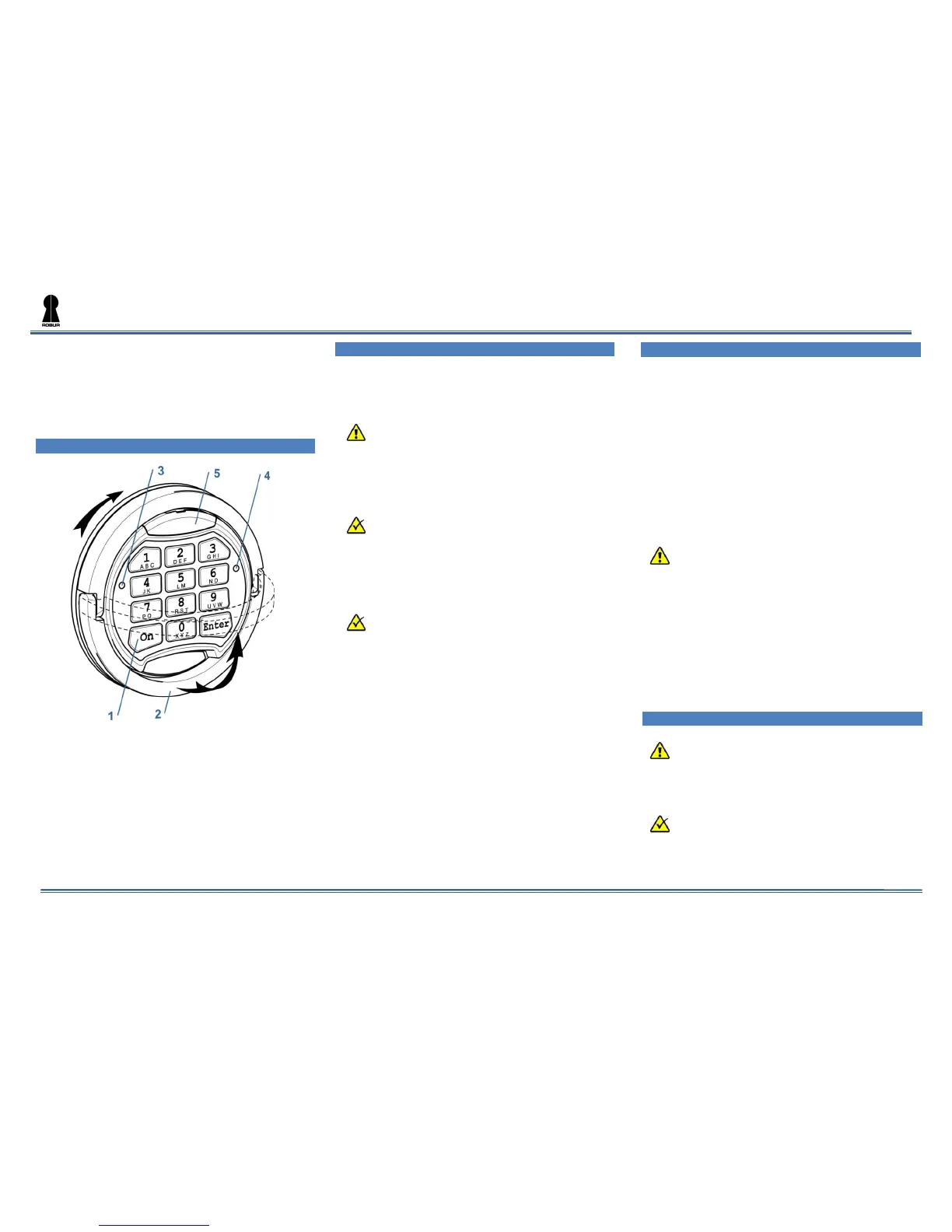
1 Main Components
Image 1.1
1 – Keypad
2 – Folding handle
3 – Green LED [G]
4 – Red LED [R]
5 – Plastic cover for emergency power
2 Definitions
Master Code [PIN1] 2.1
A set of numbers (from 6 to 8 digits) which
opens the lock and allows to operate the settings.
Before using the safe, please change the
factory Master code (see par.4.1). It is
strongly recommended to keep the master
code safe from unauthorized people.
Factory Master Code:
1–2–3–4–5–6
User Code [PIN2] 2.2
A set of numbers from 6 to 8 digits which
opens the lock and has limited functions to change
the settings.
The lock with default factory settings does not
have the User code. Please see par.4.2 to set
the User code.
Signals 2.3
[G]
1
Short single acoustic signal with single
green LED flash (3) – confirmation of the button
pressing on the keypad.
[G]
2
Short double acoustic signal with
double green LED flash (3) – confirmation of
successfully finished operation.
[R]-- Long single acoustic signal with single
red LED flash (4) – error message.
[R]
5
Short acoustic signal sounds 5 times
with 5 red LED flashes (4) – low battery message.
Please see par.5.1 how to change the battery.
3 Main Functions
Opening the Lock 3.1
3.1.1 Opening with the Factory Master code
[ON][1][2][3][4][5][6][Enter]
3.1.2 Opening with the Master Code
[ON][PIN1][Enter]
3.1.3 Opening with the User Code
[ON][PIN2][Enter]
If the code is right, there will be a green LED
flash and it will be possible to open the door within 5
seconds by turning the handle (2) clockwise.
If you enter a wrong code three times in a
row, the lock will be blocked for 5 minutes.
The blocking of the lock will be indicated
periodical red LED flashes.
Closing the Lock 3.2
Close the door and turn the handle (2) anti-
clockwise until it stops.
4 Service Functions
It is strongly recommended to change the
settings of the lock with the door opened.
The service functions will be unavailable in
case low power supply which is indicated by
the signals. [R]
5
.


 To Next Page
 Loading...