EasyManua.ls Logo

ROCAM CR1009 - User Manual

ROCAM CR1009
2 pages
Print Icon
To Next Page IconTo Next Page
Loading...
- 02 -
Chapter 2 POWER SUPPLY MODE
There are 5 power supply to power the radio:
1. Hank Crank Power
(1) Unfold the crank handle from the backside and rotate it in either
direction.
(2) Rotate the crank handle, It will generate 300-350mA electricity
to charge build-in 5000mAh rechargeable battery.
Note: Rotate the crack handle at the speed of 2 laps per second.
It will generate 300-350mA electricity.
2. Solar Power
(1) Expose the solar panel to sunlight, dont charge indoors.
(2) It will generate 30-50mA electricity to charge build-in 5000mAh
rechargeable battery.
Note: Solar panel will generate 30-50mA electricity when exposed to sunlight.
It is difficult to fully charge the 5000mAh battery with solar panel, which is
mostly used for maintaining the rechargeable battery.
3. Micro USB Adapter Charging input
(1) Connect USB Cable(included) to a regular AC power adapter(not
included).
(2) Plug the USB cable into the Micro USB port of the radio.
(3) Plug the AC adaper to a 110-220V standard outle.
It is highly recommended to use 5V/2A AC power adapter.
- 01 -
Chapter 1 LOCATION OF CONTROLS
1
3
4
5
6
7
8
9
121314 15 16 17
1. USB Output Charging Port
2. Micro USB Input charging Port for Built-in Battery
3. Carry Strap Holder 4. Flashlight Button 5. Reading Lamp Button
6. SOS Control Button 7. Speaker 8. Telescopic Antenna
9. Power ON/OFF & Volume Knob 10. Frequency Display
11. Turning Knob 12. Battery Indicator 13. Charging Indicator
14. Power On Indicator 15. Band Selector 16. Power Selector
17. Weather Band Selector 18. SOS Flashlight
19. Flashlight 20. 5000mAh Rechargeable Battery (included)
21. Battery Compartment Cover 22. Solar Panel
23. Reading Lamp 24. AAA Battery Compartment Cover
25. Crank Handle
2
10
11
18
19
20 21
22 23 24 25
1
5
2
3
4
CR1009
Emergency Alert Radio
with AM/FM/SW/NOAA weather/Solar Crank
Version 2.2
ROCAM
R
Mad e in PRC
Http://www.yelaw.net
Contact our experts
help@yelaw.net
CR1009 meets the NWS evaluation criteria for NWR All Hazards logo use
Question and Answer IconNeed help?

Do you have a question about the ROCAM CR1009 and is the answer not in the manual?

Summary

Location of Controls

Power Supply Modes

Crank Power

Generates electricity by rotating the crank handle for charging the battery.

Solar Power

Generates electricity via the solar panel when exposed to sunlight for charging.

Micro USB Adapter Charging

Charges the built-in battery using a Micro USB input port and an AC adapter.

Power Indicators and Battery Options

Li-ion Rechargeable Battery

Details on the built-in 5000mAh rechargeable battery and its charging status.

AAA Batteries

Instructions for using AAA batteries as an alternative power source.

Charging Portable Devices

Power Switch Operation

SOS Alert Function

Reading Lamp Usage

Flashlight Operation

Radio Operation Guide

Turning On and Band Selection

How to turn the radio on and select AM, FM, SW, or Weather Bands.

Volume and Tuning

Adjusting volume and tuning to desired stations for optimal reception.

Antenna and NOAA Band Usage

Guidance on using the telescopic antenna and selecting local NOAA weather bands.

NOAA Alert Feature

How the NOAA alert function works during severe weather warnings.

Technical Specifications

Overview

The FROCAM CR1009 is an Emergency Alert Radio designed to provide reliable communication and power in various situations, including emergencies. It meets the NWS evaluation criteria for NWR All Hazards, indicating its capability to receive critical weather and hazard alerts.

Function Description:

The CR1009 is a multi-band radio capable of receiving AM, FM, Shortwave (SW), and NOAA weather bands. This allows users to stay informed with local and international broadcasts, as well as crucial weather alerts from the U.S. National Weather Service.

Beyond its radio capabilities, the device integrates several emergency features:

  • SOS Alert: A dedicated SOS control button activates a flashing red SOS light and an audible alarm, signaling for help in emergency situations.
  • Flashlight: A built-in flashlight provides illumination, essential during power outages or in dark environments.
  • Reading Lamp: A rotatable reading lamp offers convenient lighting for reading or close-up tasks, functioning as a table lamp when rotated 90 degrees.
  • Power Bank Functionality: The radio can charge external USB devices via its USB output port, acting as a portable power bank during emergencies.

Important Technical Specifications:

  • Radio Frequencies:
    • FM: 87-108 MHz
    • NOAA Weather: 162.400MHz / 162.425MHz / 162.450MHz / 162.475MHz / 162.50MHz / 162.525MHz / 162.55MHz
    • AM (MW): 520-1710 KHz
    • SW: 2.3-22.00 MHz
  • Power Sources:
    • Rechargeable Battery: 5000mAh 21700 Li-ion battery (included)
    • AAA Batteries: 3pcs (not included)
    • Solar Panel Power: 30-50mA
    • Crank Power: 300-350mA
    • AC Power Input Interface: Micro USB (5V/2A AC power adapter recommended, not included)
  • Charging Output: USB Output Charging Port

Usage Features:

The CR1009 offers multiple ways to power the radio and its integrated features:
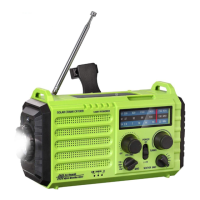
  1. Hand Crank Power: Unfold the crank handle from the backside and rotate it in either direction. Rotating the crank handle at a speed of 2 laps per second generates 300-350mA electricity, which charges the built-in 5000mAh rechargeable battery.
  2. Solar Power: Exposing the solar panel to direct sunlight generates 30-50mA electricity to charge the built-in rechargeable battery. This method is primarily for maintaining the battery charge rather than fully charging it. Indoor charging via solar panel is not effective.
  3. Micro USB Adapter Charging Input: Connect the included USB cable to a regular AC power adapter (not included) and then plug it into the radio's Micro USB port. A 5V/2A AC power adapter is highly recommended for optimal charging.
  4. Li-ion Rechargeable Battery: The radio comes with a pre-installed 5000mAh 21700 Li-ion battery. Users can switch the "POWER" button to "LI-ION" side to utilize this power source.
  5. AAA Batteries: For an alternative power source, users can open the battery compartment and insert 3pcs AAA batteries, ensuring correct polarity. The "POWER" button should then be switched to "AAA" side. Note that the SOS alert sound is lower when powered by AAA batteries due to their weaker current compared to the Li-ion battery.

Radio Operation:

  • Turning On/Off and Volume Control: Rotate the volume control knob away from the OFF position to turn on the radio. Continue rotating to adjust the sound volume.
  • Band Selection: Use the band selector switch to choose between AM, FM, Shortwave, and Weather Band.
  • Tuning: Rotate the tuning knob slowly to find the desired station.
  • Antenna: Extend the telescopic antenna for best signal reception on FM/SW/Weather Band. For AM stations, operating near a window or open space improves signal quality.
  • NOAA Alert: When the radio is on and the band selector is set to WB, the device will emit an SOS alarm sound for 9 seconds and flash a red light upon receiving a severe weather alert from the National Weather Service. After the alarm, the radio will continue to play weather information. It is recommended to use an AC adapter to power the radio when NOAA Alert is active.

Charging External Devices:

  • Connect your phone's charging cable to the USB output port on the back of the radio. This feature is intended for emergency use only and should not be used as a normal power bank. The supplied charging cable is specifically for Micro USB devices; other USB devices require their original charging cables. If the CR1009 has no power, cranking the handle for 8-15 minutes (depending on rotation speed) can provide enough power to start up a phone.

Maintenance Features:

  • Battery Indicators: The device includes a battery indicator (12) and a charging indicator (13) to monitor power status.
    • A flashing indicator every second signifies low Li-ion battery power.
    • A solid indicator means the Li-ion battery is charging.
    • A steady light indicates the radio is on.
  • Battery Compartments: Separate compartments are provided for the 5000mAh rechargeable battery (21) and AAA batteries (24).
  • Solar Panel: The integrated solar panel (22) helps maintain the charge of the rechargeable battery.

ROCAM CR1009 Specifications

General IconGeneral
BrandROCAM
ModelCR1009
CategoryRadio
LanguageEnglish

Related product manuals