6
4. Operation
●
Operation
A. Press power switch (1) to activate the instrument after making sure all tubing are well connected.
●
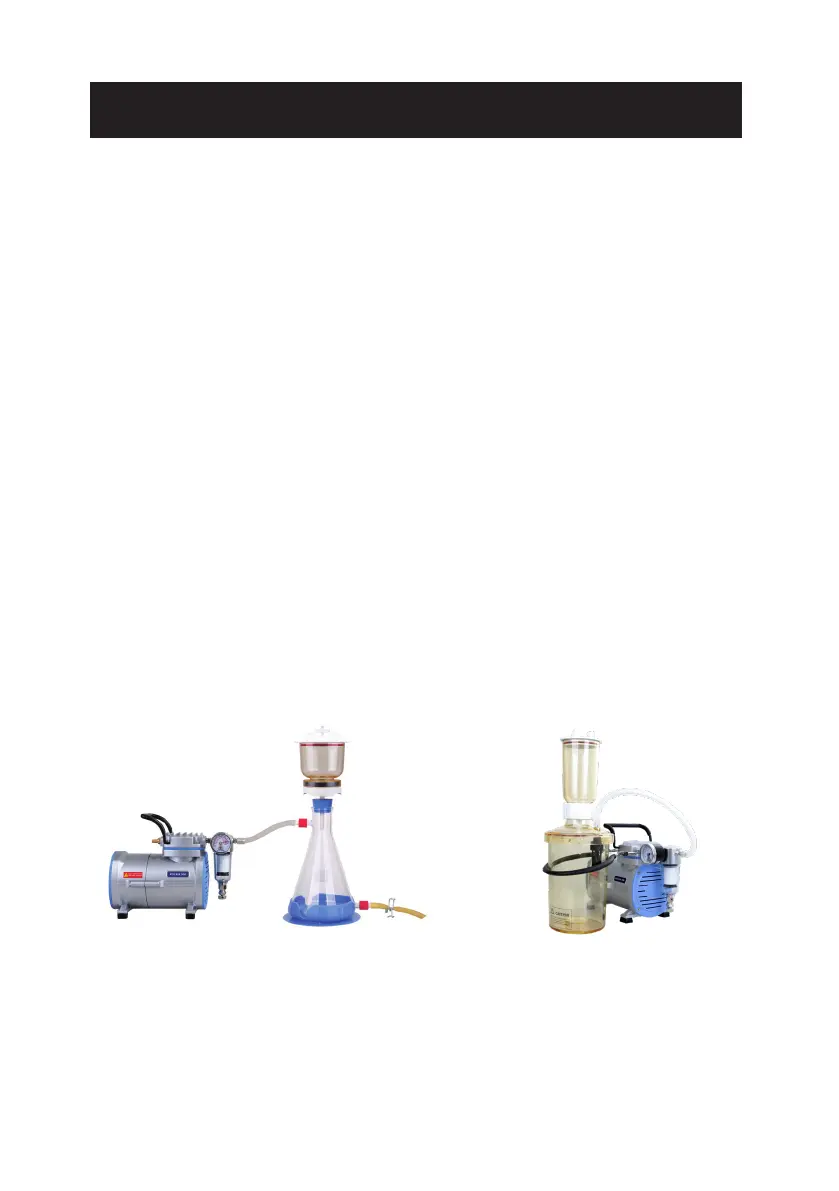
A cold trap or trap bottle is recommended to connect before air inlet (4) of vacuum pump,
while amount of moisture and steam exists.
●
A hoop holder is available to x ltration apparatus securely and save space.
B. To setup vacuum by adjusting the vacuum regulator (8).
Pressure can also be set up on Rocker 430 by adjusting the pressure regulator (12).
●
Pilot 100, vacuum controller (Cat. No. 183100-01(02)) is available for precise vacuum control.
C. Check liquid level of moisture trap (7) daily and drain the liquid when it is up to the neck of bottle.
Filtration System Assembly Diagram Filtration System with Hoop Holder
* Warning:
(1) When pump is used for aqueous solution ltration, please ensure the liquid level of ask not
exceed safety level. Failure to comply could result in serious damage to the pump and void the
warranty. If it occurs, please contact the distributor immediately for service.
(2) While Rocker 430 is operated as a compressor, please ensure a 20-min break while every
30-min working period to prevent the instrument shutdown from overheating.


 To Next Page