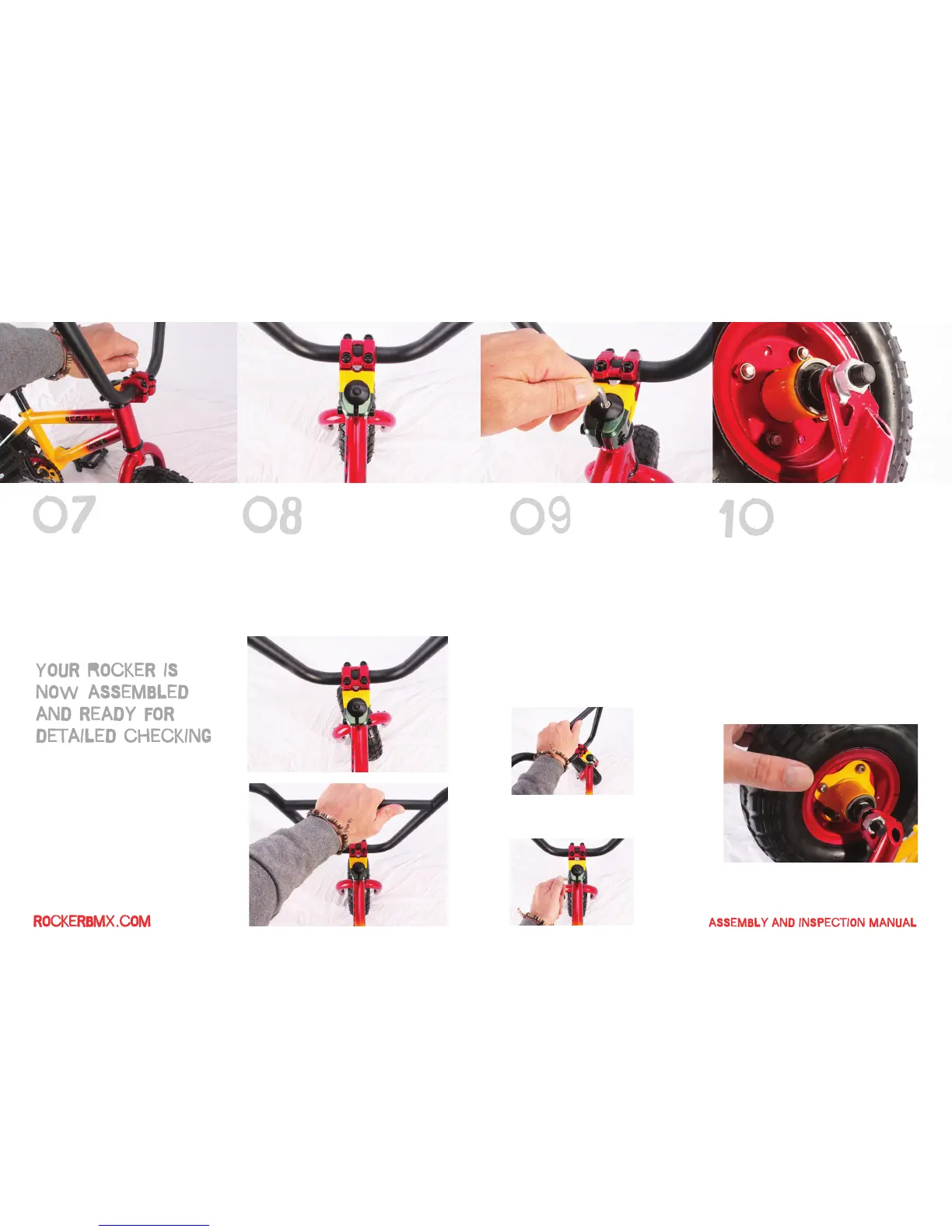
Once the faceplate starts to bite the bars,
spin the bars up into the correct position
and finally clamp down the faceplate
nice and tight. If you find your bars move
(later when riding) you can try applying
a little grease to your faceplate bolts
(threads) which will allow your to tighten
them further still.
Check the front wheel alignment and
adjust as necessary (your stem rear pinch
bolts should still be loose at this stage).
Nip up the rear bolts then grab your bars
and check for excessive free play in the
headset bearings.
On the first delivery of Rockers, the front
wheel safety tabs are not installed, so at
this stage please check your bike to
make sure they are in place, they should
look like the picture above.
If the locking washer is not already in
place please loosen the wheel nuts with
a 19mm spanner, fully remove the wheel
nuts and install the locking tab safety
washers.
Once you are happy the front wheel is
installed correctly make sure in spins
freely.
If there is excessive play, remove it by
carefully tightening your headset pre
load bolt (stem pinch bolts MUST be
loose during this operation then
re-tightened to check free play).
If there is excessive play, remove it by
carefully tightening your headset pre
load bolt (stem pinch bolts MUST be
loose during this operation then
re-tightened to check free play).
Once any ‘rock’ has been dialled out,
check your bars turn freely left and right.
Once you are happy with the set up, tighten
up your stem pinch bolts nice and tight.


 To Next Page
 Loading...