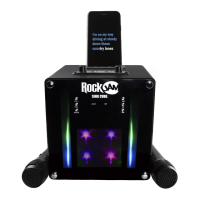
Need help?
Do you have a question about the RockJam RJPS200 and is the answer not in the manual?
Essential guidelines for safe operation and maintenance of the karaoke machine, covering reading instructions, warnings, water, ventilation, heat, and power sources.
Critical warnings about indoor use, moisture exposure, opening the casing, and using only the supplied power adapter.
Details FCC rules compliance for Class B digital devices and measures to correct radio interference.
Specifies conditions requiring professional servicing and user limitations for maintenance.
Instructions for plugging microphones into MIC 1 and MIC 2 sockets, with handling precautions.
Steps to connect the karaoke machine to a TV using RCA cables for audio and video output.
How to switch the karaoke machine on and off using the ON/OFF/SOURCE switch.
Instructions for turning the built-in lightshow on and off using the LIGHT switch.
Steps for inserting and playing CD+G or audio CDs, including notes on CD+G format.
How to adjust microphone volume, add echo effects, and handle feedback.
Explanation of the AVC function for muting background vocals on multiplex recordings.
How to skip tracks and select repeat modes (Single, All, Off) for playback.
Procedures for pausing, resuming, stopping playback, and turning off the unit.
Steps to switch the unit to Bluetooth mode and initiate pairing with external devices.
Resolving issues like music not playing or audio interruptions during Bluetooth playback.
Guidance on environmentally responsible disposal of the electronic equipment according to WEEE directive.
Technical details for audio output, impedance, frequency response, and CD player capabilities.
Specifications for Bluetooth connectivity, power, dimensions, and weight.
The RockJam RJPS200 is a portable karaoke machine with Bluetooth® connectivity, designed for indoor use. It allows users to sing along to their favorite songs, display lyrics on a connected TV, and enjoy a built-in light show that pulses with the music. The device can be powered by an AC adapter or 6 x 1.5V 'C' Type alkaline batteries, offering flexibility for use in various settings.
The RJPS200 serves as a comprehensive karaoke system, supporting CD+G and standard audio CD playback. CD+G discs are specifically designed to display song lyrics on a connected television screen, enhancing the karaoke experience. For standard audio CDs or Bluetooth® audio, lyrics will not be displayed.
It features two microphone inputs, allowing for duets. Microphone volume can be adjusted, and an Echo control is available to add an echo effect to the vocals, which can be increased by rotating the control clockwise. The Auto Voice Control (AVC) function, when activated by rotating its control clockwise, mutes the recorded vocals on multiplex CD+G recordings when the user sings through the microphone. When singing stops, the recorded vocals resume. This feature requires a multiplex recorded CD+G disc, which is not supplied.
The machine also functions as a high-quality Bluetooth® speaker, enabling users to stream music wirelessly from compatible devices such as mobile phones or tablets. The built-in light show adds a dynamic visual element to performances, beating to the pulse of the music and can be switched on or off as desired.
For external audio sources, a LINE IN socket is provided, allowing connection of other audio devices via a 3.5mm auxiliary cable. The unit can be connected to a TV using RCA video and audio cables to display lyrics and output audio.
The manual provides solutions for common issues such as no power (check power switch, AC adapter, power outlet), unexpected auto-off (power save function after 10 minutes of inactivity), no lightshow effect (check LIGHT switch), no sound (check source selection, external device volume, TV mute/volume), lyrics not appearing on TV (check video cable, TV source, CD+G disc type), no sound from microphone (check microphone connection, ON/OFF switch, MIC Volume, Master Volume), and Bluetooth® pairing problems (check Bluetooth® function on mobile device, PAIR button on karaoke machine, device name 'RJPS200', pairing code '0000'). It also addresses other Bluetooth® issues like music not playing (check A2DP profile support, external device volume) and audio breakup (move device closer, switch off Wi-Fi). Note that AVC and track programming are not available in Bluetooth® mode.
 General
| Brand | RockJam |
|---|---|
| Model | RJPS200 |
| Category | Karaoke System |
| Language | English |

 To Next Page