EasyManua.ls Logo

Rockville RF WEDGE - User Manual

Rockville RF WEDGE
14 pages
Print Icon
To Next Page IconTo Next Page
Loading...
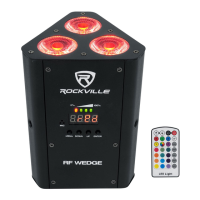
RF WEDGE
54W RGBWA+UV RECHARGEABLE BATTERY
& WIRELESS DMX PAR LIGHT w/RF REMOTE
OWNER’S MANUAL
Missing items? If you ordered a bundle that includes more than one product and you
are missing part of your bundle then it just means your order shipped from two different
warehouses. You will receive the remaining items very soon. If you have any concerns or
inquiries, feel free to call our customer support center at 1-646-758-0144, 24 hours a
day/7 days a week.
ATTENTION:
WATCH THIS VIDEO BEFORE FIRST USE!
Who reads manuals?
Scan the QR code or go to the URLs to access how-
to video(s), the owner’s manual, and other important
information you may need to get the most out of your
item.
If you prefer written instructions, please read ahead!
With Rockville you get many options.
rockvillesupport.com/rf-wedge-black rockvillesupport.com/rf-wedge-white

Questions and Answers

  • G
    Garrett PerezJul 29, 2025
    How to troubleshoot no power issue in Rockville Camera Accessories?
    • M
      Mario JohnsonJul 30, 2025
      If your Rockville Camera Accessories unit has no power, ensure it is plugged in and the black power switch is in the ON position. Also, check the power cord for any damage. If the issue persists, inspect the fuse and replace it if necessary.
  • J
    Jacob OneillAug 4, 2025
    What to do if Rockville RF WEDGE fixture has no DMX response?
    • J
      Jeremy PerezAug 4, 2025
      If your Rockville Camera Accessories fixture is not responding to DMX, verify that the starting address at the fixture is correct and consistent across all fixtures. Ensure the DMX channel setting is the same for all fixtures. Confirm you are using the correct faders on the controller, and that you are using the correct fixture template, assigning controller faders accordingly. Try changing the signal polarity at the controller. Inspect your DMX cables for damage and ensure they are connected properly and wired correctly (pin 3 is “hot”; on some other DMX devices pin 2 may be “hot”). Also, check that all cables are connected to the right connectors; it does matter which way the inputs and outputs are connected.
  • M
    Megan McbrideAug 10, 2025
    Why Rockville Camera Accessories has no power in battery mode?
    • H
      Hannah ConleyAug 11, 2025
      If your Rockville Camera Accessories unit isn't powering on in battery mode, make sure the unit is fully charged and that the black power switch is in the ON position. If it still doesn't work, charge the battery for 10 hours, ensuring you turn off the black main power switch during charging.
  • S
    Susan BarrettAug 16, 2025
    What to do if Rockville RF WEDGE Camera Accessories fixture has no DMX response in wireless mode?
    • H
      hannahcalhounAug 16, 2025
      If your Rockville Camera Accessories fixture is not responding to DMX in wireless mode, first check all the steps listed in the "No fixture DMX response" section. Also, ensure that there are no obstructions between the master unit and the slave fixtures.
  • M
    Martin PowellAug 22, 2025
    Why Rockville RF WEDGE Camera Accessories unit does not respond to sound?
    • B
      brian04Aug 22, 2025
      If your Rockville Camera Accessories unit isn't responding to sound, it might be due to quiet or high-pitched sounds which won't activate the unit. Ensure that Sound Activate mode is turned on.

Summary

INCLUDES

IMPORTANT SAFETY INSTRUCTIONS

FUNCTIONS

Remote Control

Charging

Instructions for charging the light, LED indicators, and recommended times for prolonged battery life.

Setting Wireless DMX Frequency Groups

How to set the 2.4GHz wireless DMX groups for fixture synchronization and organization.

OPERATION

Master;Slave Function

Connect multiple fixtures to control others without a DMX controller using Master/Slave modes.

Display Codes

Explanation of display codes for unit settings, modes, and values.

DMX Controller Function

6 Channel Mode

Details the functions and values for the 6-channel DMX mode, controlling individual LED brightness.

10 Channel Mode

Details functions and values for the 10-channel DMX mode, including strobe and color modes.

DMX Termination

MOUNTING

FEATURES AND SPECIFICATIONS

Troubleshooting

FEDERAL COMMUNICATIONS COMMISSION COMPLIANCE INFORMATION

Rockville RF WEDGE Specifications

General IconGeneral
BrandRockville
ModelRF WEDGE
CategoryCamera Accessories
LanguageEnglish