13
www.roco.cc
When calling up a track route the magnetically op-
erated articles are activated in the sequence of
their inputs i.e. their position numbers.
If there is doubt while running the layout follow-
ing a break in the programming or operation when
Input of Contents:
i.e. set turnout 4 4 004
input to divergent esc 004 (+red LED illuminated)
s
P.02 turnout 4 divergent
End acknowledged
i.e. set turnout 5 5 005
input to straight ok 005 (+green LED illuminated)
s
P.03 turnout 5 straight
End acknowledged
i.e. set turnout 123 1 + 2 + 3 123
input to divergent esc 123 (+red LED illuminated)
s
P.04 turnout 123 divergent
End acknowledged – three posi-
tions are occupied!
Store the track
route
ok Sto Store contents?
Yes, acknowledge ok F.23 stored!
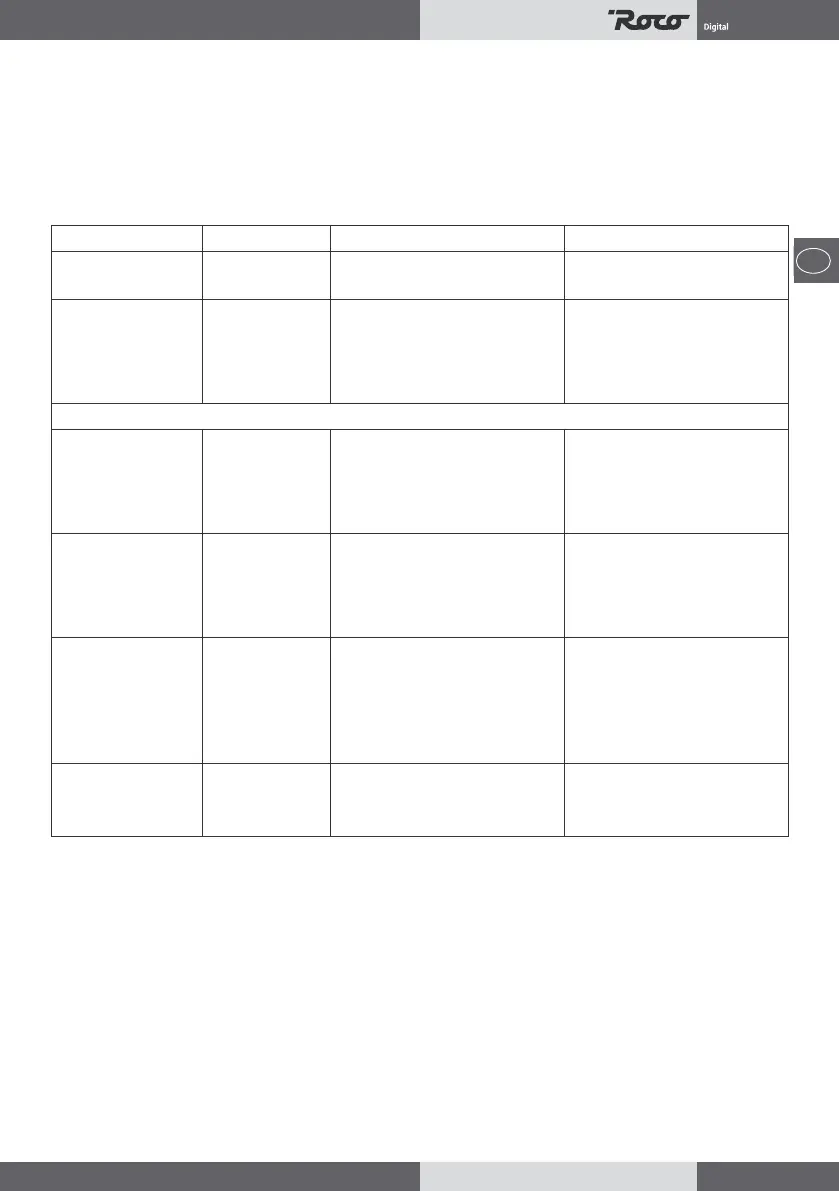
Intended action Key sequence Display Remarks
e.g. for Route 23 0
2 + 3
F. ..
F.23
Call-up Editor press Key “resc“
for 5 sec. Edt editor for track 23 is activ
P.01 Position 1 has end marking
End = track route is empty
Track route programming
confronted with a three-digit number indication in
the display if one is in layout- or editing mode help
is available by pressing one of the cursor keys: if the
position indication “P...“ appears in the display it is a
conrmation that the editing mode is still active.
If an input error of the turnout number or position is
noticed before pressing the key “...“ for the follow-
ing position it is possible to overwrite this position
immediately: if for instance the input for turnout 123
was incorrect and should have been 124, simply put
in 124 and again press the “divergent/esc“ key and
then press the cursor key “s“ to get to position
P.04.
If however all inputs made for the track route should
be disregarded, i.e. not store the inputs and discon-
tinue, press the key “esc“ after the indication “P.04“
and “End“. The display shows “dEL“ which is the
question wether to erase this track route: in this case
you answer the question with “yes“ by pressing the
key “ok“. The display will now show again “F.23“.
To change the program of a track route it is
rst called up as above and the editor is activated.
With the cursor “up“ and “down“ every position of
a dened track route can be reached. The content
of each position can be written over the same as
when programming. A particular position can also
be erased by writing 000 over the contents. Positions
can also be inserted by following the same proce-
dure. Storing of a reprogrammed track route can be
done after the position indication “End“ by pressing
of the “ok“ key twice.


 To Next Page
 Loading...