41
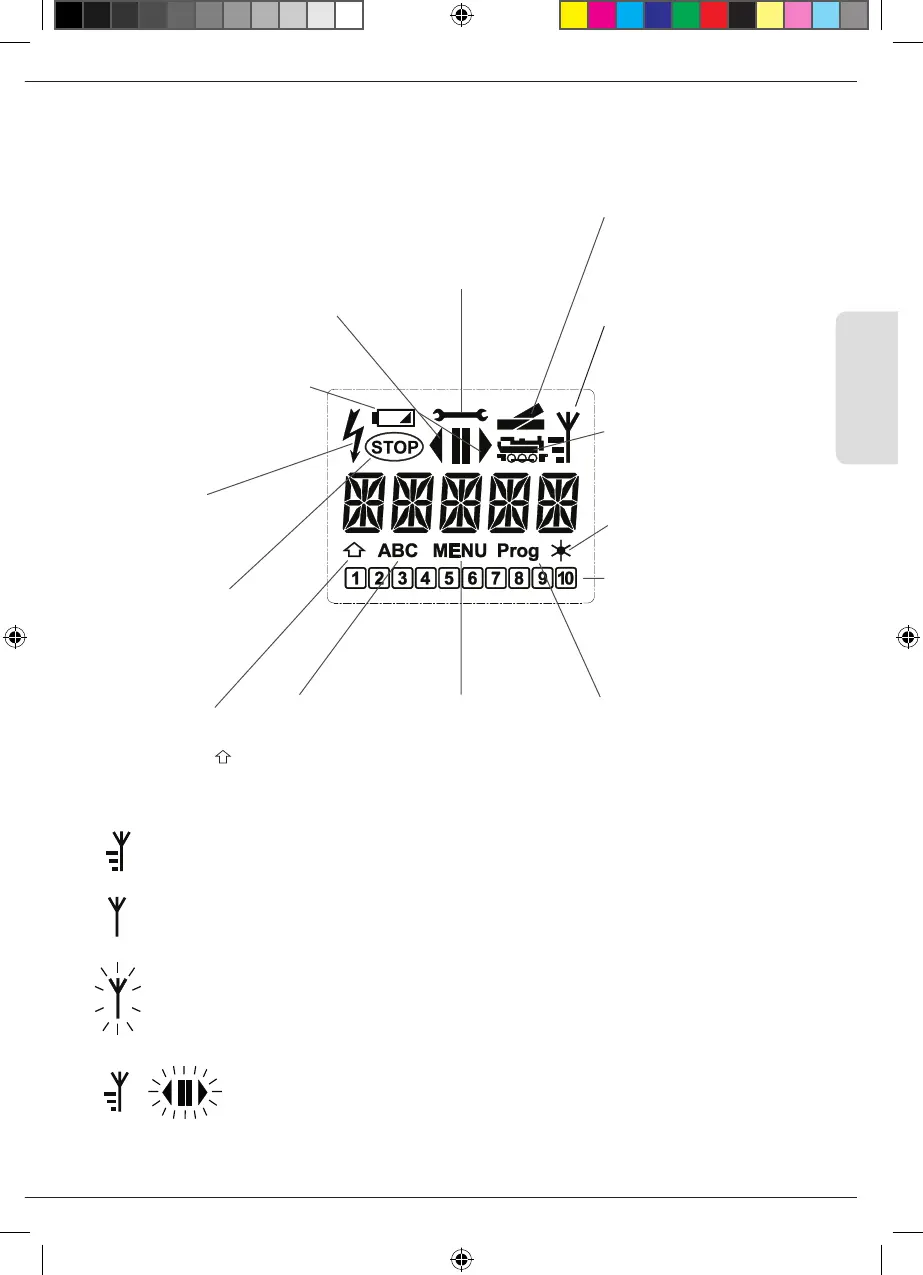
1.3 WLANmaus: The Display Screen
All the functions of the WLANmaus can be checked on the large LCD with backlight. The symbols are as
follows:
Light symbol (Light /OK key)
▪
locomotive light switched on
Turnout symbol
(locomotive /turnout key)
▪
Turnout or route mode
▪
Menu level: Route menu
Locomotive symbol (locomo-
tive /turnout key)
▪
Driev- or turnout mode
▪
with MENU: “LOCO” menu
Short circuit
▪
the symbol ashes in the
event of a short circuit
or an overload
Stop (stop-key)
▪
the symbol ashes
in the event of an
emergency stop or
short circuit
MENU
▪
the WLANmaus is
in the menu level
Prog
▪
lights up as a conrmation
when programming.
▪
Menu level: programming
menu
ABC
▪
lights up when
text is being
entered
Wrench
▪
the WLANmaus is in the
“Settings” menu level
▪
Menu level: Settings menu
Function symbols ( 1 –10)
▪
display the currently
activated special locomotive
functions
▪
Menu level: submenus
Drive symbols
▪
Arrows shows the direction of
travel of the selected locomotive
▪
“II” denotes that the locomotive
is at a standstill (by controller or
selected emergency stop)
Shift-Symbol
▪
is shown as conr-
mation of the
-key
Battery symbol
▪
Not visible: Everything OK
▪
Visible: Battery/recharge-
able battery voltage drop
▪
Flashes: Replace batteries
Wireless symbol
▪
This symbol provides infor-
mation about the wireless
connection
A completely depicted wireless symbol in the display indicates an optimal connection. The better the
connection, the more bars are displayed.
If the wireless connection is very bad, only the antenna symbol is depicted. If this is the case, it is
possible that the system will lose some of its functionality.
Should a radio link no longer exist between the WLANmaus and the WLAN router, the antenna
symbol ashes. No locomotive information (direction symbol, F-keys) is displayed.
Antenna symbol + ashing arrow/pause: WLAN connection ok, but no communication
with the Z21. Causes:
▪
Z21 is not switched on.
▪
Z21 is not correctly connected to the WLAN router.
▪
Z21-IP nicht korrekt, (Z21 IP incorrect, see Part 3, Chapter 3.6.3, page 64).
+
Basic
8010813920.indd 41 13.07.2017 10:27:45


 To Next Page
 Loading...
