RodannTechwww.rodanntech.com
123
4 5 6
TX1000A&RX1000AInstallationInstructions
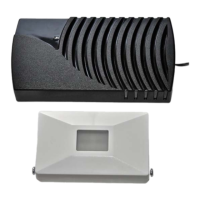
1. The TX1000A Motion Detector (transmitter) has the capability of being mounted in various
locations: ceilings, above the door jam, or side mounted. For best results this unit should be
positioned on the ceiling 1 foot in from the door and pointing down towards the door
threshold. Avoid placing the TX1000A near heating or air‐conditioning ducts, and in direct
sunlight.Thismaycausefalsesignalsornosignalfromdetector.
2. RemovetheTX1000Acoveratthecoininsertslotonthesideofbox.Pullingopenorinserting
and turning flat tip screw driver will remove the cover. Attach
battery snaps to the 9 volt
battery(usealkalinebatteryforlongerlife)and placethe batteryintobatteryholder.Replace
coverbyplacingcoverhookintoslotfirst,andpinintohole,thensqueezeclosed.
3. TheTX1000A(transmitter)hasthecapabilityofproducingfourtonesin theRX1000A(receiver)
bypositioning#5& #6dip‐switchesin variouscombinationsonthe TX1000A.Ifyourneighbor
has a similar unit that sets your unit off, change dip‐switches #1‐ #4, making sure that the
changedcodingmatchesonbothreceiverandtransmitter.
4. Your RX1000A comes with a 12VDC plug‐in power supply and a 5 ft. cord. This unit can be
mounted on any wall where there is an outlet (within 500 ft. from the TX1000A). DO NOT
mount the TX1000A or the RX1000A on metal as this may hinder performance. There is a
volumecontrolontheback
oftheRX1000A(receiver).The12VDCterminalscrewoptionoffers


 To Next Page
 Loading...