RODEC
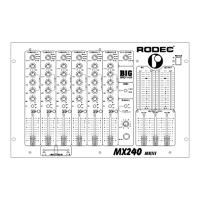
MX240 MKIII
5
Balanced microphone input. To reduce the interference on the microphone cord, you have to
use a microphone with balanced output. The use of a microphone without balanced output is
also possible, in this case please get in contact with your RODEC dealer.
F) Recording outputs
Outputs to connect cassette recorder or (HIFI) video recorders to make recordings.
G) Master output 1
Symmetrical output to connect a power-amplifier. The output level can be manipulated with
the master fader 1 (16) from 0 to maximum (3.3V).
H) Master output 2
Assymetrical output to connect a power-amplifier. The output level can be manipulated with
the master fader 1 (16) from 0 to maximum (1.55V).
I) Monitor output
Extra output from where the output voltage can be controlled from 0 to maximum (775mV)
with the monitorfader (17).The mono/stereo switch has no influence on this output.
J) Remote control terminal option
The terminal is completely independent of the electronics of this set.
Only for switching low current/low voltage.
K) Second headphones connector
On this output appears the same signal as on the headphones-output on the frontpanel (6) on
condition that the connection on the frontpanel is not in use. The specifications are the same
as the headphones output on the frontpanel.
Please use signal cables shorter than 1 meter for the inputs and the outputs.
OPERATING INSTRUCTIONS
1) First switch all the connected music-sources on (like CD-players, recordplayers, etc.). Then
switch the power button (1) to turn the power supply on. The power indicators (2) will light up
and a few seconds later the mixing panel will be in operation, ready state. In this stage you
can turn on the power amplifiers.
2) Connect the headphones to phones output (6) or (K).
3) Choose with input switch (10) the right source.
4) Switch the PFL button (9) in position ON to listen at the desired source. Check that the switch
(8) stands in the PFL position, than you get the stereo signal on the headphones and the two
left VU-meters. The PFL circuit works as a sum-system, there is the possibility to listen to
more sources at the same time. Al these operations have no influence on the outputsignal!
Adjust with the level control (11) the input signal so, that the red indicators of the level meters
(3) light sometimes. Adjust if necessary the quality of the sound with the equalizer (12).
LOOK OUT :
- The equalizer at each input is used to adjust the different sound
between the sources. To correct the acoustic of the room it is probably best to
use an external equalizer.
5) Slide up the fader (14) of the choosen source.
6) Adjust with the master (16) the volume.
7) Correct if necessary the panorama/balance with button (13), for monophonic sound set switch
(5) in mono position.


 To Next Page
 Loading...