ROFU B5000 APP
5
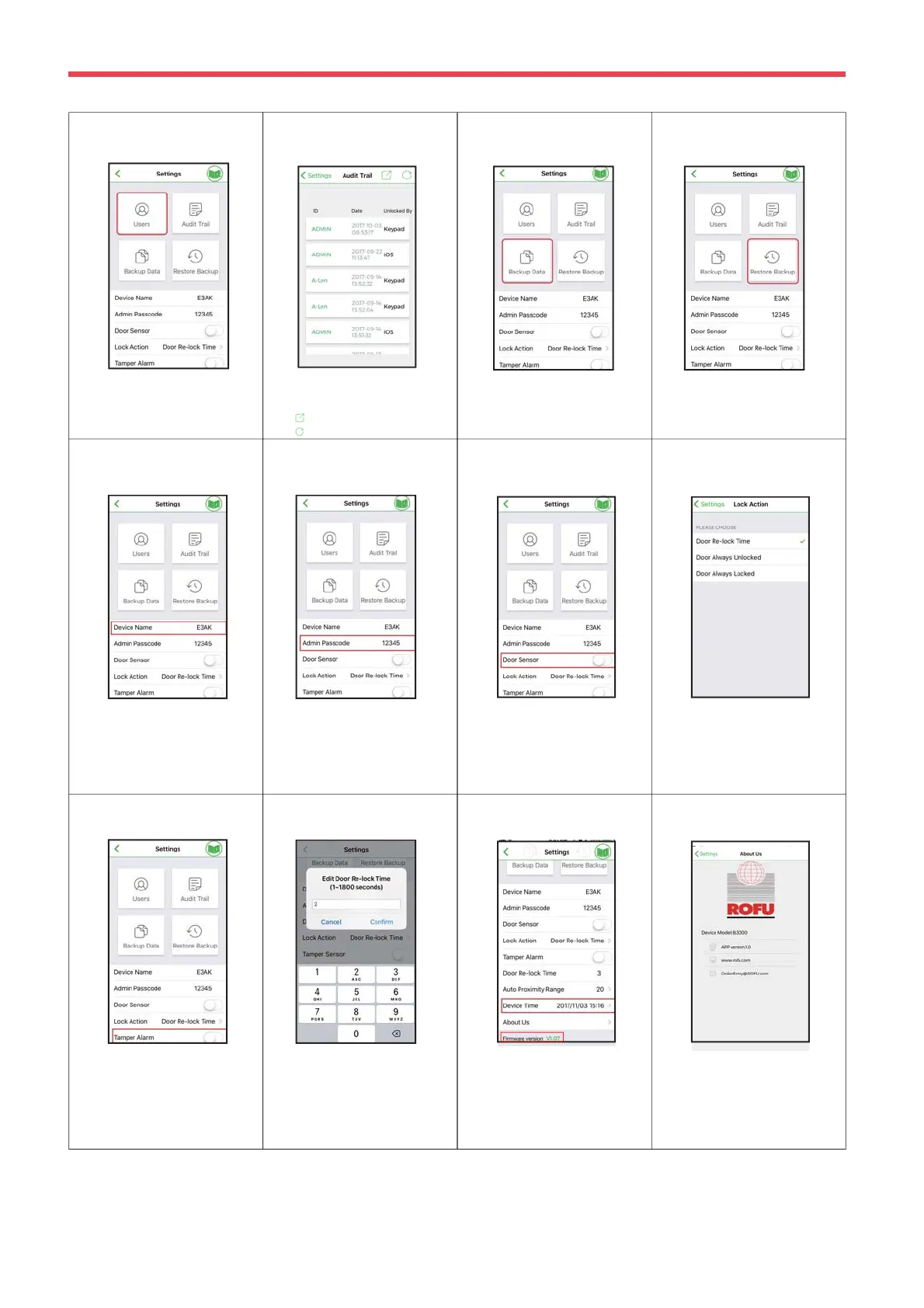
Backup Data is to backup all data to
Administrator's phone and can be
restored except Device Name, Audit
Trail logs and Device Time.
You can restore the last backup
data to a new Access Control
Keypad / Reader.
Administrator Settings Page Introductions :
Users Backup Data
Device Name Admin Passcode Door Sensor Lock Action
Audit Trail
Tamper Alarm
Device Time /
About Us
You can Add / Delete /
Edit user information.
Audit Trail is tracking last 1000 event logs,
including Tamper Alarm. Audit Trail can be
exported in an excel file.
12345 is Admin default
passcode. It’s important to
change your Admin
passcode immediately.
Device name can be
edited as a model
number, Office, Front
door, Gate, etc.
You can enable Door Sensor when
you connect to a closed-circuit
magnetic sensors or a monitored door
lock that has door sensor (or lock
sensor) outputs to monitor the open or
closed state of a door.
3 options. You can choose
Door Re-lock Time, Door
Always Unlocked and Door
Always Locked.
You can activate Tamper Alarm. If
the device is vandalized, the tamper
alarm will howl immediately and won’t
go off until it’s switched off by
Administrator.
Tamper Alarm is deactivated by
default.
Make sure to set up Device Time
precisely as your current time zone
of where you are. It helps having
correct and precise access data
and information.
See firmware version of Bluetooth
access and control keypad/reader.
Tap “ About Us” to show
Device Model, APP version,
website and E-Mail
information.
Door Re-lock Time
You can set the door re-lock
time interval between 1 to
1800 seconds.
Tap to export all events to excel file.
Tap to refresh all events.
Restore Backup
Copyright All Rights Reserved ROFU Security International Corp. ROFU BKC-5000B. Published: 2018.09.11
Firmware Version


 To Next Page
 Loading...