EN
1 Product descripon
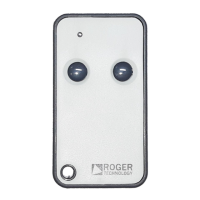
SYNUS/2 radio remote controls remotely acvate motorized doors and gates.
SYNUS/2 radio remote controls are compable with all H93/RX22A/I, R93/
RX12A/I, R93/RX12A/U Series FIXED CODE receivers, can be congured to
work in Rolling Code mode and can be used with Roger H93/RX2RC/I, R93/
RX2RC/U Series receivers.
The Rolling Code mode uses the RTHSE (Roger Technology High Security)
standard which allows a high level of security to be achieved.
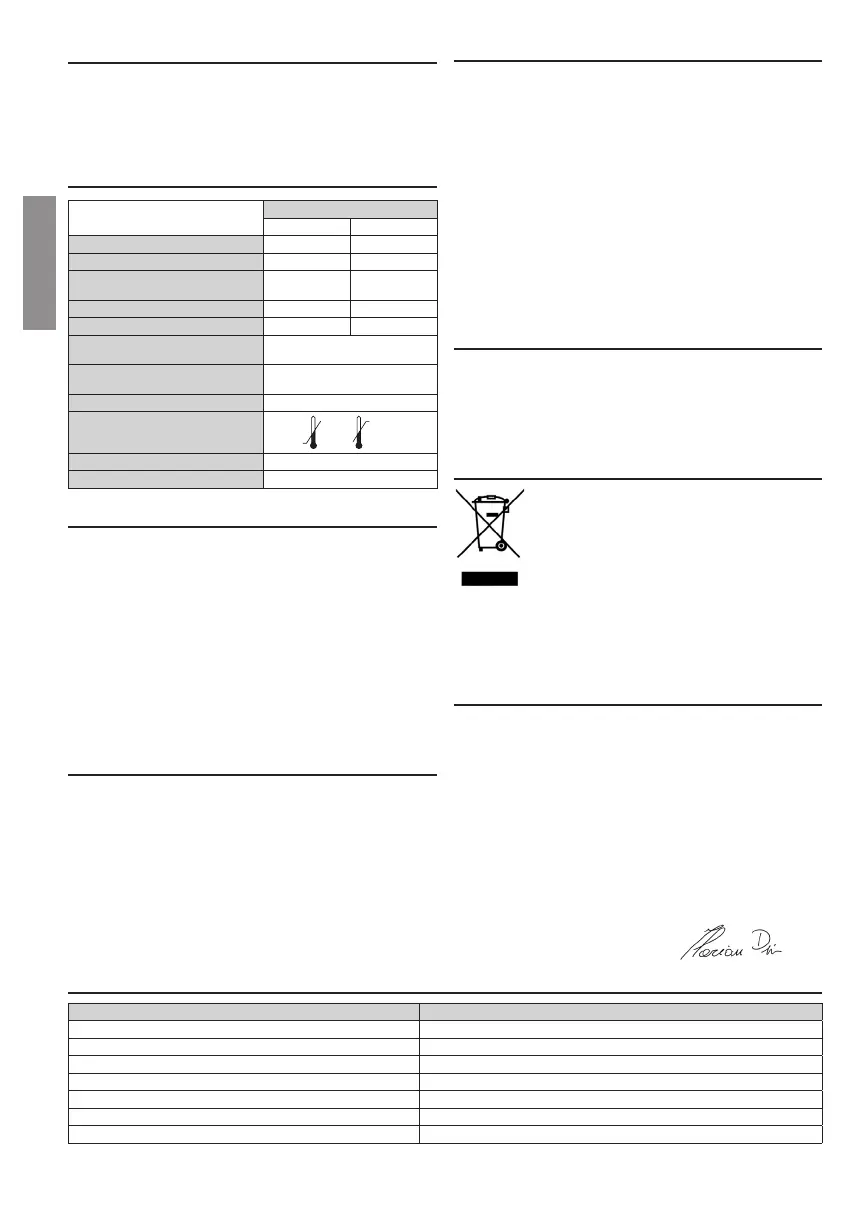
2 Technical specicaons
SYNUS/2
Fixed code Rolling Code
NUMBER OF KEYS 2 2
TRANSMISSION LED COLOUR RED GREEN
BIT NUMBER OF THE IDENTIFICATION
CODE
16 32
NUMBER OF CODE COMBINATIONS 65.536 4.294.967.296
NUMBER OF BITS TRANSMITTED 28 144
TRANSMISSION FREQUENCY AND
MODULATION
433,92 MHz
AM/ASK
MAXIMUM REACH (in unobstructed
environment)
150 m
BATTERY AND AVERAGE CONSUMPTION
1xCR2032 3V 8mA
OPERATING TEMPERATURE
-10°C +55°C
FIXED CLONABLE CODE TYPES MANCHESTER, PCM Max. 64 bit
DIMENSIONS (mm) 66x34x10,4
3 Operang mode selecon (Fig.1)
The SYNUS/2 radio remote control is congured in the factory to operate in
Fixed Code mode.
To select the “Rolling Code” mode:
1. Press and hold both keys A and B simultaneously.
2. Aer a few ashes, the LED lights up with a steady RED light.
3. Press and hold both keys A and B.
4. Aer 5 seconds the LED changes to GREEN: the “Rolling code” operang
mode is acve.
To return to the “Fixed code” operang mode, repeat the aforemenoned
procedure. The LED should change from GREEN to RED.
In the case of transmission of a (xed) CLONED code, the ashing alternates
RED ... GREEN ... RED ... GREEN LED, is preceded by:
- fast ash RED LED (if xed code mode is enabled).
- fast ashing GREEN LED (if rolling code mode is enabled).
4 Storing a remote control key in the receiver
(Fig.2)
1. Check the type of radio receiver installed. If the receiver is the Rolling
Code type, select the SYNUS/2 operang mode as per paragraph 3.
2. Switch the controller unit on.
3. Press P1 or P2 once (depending on the funcon to be enabled) on the
receiver.
4. When LED L1 or LED L2 on the receiver ashes slowly, press the key on
the transmier where the funcon is to be stored.
5. When LED L1 or L2 remains on for 1 second, the transmier has been stored.
6. LED L1 or L2 ashes slowly again and other transmiers can be stored
during this me.
7. The procedure is automacally exited when no more transmiers are stored.
5 Radio remote control copy (Fig. 3)
1. Press the two keys (A and B) of a NEW radio remote control simultaneously.
2. The LED (RED if Fixed Code mode is enabled - GREEN if Rolling Code mode
is enabled) on the radio remote control ashes slowly unl it lights up in
steady light.
3. On the NEW radio remote control, release a key and hold down the key
on which you wish to store the code. The LED ashes briey for up to 20 s.
4. Zoom in on the NEW radio remote control, the OLD one (the one you want
to copy), as close as possible, and press the key to copy on the OLD radio
remote control.
5. When the LED on the NEW radio remote control is lit for 1 second (RED if
Fixed Code mode is enabled - GREEN if Rolling Code mode is enabled), it
indicates that the copy has been completed successfully.
Warning!
The Synus radio remote control in Rolling Code mode cannot copy the Roger
E80/TX2R/RC or E80/TX4R/RC radio remote controls, or SYNUS/2 congured in
Rolling Code mode. Instead, you can copy the Fixed Code radio remote controls.
Codes copied with radio remote controls in “Fixed Code” mode remain in
memory even when the radio remote control is set to “Rolling Code” mode
and vice versa. Mode shiing does not delete the codes.
6 Baery replacement (Fig. 4)
1. Using a screwdriver, unscrew the side screw of the radio remote control.
2. Gently rotate one of the two parts.
3. Remove it gently.
4. Remove the baery from its housing.
5. Replace the baery paying aenon to the polarity.
6. Close both parts again and ghten the side screw without over-
ghtening it.
7 Disposal
This product may only be uninstalled by qualied technical
personnel, following suitable procedures for removing the
product correctly and safely.
This product consists of numerous dierent materials.
Some of these materials may be recycled, while others must
be disposed of correctly at the specic recycling or waste
management facilies indicated by local legislaon applicable
for this category of product.
Do not dispose of this product as domesc refuse.
Observe local legislaon for dierenated refuse collecon, or hand the
product over to the vendor when purchasing an equivalent new product.
Local legislaon may envisage severe nes for the incorrect disposal of this
product. Warning! some parts of this product may contain substances that
are harmful to the environment or dangerous and which may cause damage
to the environment or health risks if disposed of incorrectly.
8 Declaraon of Conformity
The undersigned, represenng the following manufacturer
Roger Technology - Via Bocelli 8, 31021 Mogliano V.to (TV)
hereby DECLARE that the appliance described hereaer:
Descripon: Remote control
Model: SYNUS/2
Is in conformity with the legislave provisions that transpose the following di-
recves:
– 2014/53/EU RED Direcve and subsequent changes;
– 2011/65/EU RoHS Direcve
and that all the standards and/or technical requirements indicated as follows
have been applied:
EN 300 220-1 V2.4.1:2012-05; EN 300 220-2 V2.4.1:2012-05
EN 301 489-1 V2.1.1, EN 301 489-3 V1.6.1
EN 62479
EN 60950-1:2006+A11:2009+A1:2010+A12:2011+AC:2011
Last two gures of year in which marking was applied | 18.
Place: Mogliano V.to
Date: 18/06/2018 Signature
9 Indicators
ACTION LED STATUS
Fixed code Transmission RED LED fast ashing
ROGER Code Rolling code transmission GREEN LED fast ashing
Cloned xed code transmission (when xed code mode is enabled) Fast ash RED LED, follow by RED...GREEN...RED...GREEN alternang ashing
Cloned xed code transmission (when Rolling code mode is enabled) Fast ash GREEN LED, follow by RED...GREEN...RED...GREEN alternang ashing
Failure when copying the code. Code not recognized LED steadily on
Baery almost depleted Normal ashing with long pauses
Baery depleted Brief fast ashing, repeated at long intervals.
4


 To Next Page
 Loading...