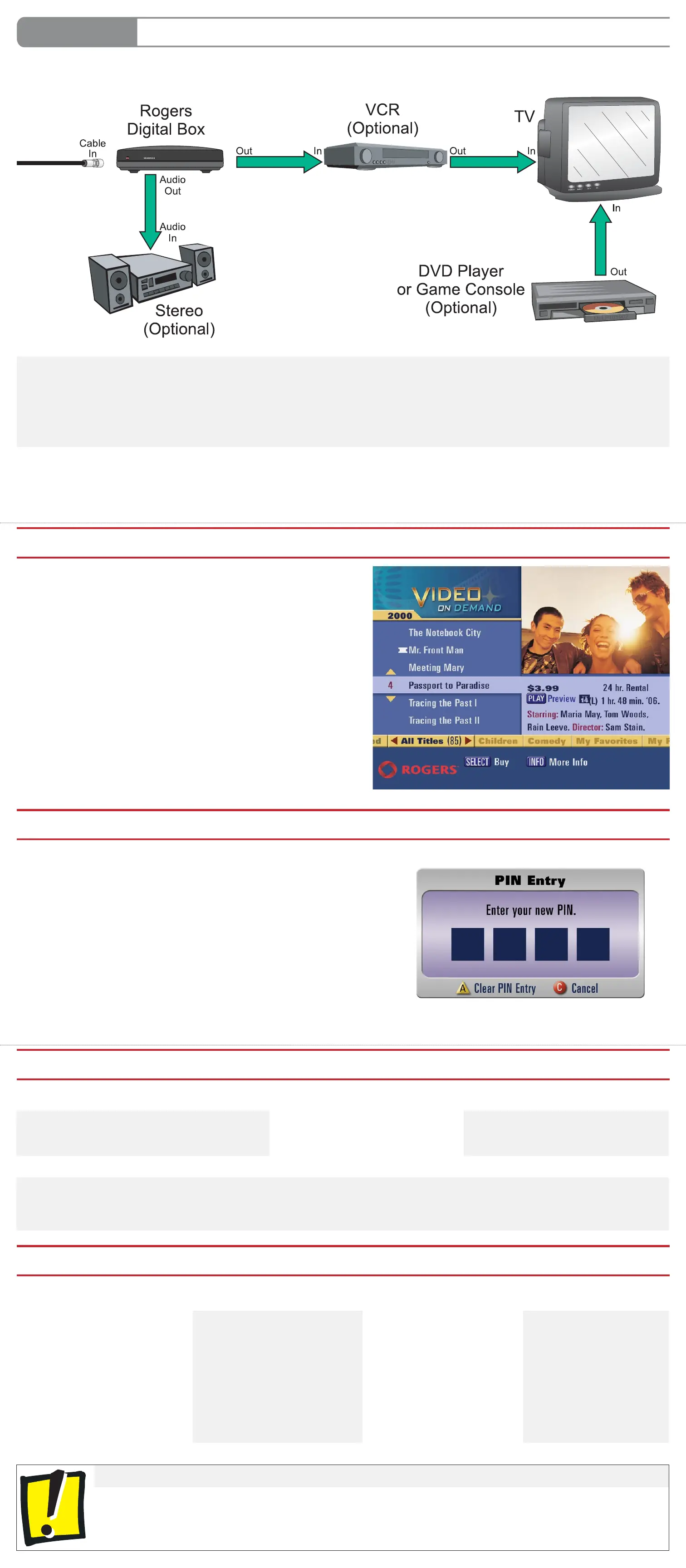
OPTIONAL Connect Additional Equipment To Your TV
How Do I Solve Common Problems?
Setting your PIN will prevent people in your household who shouldn’t be able to view certain programming and/or purchase On Demand or Pay Per View
content from doing so.
For further instructions refer to Your PersonalTV User Guide or www.rogershelp.com/PIN
Where Can I Get More Information/Help With The Rogers Digital TV Service?
Important Information About Your TV
• Some televisions can experience image “Burn-In” if fi xed images are displayed for extended periods of time. Consult your TV manufacturer’s
documentation for more information.
• Always keep the digital box plugged in to the power outlet and connected to the cable outlet. Do not disconnect it when not in use. Updates
are sent periodically to the digital box and if the box is not connected and plugged in, you may miss an update. Also, if the box is disconnected
for a long period of time, your channels may become unauthorized.
DTV Easy Installation Guide - ATL SD v4.1 08/10 ©2010 Rogers Communications Inc.
The order in which you connect your other components like a VCR and DVD player to the TV is very important. Below is the recommended connection order for Stan-
dard Defi nition TVs. Any additional cables that may be required are sold separately at Rogers Plus stores.
With this connection you can:
• Watch TV programming, DVDs and VCR videos on your TV.
• Listen to TV shows and movies from the digital box on your stereo or home
theatre.
• Record the show you are watching on the digital box to your VCR.
Note:
This hookup will not allow you to record one program on your VCR while
watching another.
For other hookup options visit:
www.rogershelp.com/hookups
How Do I Order Rogers On Demand?
1. Tune to channel 100.
An On Demand splash screen appears.
2. Use the
UP/DOWN/LEFT/RIGHT and SELECT buttons on your remote to navigate
throughout the menus.
3. Scroll up/down to see the different On Demand services available.
4. To select a category, highlight it and press the SELECT button.
5. Highlight a title to see the price, running time and cast information.
6. Press
INFO to view the movie synopsis.
7. Press SELECT to purchase the title.
8. Press PLAY to begin playback of your purchased title.
9. Use the VCR buttons to control the playback of your Rogers On Demand selection.
TIP: Find out what titles are premiering this month by visiting rogers.com/rod
Help with common problems are in the troubleshooting section of Your Digital TV User Guide:
No picture on any channel (Just a black screen) No sound Remote control does not work
“Not Authorized” messages on channels I should be receiving Changing the PIN
Before calling Rogers for Technical Support . . .
Most common problems can be fi xed by rebooting the digital box. To reboot the box:
1. Unplug the power cord and wait 10 seconds.
2. Plug the power cord back in and wait 10 minutes.
3. Press the PWR button on your Rogers remote.
4. Ensure your TV is on and is set to Channel 03.
Why Should I Set My PIN?
To help you get the most out of your Digital TV service, and to solve potential problems, Rogers provides you with a wide range of support options. Use the
information below to choose the support option that best meets your needs.
Your Digital TV User Guide Online Support Email Phone
Your Digital TV User Guide is a
comprehensive user guide designed
to help you resolve the most common
troubleshooting issues.
Save time by following the quick
and easy steps detailed in the guide
included with your digital box.
Visit us at:
www.rogershelp.com for
additional Digital TV information.
View a selection of How To Videos
at: www.rogershelp.com/video
Email us at:
digitaltvsupport@rci.rogers.com
for technical support.
Call us at 1 888 ROGERS1
(1 888 764 3771) and follow
the prompts.



 To Previous Page
 Loading...