2
CONSOLE OVERVIEW
DISPLAY
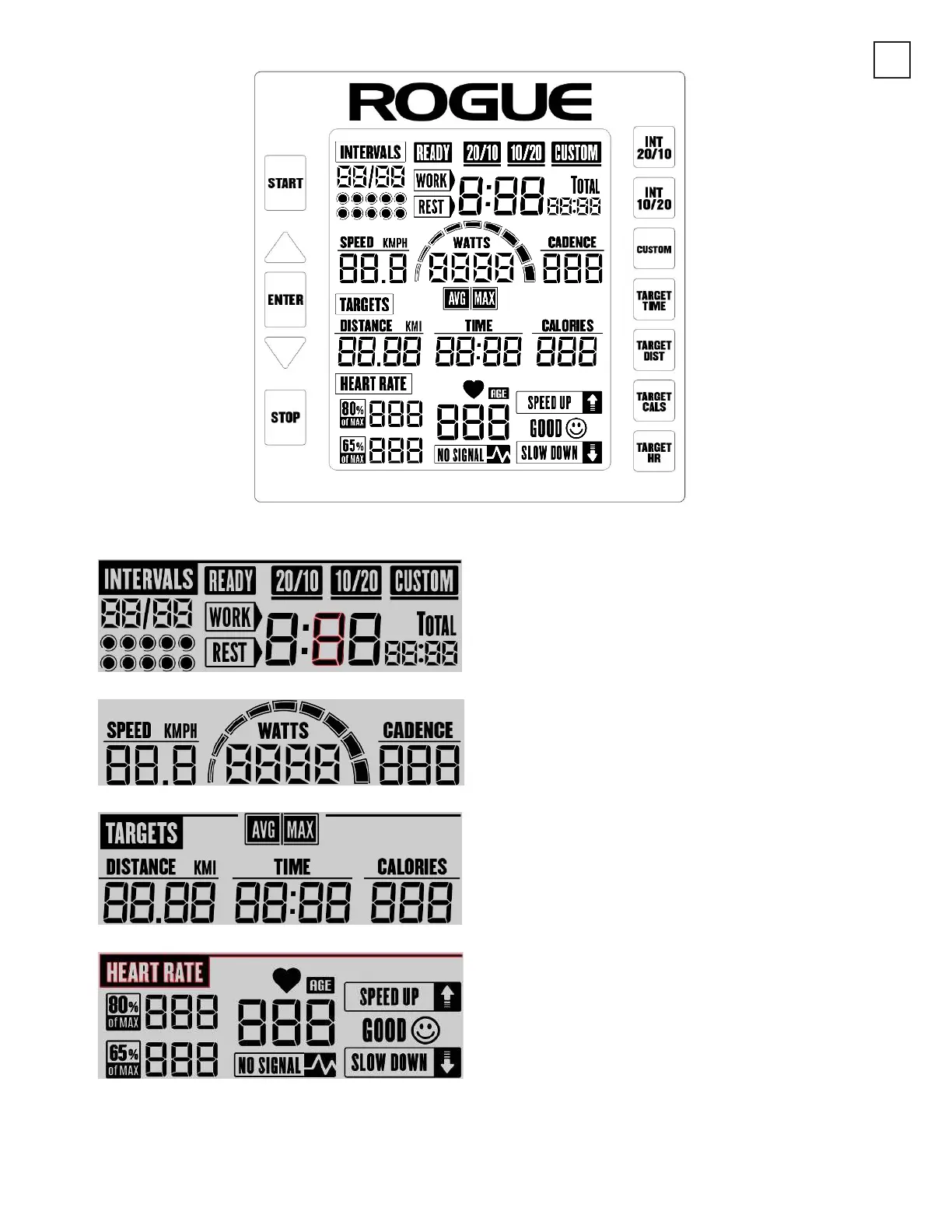
There are four major sections on the display, presenting different sets of exercise data to the user:
INTERVALS
This section shows the interval training workout
information. It shows the current interval training
session, whether it is a WORK or REST period, the total
workout time and the remaining time in the current
WORK/REST period.
SPEED / WATTS / CADENCE
This section indicates the intensity of the workout by
showing the SPEED, WATTS, and CADENCE data.
TARGETS
This section shows the data, which can be set by the
user as the exercise target. DISTANCE, TIME and
CALORIES data are shown here.
HEART RATE
This section shows the heart rate related information.
When the user chooses to go in HEART RATE TARGET
mode, it will show the suitable heart rate range for the
user in the “80% of MAX” and “65% of MAX” fields and
the console will also show the user whether his/her
heart rate is within the desired range. If the heart rate
is too low, the “SPEED UP” icon will flash. If the heart
rate is too high, the “SLOW DOWN” icon will flash. If
the heart rate is within the desired range, “GOOD” icon
will be turned on. NOTE: A HEART RATE TRANSMIT-
TER IS REQUIRED TO SEND DATA TO THE BIKE AND IS
NOT INCLUDED.


 To Next Page
 Loading...