EasyManua.ls Logo

ROGUE ECHO BIKE - User Manual

ROGUE ECHO BIKE
4 pages
Print Icon
To Next Page IconTo Next Page
Loading...
ECHO BIKE USER GUIDE
ROGUE FITNESS
511 E 5th Ave
Columbus, OH 43201
(614) 358-6190
TEAM@ROGUEFITNESS.COM
1
CONTENTS
PAGE 1: COVER PAGE
PAGE 2-3: CONSOLE OVERVIEW
PAGE 4: GENERAL MAINTENANCE
Question and Answer IconNeed help?

Do you have a question about the ROGUE ECHO BIKE and is the answer not in the manual?

Summary

Console Overview

Console Display Layout

Details the four major sections of the console display presenting exercise data.

Console Button Functions

Explains the purpose and function of the console buttons for workout control and setup.

Console Operating Modes

Describes various console modes including Idle, Manual, Interval, and Competition.

Interval Workout Mode Guide

Details the functionality of the interval workout mode, including WORK and REST periods.

Manual Workout Mode (No Target)

Explains the manual workout mode without specific targets, displaying real-time data.

Manual Workout Mode (Targeted)

Describes manual mode when a target for time, distance, or calories is set by the user.

Manual Workout Mode (Heart Rate Target)

Explains manual mode with a heart rate target, including zone indicators.

Competition Mode Usage

Details the competition mode for head-to-head or group settings with visual feedback.

Paused Mode Operation

Explains how the console enters and exits the paused mode during workouts.

Sleep Mode Functionality

Describes the console's sleep mode activation and wake-up conditions.

Unit System Configuration

Instructions on how to change the console's unit system between metric and imperial.

General Maintenance

Pre-Use Maintenance Checks

Lists essential checks to perform before the initial use of the bike.

Overview

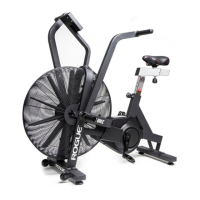
The Rogue Echo Bike is a stationary exercise bike designed for a comprehensive workout experience, featuring a fan-based resistance system. Its primary function is to provide a full-body, low-impact cardiovascular and strength training workout. The bike's design incorporates moving handlebars and foot pedals, allowing users to engage both their upper and lower body simultaneously or independently. The large fan at the front generates resistance that scales with the intensity of the user's effort, meaning the harder one pedals, the greater the resistance. This self-regulating resistance mechanism makes it suitable for users of all fitness levels, from beginners to advanced athletes.

The Echo Bike is equipped with a user-friendly console that serves as the central interface for monitoring and controlling workouts. The console displays a variety of exercise data, categorized into four main sections: Intervals, Speed/Watts/Cadence, Targets, and Heart Rate. This detailed feedback allows users to track their performance, set goals, and adjust their intensity in real-time.

Usage Features:

The console offers several modes to cater to different workout preferences and goals:

  • Idle Mode (Power On): Upon powering on, the console lights up all LCD segments briefly and then enters Idle mode, indicated by a double beep and flashing fields. From this mode, users can initiate a manual workout by pedaling or pressing the START button.
  • Manual Workout Mode – No Target: This is the default workout mode when no specific targets are set. The console continuously calculates and displays exercise data such as watts, speed, cadence, time, distance, calories, and heart rate as the user pedals. Pressing STOP will end the workout and return the console to Idle mode, retaining the exercise data on display.
  • Manual Workout Mode – Target TIME/DISTANCE/CALORIES: Users can set specific goals for time, distance, or calories. When a target is entered, the corresponding field flashes, indicating a countdown. Other exercise data is displayed as usual. The workout concludes when the target is met or when the STOP button is pressed.
  • Manual Workout Mode – Target HR (Heart Rate): This mode allows users to train within a specific heart rate zone. After entering their age, the console calculates and displays suitable heart rate ranges (65% to 80% of maximum heart rate). During the workout, the console provides visual cues: "SPEED UP" flashes if the heart rate is too low, "SLOW DOWN" flashes if it's too high, and "GOOD" illuminates if the heart rate is within the desired range. Note: A heart rate transmitter is required and not included.
  • Interval Workout Mode: This mode is designed for high-intensity interval training (HIIT). Users can choose from pre-set intervals like "INT 20/10" (20 seconds WORK, 10 seconds REST for 8 sessions) or "INT 10/20" (10 seconds WORK, 20 seconds REST for 8 sessions). A "CUSTOM" option allows users to define their own WORK/REST durations and number of sessions. In this mode, the console highlights the active interval icon and flashes "WORK" or "REST" to guide the user. The remaining time for the current interval is displayed.
  • COMP Mode (Competition Mode): This mode is specifically designed for head-to-head competitions or group settings. It features a visual green LED display on the console's top, and all other functions are locked out. The timeout is extended to 30 minutes to accommodate longer competition stages. To enter COMP SETUP mode, users press and hold one of the TARGET TIME/DIST/CALS buttons for 2 seconds, adjust the target, and then press and hold ENTER for 5 seconds to lock the value and enter COMP READY mode. Pressing START initiates COMP RUNNING mode, where the LED flashes continuously.
  • Paused Mode: The console enters Paused mode if the user presses START during a workout or if pedaling stops for 8 seconds during a non-interval workout. In this mode, the LCD flashes. Pressing START again resumes the workout.
  • Sleep Mode: After 5 minutes of inactivity (no cadence signal or button presses), the console enters Sleep mode, turning off the LCD. Any button press or pedaling will wake the console, initiating the Power-On sequence and returning to Idle mode.
  • Changing the Unit System: The default unit system is imperial. To toggle between imperial and metric units, users press and hold both the UP and DOWN buttons for 3 seconds while in Idle mode. The console will flash to indicate the new unit system.

Maintenance Features:

Regular maintenance is crucial to ensure the longevity and optimal performance of the Rogue Echo Bike. The manual outlines a simple yet effective maintenance schedule:

  • Before First Use:
    • Verify that all bolts are tight.
    • Confirm that the pedals are fully threaded onto the cranks.
    • Ensure that the arms are tightly secured and exhibit no "play" or looseness.
  • During the First Week of Use:
    • Repeat all the "Before First Use" checks. This initial period of use can sometimes reveal minor adjustments needed after assembly and initial operation.
  • Weekly Thereafter:
    • Continue to repeat all the checks performed during the first week of use on a weekly basis. This routine ensures that all critical components remain secure and in good working order, preventing potential issues and maintaining the bike's stability and safety.

By adhering to these maintenance guidelines, users can help preserve the structural integrity and functionality of their Rogue Echo Bike, ensuring a consistent and reliable workout experience over time. For any questions or concerns, users are encouraged to contact Rogue Fitness directly, providing a dedicated support channel for assistance.

ROGUE ECHO BIKE Specifications

General IconGeneral
TypeAir Bike
Weight127 lbs
MaterialSteel
ColorBlack
Resistance TypeAir
Weight Capacity350 lbs
HandlebarsMulti-Grip
Seat HeightAdjustable
ConsoleLCD
Drive SystemBelt
SeatAdjustable
PedalsStandard
Warranty2 years
Width23.75"