This document describes the Rohnson R-894 Portable Air Conditioner, a multi-functional appliance designed for cooling, dehumidifying, and heating, suitable for various room settings. It features a UV-C sterilizer for enhanced air quality.
Function Description
The R-894 is a multi-functional portable air conditioner offering cooling, dehumidifying, and heating capabilities. It is designed for use in rooms up to 26 square meters and operates with an independent compressor. The appliance includes a UV-C sterilizer, indicated on the front display, to help improve air hygiene. It can be controlled via a control panel on the unit or a remote controller. The unit also features an automatic, cool, dehumidify, and fan mode operation.
Important Technical Specifications
- Model: R-894
- Rated Voltage / Frequency: 220-240V~/50Hz
- EER Rated Class: A
- Dimensions (Body): 440 X335 X710mm
- Dimensions (Package): 470X380X880mm
- Refrigerant: R290
- Miniature Fuse: 3.15A, 250VAC
- Maximum refrigerant charge amount: 260g
- Operating Conditions:
- Cooling: Indoor air temperature is over 43°C, Room temperature is below 15°C
- Dehumidifying: Room temperature is below 15°C
- The air conditioner runs in COOLING or DRY mode with door or window opened for a long time when relative humidity is above 80%, dew may drip down from the outlet.
Usage Features
The R-894 offers a user-friendly experience with both a control panel and a remote controller.
Control Panel Features:
- On/Off Button: Powers the unit on or off.
- Speed Button: Adjusts fan speed (low, middle, high).
- Timer Button: Sets the timer for automatic on/off operation.
- Timer/Temperature Up/Down Buttons: Adjusts timer settings and desired temperature.
- Swing/UV Button: Activates the swing function for louvers and the UV-C sterilizer.
- Fan Button: Controls fan operation.
- Mode Button: Selects operating modes (Automatic, Cool, Dehumidify, Fan).
- Sleep Button: Activates sleep mode.
- Full Water Alarm: Indicates when the water tank is full.
Remote Controller Features:
- ON/OFF Button: Starts or stops the appliance.
- MODE Button: Selects the operation mode (Cool, Dry, Fan, Heat, Auto).
- FAN Button: Selects fan speed (low, medium, high, auto).
- UP/DOWN SETTING BUTTONS: Adjusts room temperature and timer.
- TIMER ON/OFF Button: Sets automatic off and automatic on time.
- SWING Button: Used for automatic swing set.
Operating Modes:
- Automatic Mode: The unit automatically selects the desired operation mode (Cool or Dehumidify) based on the room temperature.
- Cool Mode: Operates with a set temperature and fan speed. The compressor runs at high speed initially, then adjusts.
- Dehumidify Mode: Removes moisture from the air. The compressor and fan operate at low speed.
- Fan Mode: Circulates air without cooling or heating.
- Sleep Mode: Reduces noise and adjusts temperature for comfortable sleep.
Adjusting Temperature and Fan Speed:
- Temperature can be set between 15°C and 31°C using the up/down buttons.
- Fan speed can be adjusted to low, middle, or high.
Water Drainage:
- The unit has a water-full warning (E4) and will stop operating when the water tank is full.
- For continuous dehumidifying, a drain hose can be connected to the primary drain port.
Installation:
- The appliance comes with an air exhaust duct, window exhaust adapter, and baffle plate for installation.
- The air exhaust duct should be extended and screwed into the connector.
- The connector is then screwed into the plastic window connector.
- Finally, the connector of the air exhaust duct is connected to the unit.
- It is recommended to place the unit near a window or French window and ensure the air hose has clearance.
Maintenance Features
Regular maintenance is crucial for the appliance's longevity and efficient operation.
Appliance Maintenance:
- Cut off power supply: Always disconnect from power before maintenance.
- Wipe with a soft and dry cloth: Clean the appliance with a soft, damp cloth (water temperature below 40°C). For very dirty appliances, use a dry and soft cloth with a neutral detergent.
- Never use volatile substances: Avoid gasoline, polishing powder, or chemical cleaners.
- Never sprinkle water onto the main unit: This can cause electrical shock.
Air Filter Maintenance:
- Clean the air filter every two weeks: Or more frequently in dusty environments.
- Stop the appliance and remove the air filter: Pull out the filter from the back of the unit.
- Clean and reinstall the air filter: Wash it with a solution of detergent in lukewarm water. After cleaning, dry it in a shaded and cool place, then reinstall.
Maintenance after using:
- Pull out the primary and secondary rubber plug of the drain port to drain the water.
- Keep the appliance running with the fan on for half a day during a sunny day to dry the appliance inside and prevent mold.
- Stop the appliance, pull out the power supply plug, then take out the batteries of the remote controller and store the appliance properly.
- Clean the air filter and reinstall it.
- Remove the air hoses and store them properly, and cover the hole tightly.
Troubleshooting and Solutions:
- Does not run: Check if the protector trip or fuse is blown, wait 3 minutes for the protector device to reset, check if batteries in the remote controller are exhausted, and if the plug is properly plugged in.
- Runs for a short while only: Check if the set temperature is close to room temperature, if the air outlet is blocked by obstacle.
- Runs but not cooling: Check if the door or window is open, if there is another appliance heat-working, if the air filter is dirty, if the air outlet or intake is blocked, or if the set temperature is too high.
- Water leak during moving: Drain the condensate before moving, avoid water leakage.
- Does not run and water full indicator "E4": Pull out the rubber plug to drain water.
- Machine fails to start up: Power supply failure (plug not plugged, plug or socket damaged, fuse broken). Solutions include plugging in, replacing the power cord or socket, and replacing the fuse.
- Machine automatically stops: TIMING shut down or set temperature reached. Restart or wait for auto-switch.
- No cold air under COOLING mode: Room temperature lower than set temperature, machine enters into anti-frost protection. This is a normal phenomenon; the machine will auto-switch while the room temperature is higher than the set temperature. The machine will auto switch after anti-frost protection is over.
- LED displays failure code "E2": Room temperature sensor fails or damaged. Replace the room temperature sensor.
- LED displays failure code "E3": The evaporator oil pipe sensor fails or damaged. Replace the evaporator coil pipe sensor.
- LED displays failure code "E4": Water-full warning. Drain out the water.
Warranty Information:
The manufacturer provides a warranty in accordance with the legislation of the customer's country of residence, with a minimum of 1 year, starting from the date on which the appliance is sold to the end user. Repairs under warranty may only be carried out by an authorized service center. The warranty will not apply in cases of: normal wear and tear, incorrect use, overloading of the appliance, use of non-approved accessories, use of force, damage caused by external influences, damage caused by non-observance of the user manual, e.g., connection to an unsuitable mains supply or non-compliance with the installation instructions, or partially or completely dismantled appliances.

 Need help?
 General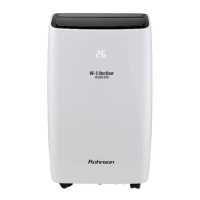

 To Next Page