The Roine ROME digital electric connected D.H.W. unvented heater is designed for low consumption and offers a range of features for efficient and safe hot water supply.
Function Description
The Rointe ROME heater is a domestic hot water cylinder with an enamelled steel tank, suitable for domestic hot water systems where the cold mains water supply has a maximum supply pressure of 0.9 MPa. It is designed to be vertically wall-mounted and can be installed in a frost-free environment. The unit incorporates a 1.77" TFT Screen with personalisable background colours & touch control panel for easy operation. It also includes anti-legionella and water heating progress functions. The heater can be controlled via a Wi-Fi connection through the Rointe Connect App, allowing for remote management of settings. It supports various operating modes including MANUAL, AUTOMATIC, COMFORT, ECO, and ANTI-FROST, as well as a PILOT WIRE function for centralized programming.
Important Technical Specifications
The Rointe ROME heater is available in two models: RWH1080DHWC4 and RWH150DHWC4, with volumes of 80 liters and 150 liters respectively. Both models have a nominal power of 2,400 W.
General Specifications:
- Tank Material: Enamelled steel
- Insulation: CFC-free polyurethane insulation foam
- Maximum Working Pressure: 8 bars
- Protection Grade: IP24
- Energy Classification: C
- Power Supply: 230 V, 50Hz
- Water Connections: 1/2"
Dimensions:
- RWH1080DHWC4 (80L):
- Diameter: 470 mm
- Height: 777 mm
- Installed depth: 487 mm
- Distance between connections: 100 mm
- Empty weight: 25.2 kg
- RWH150DHWC4 (150L):
- Diameter: 470 mm
- Height: 1297 mm
- Installed depth: 487 mm
- Distance between connections: 100 mm
- Empty weight: 38.5 kg
Safety Features:
- TRP Energy Meter: Included
- Anti-legionella disinfection cycle: Included
- Support Tripod: Optional
- Safety Valve: Included
- Magnesium Anode Protector: Included
Usage Features
The Rointe ROME heater offers a user-friendly interface with a 1.77" TFT screen and touch controls.
Control Panel (Keypad):
- On/Off button: To switch the product on or off.
- Accept/Confirm button: To confirm selections.
- Decrease temperature button: To lower the temperature.
- Move left button: To navigate left in menus.
- Increase temperature button: To raise the temperature.
- Move right button: To navigate right in menus.
- Menu button: To access the main menu.
- Move upwards button: To navigate up in menus.
- MANUAL/AUTOMATIC button: To select manual or automatic mode.
- PROG button: To access programming options.
- Move downwards button: To navigate down in menus.
Display Panel:
The display shows various information including:
- Current temperature (°C)
- Time of day (HH:MM)
- Days of the week (1-7)
- Selected temperature
- Control panel locked/unlocked status
- MANUAL/AUTOMATIC/PILOT WIRE function indicator
- COMFORT/ECO/ANTI-FROST mode indicator
- Wi-Fi connection status indicator
- Heating element active indicator
- Energy consumption indicator
Settings and Adjustments:
- Adjusting Day and Time: The time can be set manually or automatically synchronized with the Rointe Connect App. The day and time are adjusted using the keypad buttons.
- Adjusting Temperature: The temperature can be increased or decreased using the keypad buttons. The water temperature is shown on the display panel.
- Locking the Control Panel: The keypad can be locked to prevent unintended changes. This feature can be activated or deactivated from the product or remotely.
- Main Menu Navigation: The main menu allows access to various settings such as Display backlight brightness, Wi-Fi settings, Language, Time, Energy sub-menu, and Equilibrium/Balance sub-menu.
- Adjusting Display Backlight Brightness: The brightness of the display panel can be adjusted to STAND-BY or ON modes.
- Wi-Fi Settings: The product can be paired with a Wi-Fi network to enable remote control via the Rointe Connect App. The network name (NET) and password (PIN) are required for pairing.
- Change Language: The display language can be changed from the main menu (English, Français, Español, Português).
- Adjust Day and Time: The hour, minutes, and day of the week can be set.
Energy Sub-Menu:
This menu provides access to functions related to energy management:
- Water Heating Progress Function: Displays the percentage of water contained in the product that is at the user-defined target temperature.
- Anti-legionella Function: The product automatically sets to over 60°C for at least one hour once a week to prevent legionella bacteria. The user can choose a time period in days for this function to be active.
- Effective Power Function: Displays the nominal power (W) and effective power (W) consumed during periods of operation.
- Information: Displays software version, Wi-Fi connection status (MAC, IP address, subnet mask, gateway, RSSI), and other relevant product information.
Equilibrium/Balance Sub-Menu:
This menu allows the user to change the product between the COMFORT, ECO, and ANTI-FROST modes and to change the temperature for each mode.
- MANUAL: Allows for manual control of the heating.
- AUTOMATIC: Activates programming that has been previously set in the product.
- PILOT WIRE: Allows the product to be controlled by a central programmer (not available in UK).
Programming Options:
- Pre-programs: The product offers pre-defined programs (A1, A2, A3, A4).
- Start Programming: Allows the user to create custom programs.
- STEP 1 - Select COMFORT mode temperature: Sets the COMFORT mode temperature between 55°C and 73°C.
- STEP 2 - Select ECO mode temperature: Sets the ECO mode temperature between 40°C and 54.5°C.
- STEP 3 - Select the Days: Allows selection of days for programming (DAY 1, DAY 2, DAY 3, etc.).
- STEP 4 - Select the Hours: Allows selection of hours for programming.
User Mode:
- Enable/Disable Functions: Allows enabling or disabling various functions.
- Change PIN: Allows changing the 4-digit PIN code for menu access.
- Upper Temperature Limit: Sets the upper temperature limit between 55°C and 73°C.
- Lower Temperature Limit: Sets the lower temperature limit between 40°C and 54.5°C.
- PILOT WIRE Function: Enables or disables the PILOT WIRE mode (not available in UK).
Maintenance Features
Regular maintenance is crucial for the longevity and efficient operation of the Rointe ROME heater.
General Maintenance:
- Annual Inspection: It is recommended that your hot water system is serviced regularly by a service engineer.
- Water Supply: Ensure the water supply is clean and free of impurities. A hot water tap or basin may show milky water due to tiny air bubbles, which will clear quickly.
- Draining the Cylinder: Periodically drain the cylinder to remove sediment and prevent blockages. This involves turning off the water supply, opening the drain cock, and all hot taps.
- Magnesium Anode: The magnesium anode should be checked at least once a year and replaced if worn or defective.
- Pressure Reducing Valve: Remove the cartridge from the pressure reducing valve, check the strainer, and remove any debris.
- Charge Expansion Pressure: Check the charge expansion pressure in the expansion vessel and top up as necessary. The charge pressure should be 0.15 or 0.3 MPa.
- Heating Element and Hot Water Taps: Close the drain cock, disconnect the hose, refit the heating element, and close all hot water taps before reopening the stopcock.
- Pressure Relief Valve: Manually lift the expansion relief and temperature and pressure relief valve one at a time, every 12 months, to prevent debris from building up behind the valve seat.
- Water Switch: Finally, when the product is full of water, switch on the mains electricity supply to the product. As the system heats up, check again for any leaks and rectify as necessary.
- Manual Reset Cut-out: In the event of the manual reset cut-out operating, isolate the product from the mains supply, investigate the cause, and reset the cut-out.
Troubleshooting:
The manual provides a troubleshooting guide for common issues:
- No hot water: Possible causes include mains supply off, strainer in pressure reducing valve blocked, pressure reducing valve incorrectly fitted. Remedies include opening the stopcock, removing strainer and clean, and re-fitting correctly.
- Water from hot taps is cold: Possible causes include programmer if fitted is not switched on, or high limit thermostat has tripped. Remedies include switching on the programmer and checking/re-setting the thermostat.
- Intermittent water discharge through tundish on warm-up: Possible cause is expansion vessel has lost its charge pressure. Remedy is to top up the charge pressure.
- Continuous water discharge: Possible causes include pressure reducing valve not working, expansion relief valve not seating correctly, or temperature and pressure relief valve not seating correctly. Remedies include checking pressure from pressure reducing valve, manually lifting the valve once or twice to clear any debris, or replacing the valve.
Product Guarantee:
Rointe provides a guarantee against material defects and electronic components for 24 months, and the cylinder for a period of 60 months. The guarantee is only applicable if the original guarantee is issued by the seller and when the said guarantee is filled in correctly, including product reference, series number, purchase date, and seller's stamp. The guarantee does not cover damage due to incorrect installation, misuse, lack of maintenance, or external factors like lightning, fires, floods, or natural disasters.

 Need help?
 General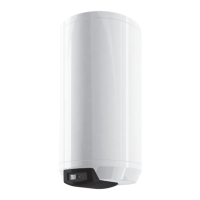

 To Next Page