Confidential & Proprietary|© ROKIT Healthcare Inc. 2019. All Rights Reserved
Dr. INVIVO 4D User Guide
Creating a G-Code for Dual Printing
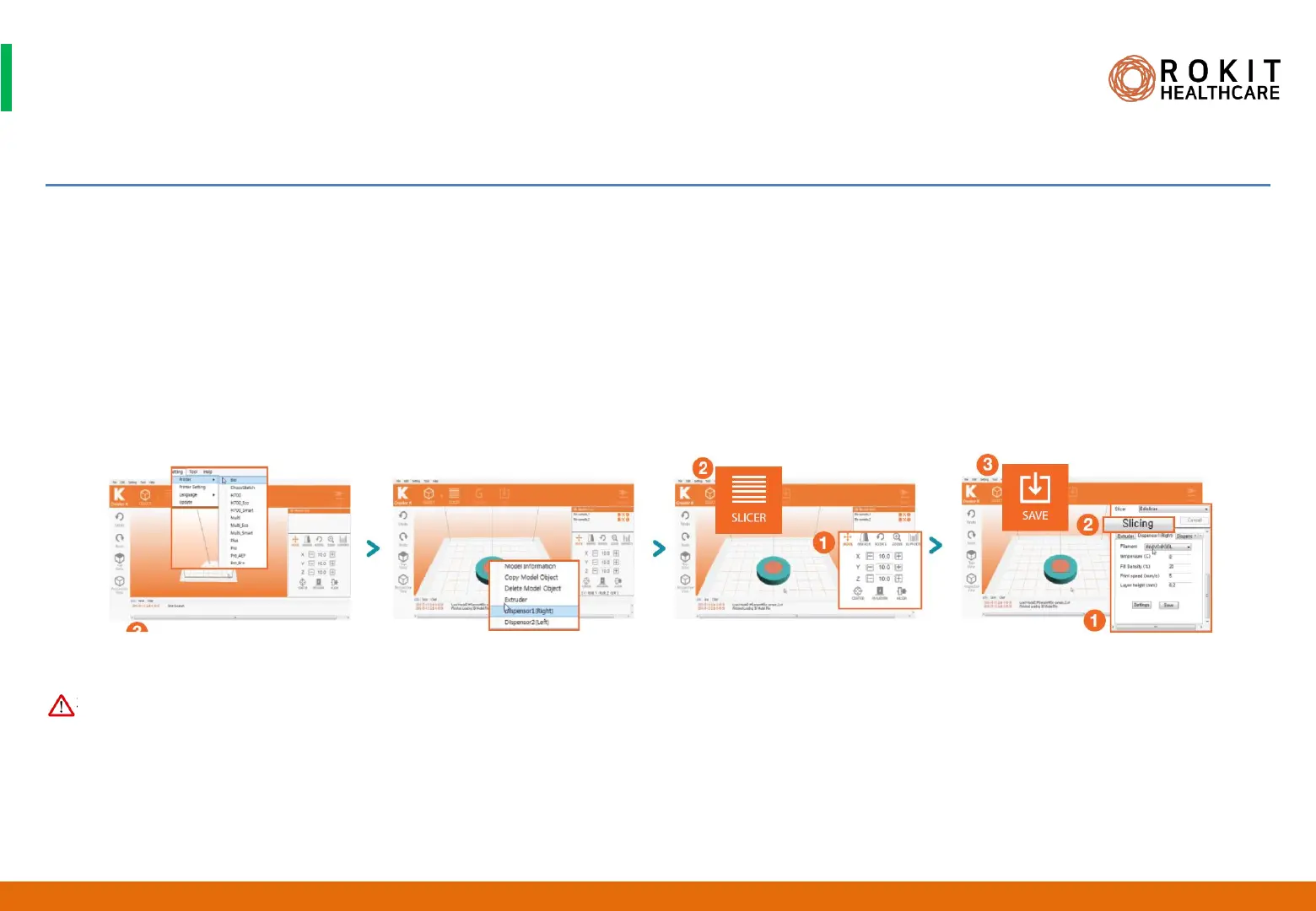
1. Run [New Creator K] installed on your PC.
2. Select [Settings]> [Printer]> [Bio] on the top menu of NewCreatorK.
3. Press [File]> [Open] to load two 3D model files.
4. Right-click on each object and select the desired dispenser type.
5. In [OBJECT], you can individually move and rotate, set the dimensions of each file. Press the [Ctrl] key to do it with the both file
simultaneously.
6. In [SLICER], enter the printing setting parameters (output speed, output nozzle temperature, fill%, etc.).
7. Click the [Slicing] button at the top to create a G-Code file, and then click the [SAVE] button to save the file.
1. The right Dispenser is Dispenser1 and the left Dispenser is Dispenser2.
37
INV-CHS-20191210
CAUTION


 To Next Page
 Loading...