1
2
OR
ALTERNATIV
OU
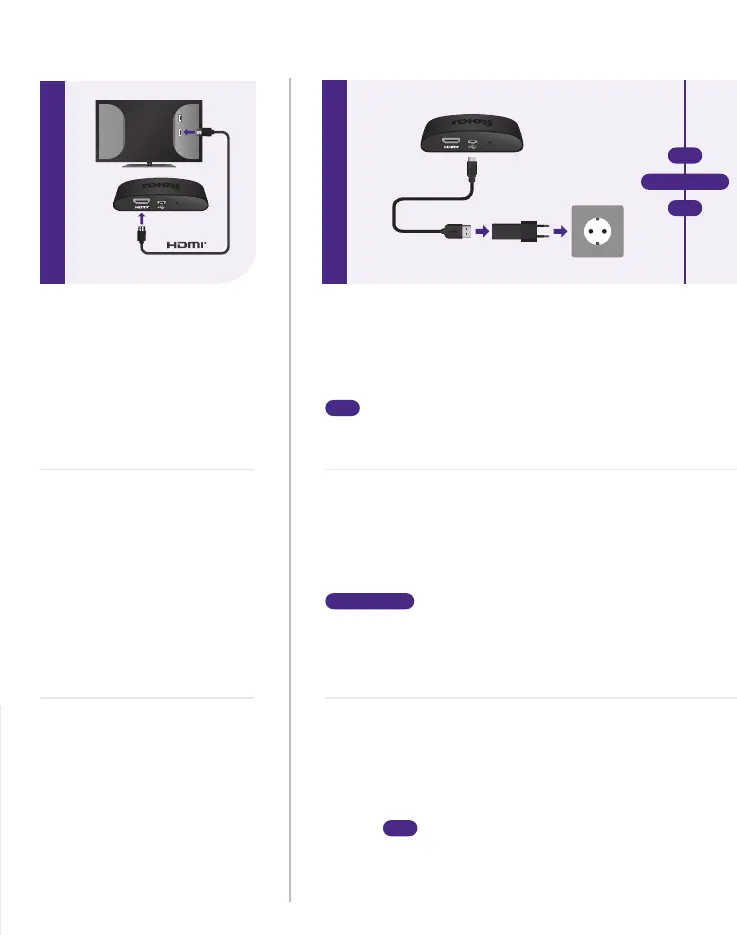
SCHRITT 1: Mit dem
TV verbinden
Schließe den Streaming-Player
mit dem mitgelieferten Kabel an
einen HDMI-Anschluss auf der
Rückseite deines Fernsehgeräts
an. Um 4K- oder HDR-Streams
wiederzugeben, wähle einen
HDMI-Anschluss am TV, der
HDCP 2.2 unterstützt.
ÉTAPE 1 : Brancher au
téléviseur
Connectez votre lecteur de
streaming à un port HDMI à
l’arrière de votre téléviseur
avec le câble inclus. Pour
streamer en 4K ou HDR,
choisissez un port HDMI
compatible HDCP 2.2.
STEP 1: Connect to TV
Connect your streaming player
to an HDMI port on the back
of your TV with the included
cable. For 4K streaming, you’ll
need to use an HDMI port that
supports HDCP 2.2.
Installation
USB
HDMI
RESET
RESET
STEP 2: Connect to power
For the best streaming experience, use the
included USB power cable and power adaptor to
connect your streaming player to a wall outlet.
OR
Or use the included USB power cable to
connect to the USB port on your TV.
SCHRITT 2: Mit der Stromversorgung
verbinden
Für ein optimales Streaming-Erlebnis, verwende das
mitgelieferte USB-Kabel und das Netzteil, um den
Streaming-Player an eine Steckdose anzuschließen.
ALTERNATIV
Kannst du das mitgelieferte USB-Kabel
verwenden, um die Verbindung zum USB-Anschluss
des TVs herzustellen.
ÉTAPE 2 : Brancher l’alimentation
Pour bénéficier d’une expérience de streaming
optimale, utilisez le câble d’alimentation USB
fourni ainsi que l’adaptateur secteur pour
brancher votre lecteur de streaming à une prise
murale.
OU
Vous pouvez également utiliser le
câble d’alimentation USB fourni pour le
connecter au port USB de votre téléviseur.
HDCP 2.2
(for 4K)



 To Next Page