
 Need help?
Do you have a question about the Roku Indoor Smart Plug SE and is the answer not in the manual?
Guide to downloading the Roku Smart Home app on your smartphone for setup.
Instructions for plugging the smart plug into a power outlet.
Steps to connect the smart plug to the Roku Smart Home application.
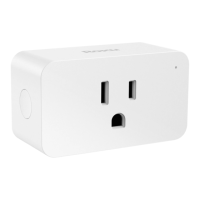
The Roku Indoor Smart Plug SE is a smart home device designed to provide remote control and automation for indoor appliances and lights. This quick start guide outlines the setup process, key features, and troubleshooting tips for the smart plug.
The Roku Indoor Smart Plug SE allows users to turn connected devices on and off remotely using the Roku Smart Home app on their smartphone. It integrates into a smart home ecosystem, enabling scheduling, voice control (with compatible assistants), and other smart automation features. The plug is designed for indoor use and provides a convenient way to manage power to various electronics without needing to manually plug or unplug them. The primary function is to convert a standard power outlet into a smart outlet, offering enhanced control and energy management capabilities.
While specific electrical ratings (voltage, current, wattage) are not detailed in the provided pages, the device is an "Indoor Smart Plug SE," indicating it's intended for standard indoor electrical outlets. The connectivity relies on Wi-Fi, as indicated by the "Connecting to Wi-Fi®" status. The device features a power button for manual control and a status light to indicate its operational mode. The FCC warning and radiation exposure statement suggest that the device operates using radio frequency (RF) technology, likely Wi-Fi, and has specific requirements for installation distance (minimum 20 cm from the body) to comply with FCC radiation exposure limits. It complies with part 15 of the FCC Rules, meaning it is subject to conditions regarding harmful interference and must accept any interference received.
The manual does not explicitly detail maintenance features in terms of cleaning or hardware upkeep. However, software maintenance and troubleshooting are supported through the Roku Smart Home app and online resources. The FCC warning highlights the importance of not making unauthorized changes or modifications to the device, as this could void the user's authority to operate the equipment and potentially impact its compliance and performance. The device is designed to be a plug-and-play solution with minimal physical maintenance required from the user, relying more on software updates and network connectivity for optimal performance. Regular checks of the status light can help diagnose connectivity issues.
 General
| Brand | Roku |
|---|---|
| Model | Indoor Smart Plug SE |
| Category | Home Automation |
| Language | English |

 To Next Page

