4
2 3
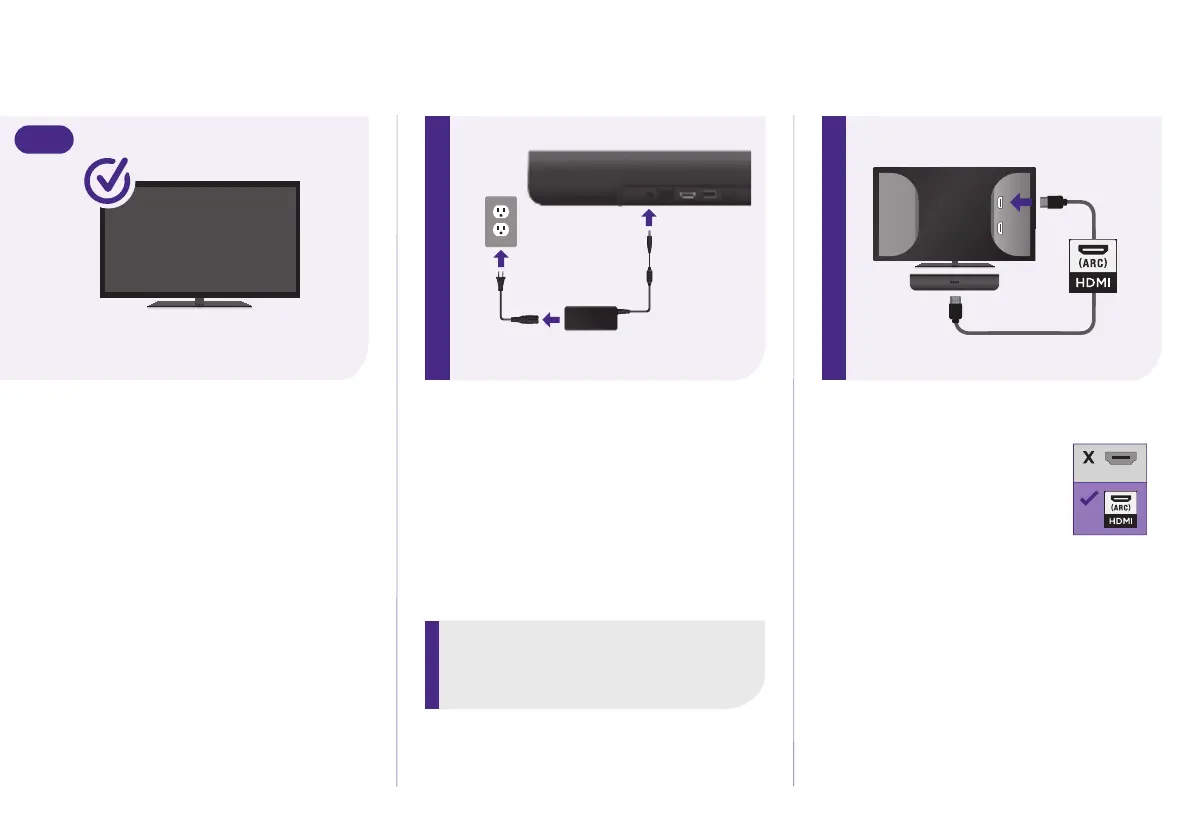
STEP 1: Adjust TV settings
All other TVs
You may need to enable your TV’s
HDMI-CEC and ARC settings.
TV manufacturers use dierent
names for these settings. For help,
visit
go.roku.com/streambar
STEP 2: Connect to power
Use the included power adaptor and
cable to connect your Streambar to a
wall outlet.
STEP 3: Connect to TV
Connect your Streambar
to the HDMI port on your
TV labeled “ARC”with the
included cable.
Don’t see an HDMI-ARC port? Use
the included optical cable along
with the HDMI Cable to connect.
Remember to remove the plastic
caps before use!
IHDM
TIP:
Place your Streambar at the front edge
of your TV stand for the best sound
experience.
HDMI
(ARC)
HDMI
OR



 To Next Page