EasyManua.ls Logo

Roland 5500 - Changing MIDI Channels; Program Change Message Operations; Sending Program Change 1 to 128

Roland 5500
14 pages
Print Icon
To Next Page IconTo Next Page
To Previous Page IconTo Previous Page
Loading...
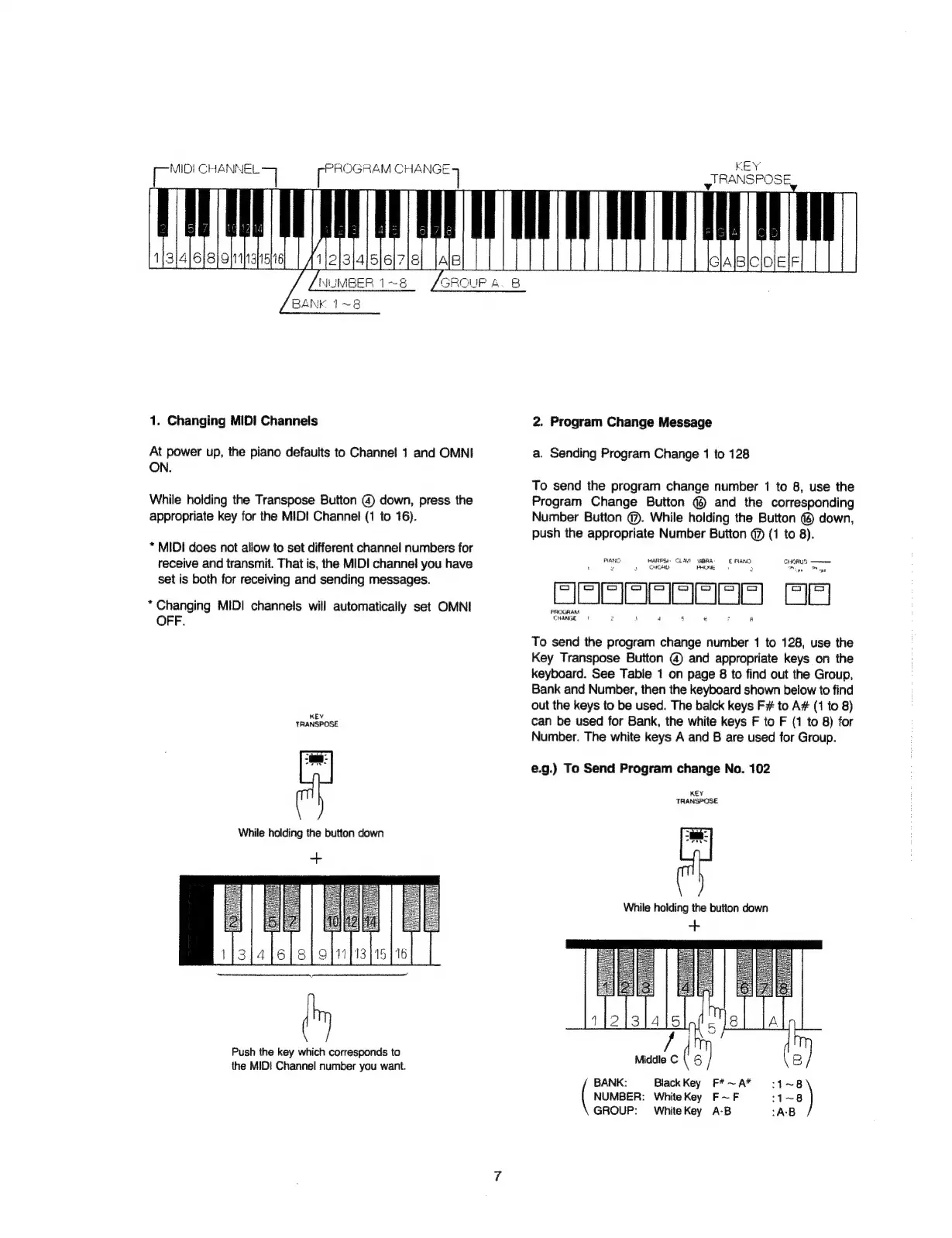
BANK
1~8
1.
Changing
MID!
Channels
At
power
up,
the
piano
defaults
to
Channel
1
and
OMNI
ON.
While
holding
the
Transpose
Button
@
down,
press
the
appropriate
key
for
the
MID!
Channel
(1
to
16).
*
MIDI
does
not
allow
to
set
different
channel
numbers
for
receive
and
transmit.
That
is,
the
MIDI
channel
you
have
set
is
both
for
receiving
and
sending
messages.
*
Changing
MIDI
channels
will
automatically
set
OMNI
OFF.
KEY
TRANSPOSE
While
holding
the
button
down
Push
the
key
which
corresponds
to
the
MIDI
Channel
number
you
want.
KEY
y
RANSPOSE,
2.
Program
Change
Message
a.
Sending
Program
Change
1
to
128
To
send
the
program
change
number
1
to
8,
use
the
Program
Change
Button
©
and
the
corresponding
Number
Button
@.
While
holding
the
Button
@
down,
push
the
appropriate
Number
Button
@
(1
to
8).
PANG
HARPS:
CLAY)
VIBRA
E
PIANO
CHORUS
eee
2
3
CHO
UNE
+
:
To
send
the
program
change
number
1
to
128,
use
the
Key
Transpose
Button
@
and
appropriate
keys
on
the
keyboard.
See
Table
1
on
page
8
to
find
out
the
Group,
Bank
and
Number,
then
the
keyboard
shown
below
to
find
out
the
keys
to
be
used.
The
balck
keys
F#
to
A#
(1
to
8)
can
be
used
for
Bank,
the
white
keys
F
to
F
(1
to
8)
for
Number.
The
white
keys
A
and
B
are
used
for
Group.
e.g.)
To
Send
Program
change
No.
102
KEY
TRANSPOSE
While
holding
the
button
down
aie
3)
BANK:
Black
Key
F*~A*
:1~8
NUMBER:
WhiteKey
F~F
:1~8
GROUP:
WhiteKey
A-B
:A-B