EasyManua.ls Logo

Roland DAC-15D - Panel Description; Input and Control Knobs; Switches and Indicators; Effect and Remote Jacks

Roland DAC-15D
6 pages
Print Icon
To Next Page IconTo Next Page
To Previous Page IconTo Previous Page
Loading...
M
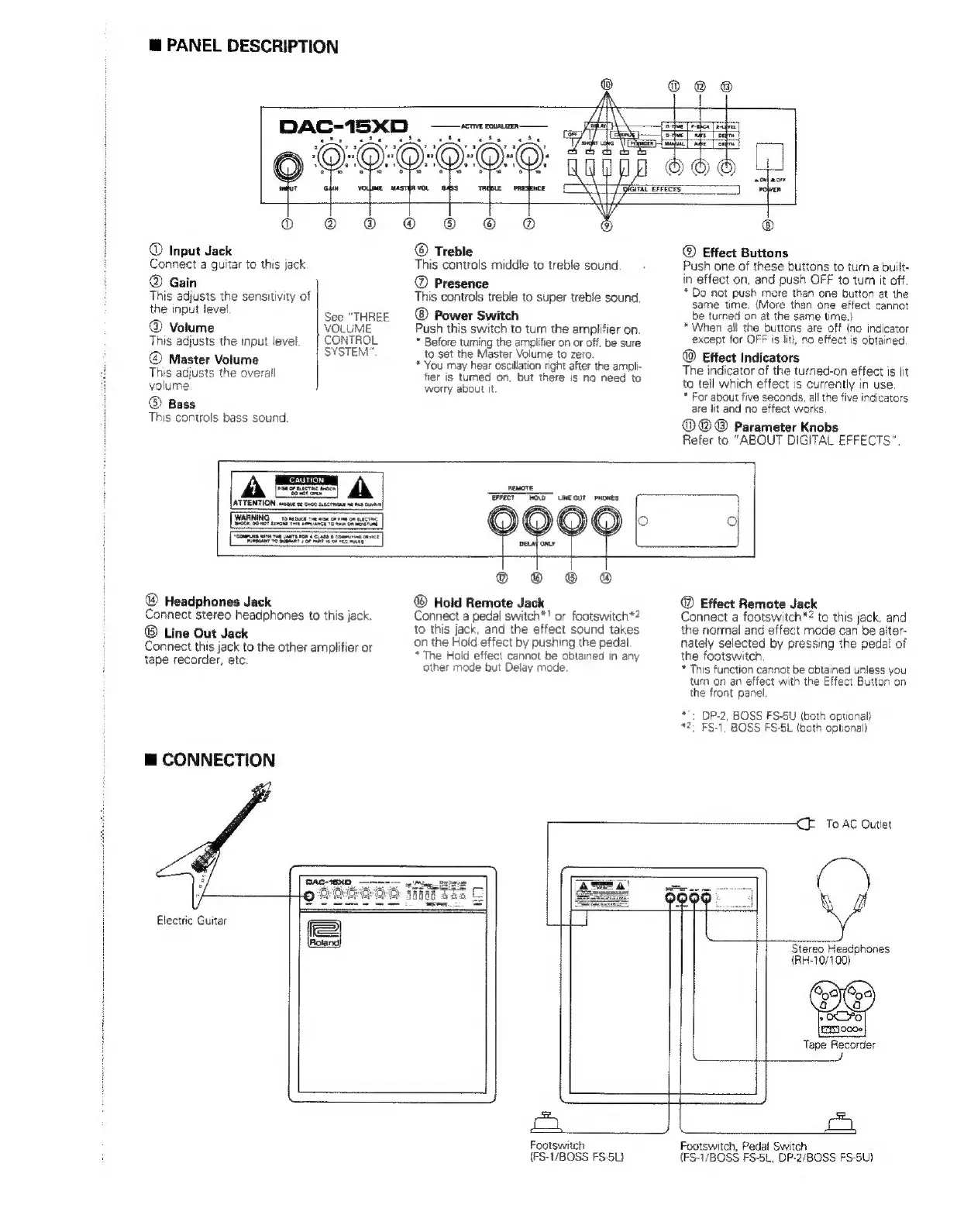
PANEL
DESCRIPTION
EE
TET
yn)
İm
th:
j
oO
©
Input
Jack
Connect
a
guitar
to
this
jack
©
Gain
This
adjusts
the
sensitivity
of
the
input
level
See
“THREE
©
Volume
VOLUME
This
adjusts
the
input
level
CONTROL
SYSTEM”.
©
Master
Volume
This
adjusts
the
overall
volume
®
Bass
This
controls
bass
sound.
©
Treble
This
controls
middie
to
treble
sound
©
Presence
This
controis
treble
to
super
treble
sound
Power
Switch
Push
this
switch
to
turn
the
amplifier
on.
*
Before
turning
the
amplifier
on
or
off,
be
sure
to
set
the
Master
Volume
to
zero.
*
You
may
hear
oscillation
right
after
the
ampli-
fier
is
tumed
on,
but
there
is
no
need
to
worry
about
it.
©
Effect
Buttons
Push
one
of
these
buttons
to
turn
a
built-
in
effect
on,
and
push
OFF
to
turn
it
off.
*
Do
not
push
more
than
one
button
at
the
same
time.
(More
than
one
effect
cannot
be
turned
on
at
the
same
time.)
*
When
all
the
buttons
are
off
(no
indicator
except
for
OFF
is
lit),
no
effect
is
obtained
©
Effect
Indicators
The
indicator
of
the
turned-on
effect
is
lit
to
tell
which
effect
is
currently
in
use.
*
For
about
five
seconds,
ali
the
five
indicators
are
lit
and
no
effect
works
MOO
Parameter
Knobs
Refer
to
“ABOUT
DIGITAL
EFFECTS".
CAUTION
WARNING
TO
MDE
Te
nan
OF
i
Om
rt
abe
ANCE
Ta
tae
OR
"cones
wT
Tot
ara
FoR
AR
Ye
Bl
sor
tant
oe
vee
mata
ae
ee
Tn,
LUNE
QUT
PHONES
®
Headphones
Jack
Connect
stereo
headphones
to
this
jack.
®
Line
Out
Jack
Connect
this
jack
to
the
other
amplifier
or
tape
recorder,
etc.
E
CONNECTION
569
© ©
8
©
Hold
Remote
Jack
Connect
a
pedal
switch*!
or
footswitch*?
to
this
jack,
and
the
effect
sound
takes
on
the
Hold
effect
by
pushing
the
pedal
*
The
Hold
effect
cannot
be
obtained
in
any
other
mode
but
Delay
mode.
©)
Effect
Remote
Jack
Connect
a
footswitch”?
to
this
jack,
and
the
normal
and
effect
mode
can
be
alter-
nately
selected
by
pressing
the
pedal
of
the
footswitch.
*
This
function
cannot
be
obtained
unless
you
turn
on
an
effect
with
the
Effect
Button
on
the
front
panel.
:
DP-2,
BOSS
FS-5U
(both
optional)
:
FS-1,
BOSS
FS-5L
(both
optional)
<E
To
AC
Outlet
Electric
Guitar
Stereo
Headphones
(RH-10/100)
Tape
Recorder
pay
ii
Footswitch
(FS-1/BOSS
FS-5L}
Footswitch,
Pedal
Switch
(FS-1/BOSS
FS-5L,
DP-2/BOSS
FS-5U)

Related product manuals