EasyManua.ls Logo

Roland DAC-15D - Three Volume Control System; Normal Sound Settings; Distortion Sound Settings; Digital Effects Explained

Roland DAC-15D
6 pages
Print Icon
To Next Page IconTo Next Page
To Previous Page IconTo Previous Page
Loading...
M
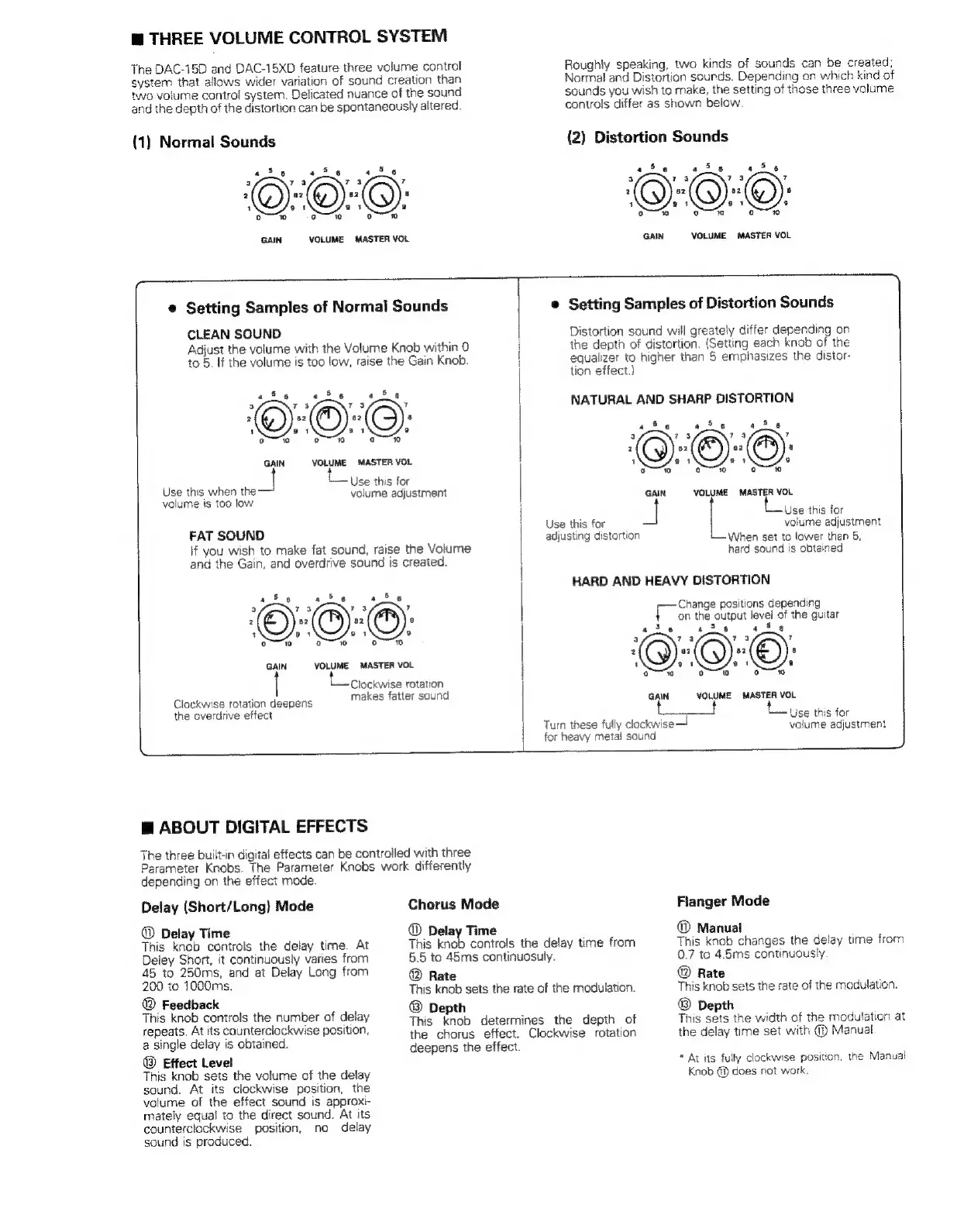
THREE
VOLUME
CONTROL
SYSTEM
The
DAC-15D
and
DAC-15XD
feature
three
volume
control
system
that
allows
wider
variation
of
sound
creation
than
two
volume
contro!
system.
Delicated
nuance
of
the
sound
and
the
depth
of
the
distortion
can
be
spontaneously
altered.
(1)
Normal
Sounds
ais
a
Sis
“Ss
a
ra
ys
7
2
82
az
a
1
so
2
oo
ge
0
GAIN
VOLUME
MASTER
VOL
Roughly
speaking,
two
kinds
of
sounds
can
be
created;
Normal
and
Distortion
sounds.
Depending
on
which
kind
of
sounds
you
wish
to
make,
the
setting
of
those
three
volume
controls
differ
as
shown
below
{2)
Distortion
Sounds
4
Se
ita «Se
3
73 73
7
2
82
32
8
1
e
ge
ga
ote
GAIN
VOLUME
MASTER
VOL
e
Setting
Samples
of
Normal
Sounds
CLEAN
SOUND
Adjust
the
volume
with
the
Volume
Knob
within
0
to
5.
If
the
volume
is
too
low,
raise
the
Gain
Knob.
Sis
«S6 «Se
3
73 73
7
2
82
82
a
1
94
ə
oo
oio
0
GAIN
VOLUME
MASTER
VOL
Use
this
for
Use
this
when
the
volume
adjustment
volume
is
too
low
FAT
SOUND
If
you
wish
to
make
fat
sound,
raise
the
Volume
and
the
Gain,
and
overdrive
sound
is
created.
GAIN
VOLUME
MASTER
VOL
Clockwise
rotation
Clockwise
rotation
deepens
makes
fatter
sound
the
overdrive
effect
©
Setting
Samples
of
Distortion
Sounds
Distortion
sound
will
greately
differ
depending
on
the
depth
of
distortion.
(Setting
each
knob
of
the
equalizer
to
higher
than
5
emphasizes
the
distor-
tion
effect.)
NATURAL
AND
SHARP
DISTORTION
i
«S6
ae
a
E4
73
7
2
aa a2
a
1
sa ay
9
10
ooo
0
GAIN
VOLUME
MASTER
VOL
Use
this
for
volume
adjustment
When
set
to
lower
than
5,
hard
sound
is
obtained
Use
this
for
adjusting
distortion
HARD
AND
HEAVY
DISTORTION
Change
positions
depending
on
the
output
level
of
the
guitar
ase
«Se
ais
3
ra ra
?
2
87
82
8
1
9.
ot
a
w
ooo
ooo
GAIN
VOLUME MASTER
VOL
Use
this
for
Turn
these
fully
clockwise
volume
adjustment
for
heavy
metal
sound
M
ABOUT
DIGITAL
EFFECTS
The
three
built-in
digital
effects
can
be
controlled
with
three
Parameter
Knobs.
The
Parameter
Knobs
work
differently
depending
on
the
effect
mode.
Delay
(Short/Long)
Mode
@
Delay
Time
This
knob
controls
the
delay
time.
At
Deley
Short,
it
continuously
varies
from
45
to
250ms,
and
at
Delay
Long
from
200
to
1000ms.
©
Feedback
This
knob
controls
the
number
of
delay
repeats.
At
its
counterclockwise
position,
a
single
delay
is
obtained.
®
Effect
Level
This
knob
sets
the
volume
of
the
delay
sound.
At
its
clockwise
position,
the
volume
of
the
effect
sound
is
approxi-
mately
equal
to
the
direct
sound.
At
its
counterclockwise
position,
no
delay
sound
is
produced.
Chorus
Mode
@
Delay
Time
This
knob
controls
the
delay
time
from
5.5
to
45ms
continuosuly.
©
Rate
This
knob
sets
the
rate
of
the
modulation.
®
Depth
This
knob
determines
the
depth
of
the
chorus
effect.
Clockwise
rotation
deepens
the
effect.
Fianger
Mode
©
Manual
This
knob
changes
the
delay
time
from
0.7
to
4.5ms
continuously
©
Rate
This
knob
sets
the
rate
of
the
modulation.
®
Depth
This
sets
the
width
of
the
modulation
at
the
delay
time
set
with
@
Manual
*
At
its
fully
clockwise
position,
the
Manual
Knob
@
does
not
work.

Related product manuals