Editing
21
Editing the Eects
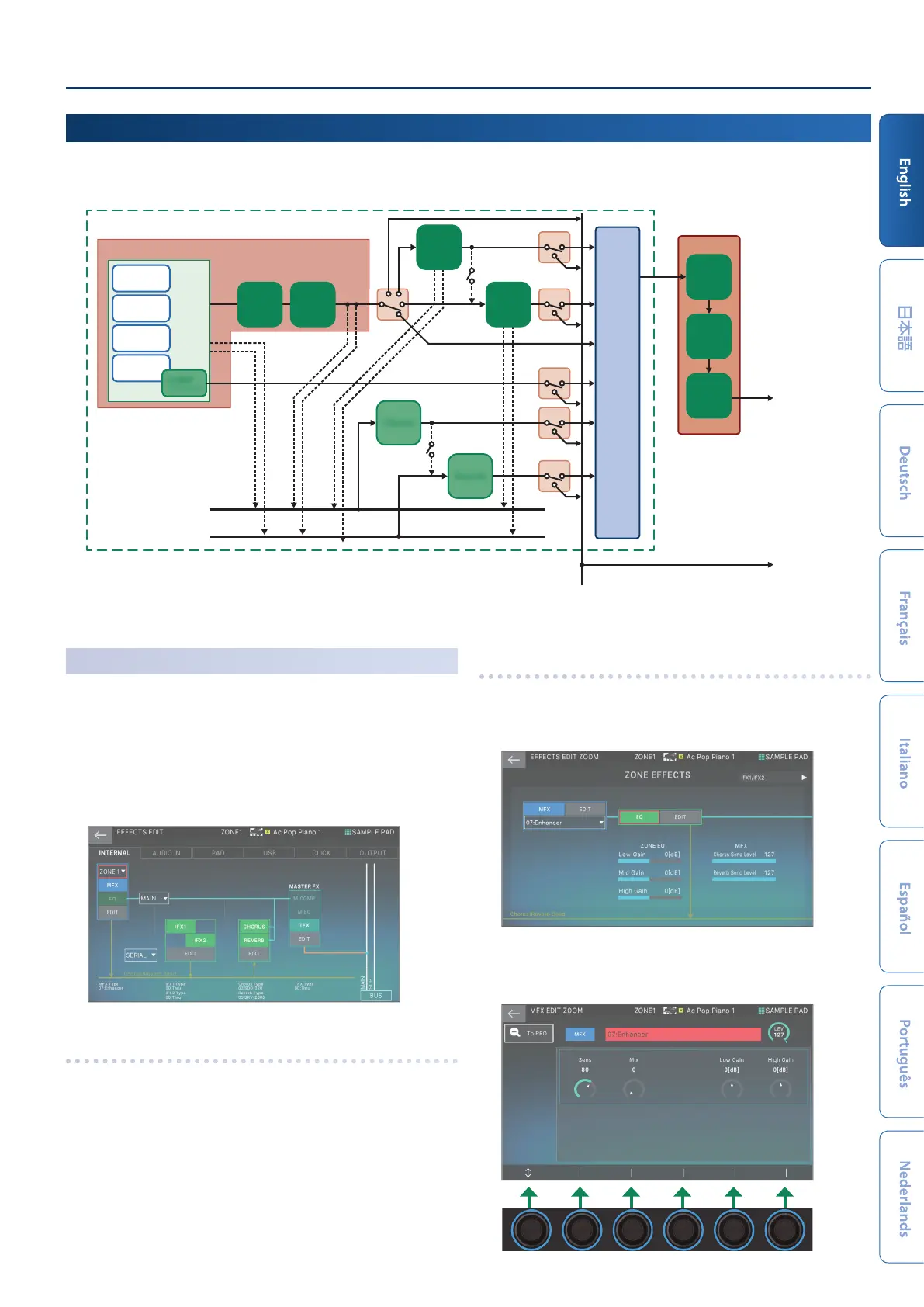
The arrangement and signal paths for each eect are as shown below. Select the eect to match your needs, and then edit its settings.
Here we’ll explain how to edit the tone eects (MFX).
SCENE
Master FX
IFX 1
Insert Eect 1
MFX
Multi Eect
Zone EQ
IFX 2
Insert Eect 2
M. COMP
Master Comp
M. EQ
Master EQ
TFX
Total Eect
ZONE 1–16
ZEN-Core
PARTIAL
Ó
PARTIAL EQ
Drum Kit
Inst
Ó
KIT PTL EQ
COMP
x 6
for Drum kit
VTW
Virtual Tone Wheel
* Zone 2 only
SN-A
SNAP, SNEP
Chorus Send
Reverb Send
Chorus
Reverb
MIXER
MAIN Output
SUB Output
5
For details on the IFX1/2, Chorus, Reverb and Master FX, see the “Parameter Guide” (PDF).
Editing the Tone’s Eect
(MFX)
Here’s how to edit the tone’s eect (MFX).
1.
Press the [MENU] button.
The MENU screen appears.
2.
Touch <EFFECTS EDIT>.
The EFFECTS EDIT screen appears.
Turning the MFX on/o
1.
In the screen, touch <MFX> to turn it on/o.
Editing the MFX parameters
1.
In the MFX section, touch <EDIT>.
The EFFECTS EDIT ZOOM screen appears.
2.
In the MFX section, touch <EDIT>.
The MFX EDIT ZOOM screen for MFX appears.


 To Next Page