21
REMOTE CONTROLS
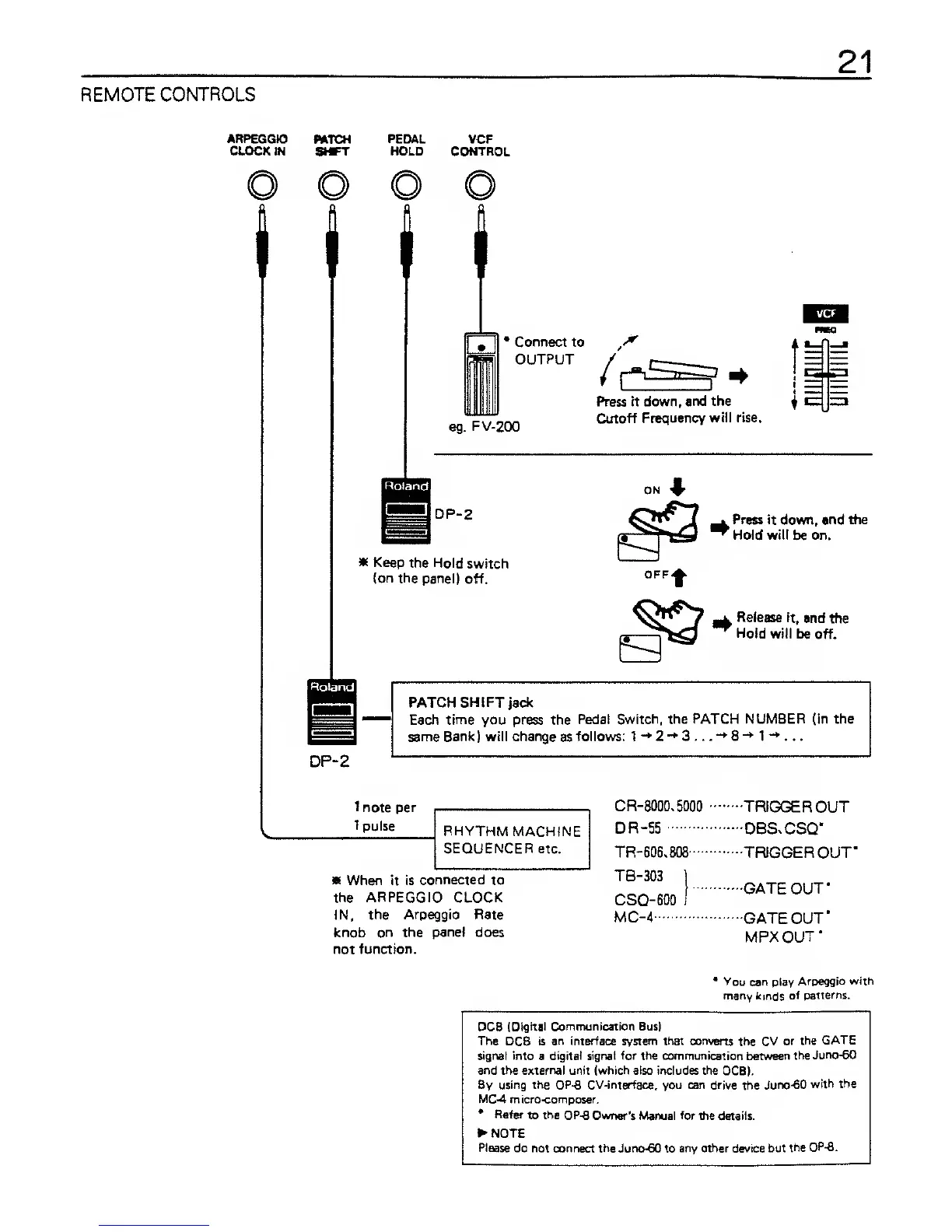
ARPEGGIO
BATCH
CLOCK
IN SMFT
PEDAL
HOLD
VCF
CONTROL
Connect to
OUTPUT
rma
eg.
FV-200
Press it
down, and the
Cutoff
Frequency will rise.
=
zz*
DP-2
* Keep the Hold
switch
(on the panel)
off.
Press it
down, and
tine
Hold will be on.
^
Release
it,
and
the
^
Hold
will
be off.
!
Roland
I
1
DP-2
PATCH
SHI FT
jack
Each
time
you press the
Pedat Switch,
the PATCH NUMBER (in the
same
Bank) will change
as
follows: 1-+2-*3...*+8-M-*...
1
note per
1
pulse
RHYTHM
MACHINE
SEQUENCER etc.
CR-8000,5000
*
When it
is connected to
the
ARPEGGIO CLOCK
IN,
the
Arpeggio
Rate
knob
on the
panel
does
not
function.
DR-55
TR-606,808
TB-303
CSQ-600
MC-4
•TRIGGER
OUT
DBSxCSQ'
•TRIGGER
OUT*
•GATE OUT
*
GATE OUT*
MPXOUT*
*
You
can
play
Arpeggio with
many kinds
of
patterns.
DCS (Digital
Communication
Bus)
The
DCB is
an interface system that converts
the CV
or the
GATE
signal into
a
digital signal for the communication between
the
Juno-60
and
the
external unit (which also includes the
DCB).
By using the OP-8 CV-interface, you can drive
the
Juno-60
with the
MC-4 micro-composer.
*
Refer
to
the OP-6
Owner's
Manual for the
details.
NOTE
Please do
not connect the Juno-60 to
any other
device but
the OPS.


 To Next Page