19
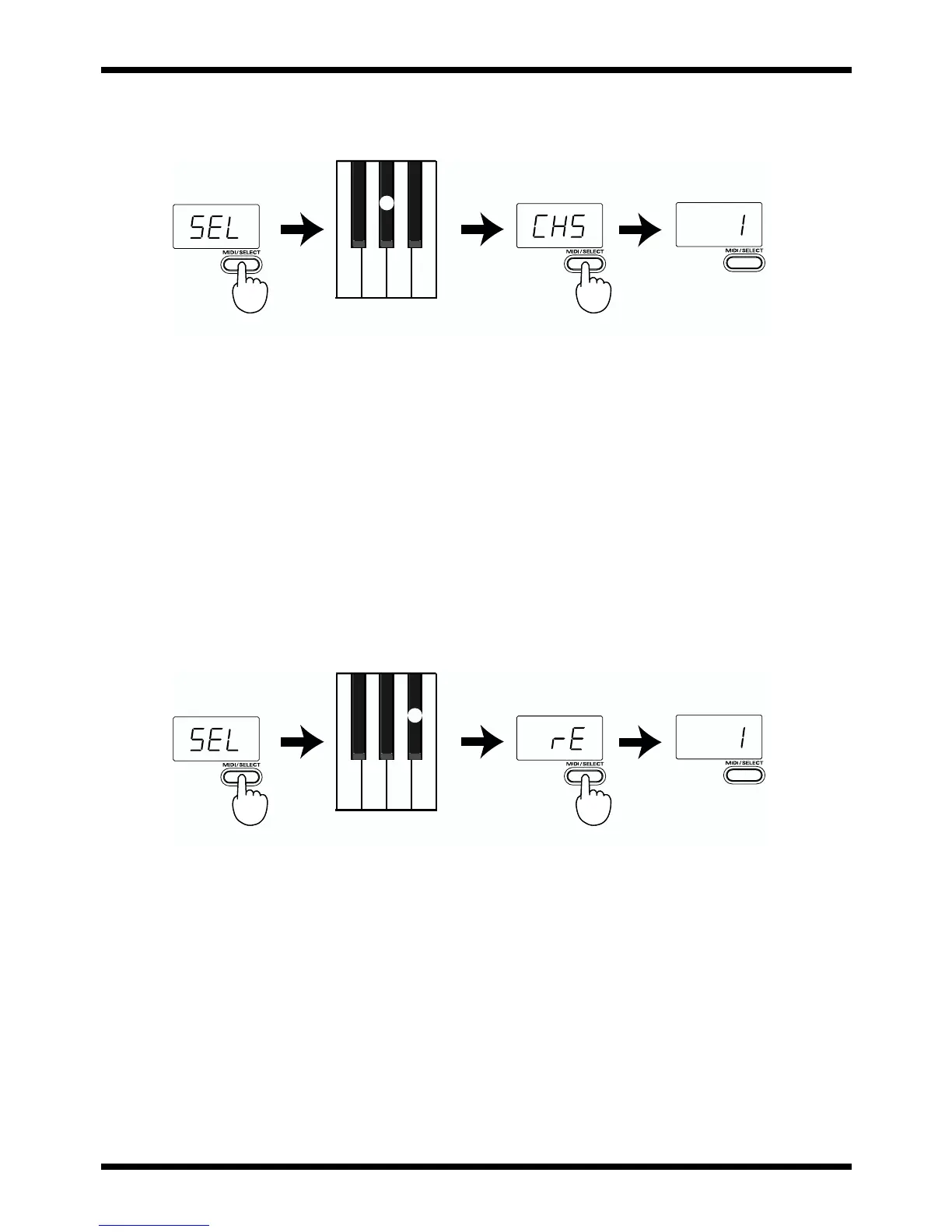
Changing the Chorus Depth: Chorus Send Level (CC 93)
This function allows you to set the Chorus depth for each Part.
fig.chorus.e
[Procedure]
1. Set the MIDI transmit channel to match that of the desired Part.
2. Press MIDI/SELECT [3] (LED will show “SEL”).
3. Press the A#3 black key (CHORUS LEVEL) [9].
4. Press MIDI/SELECT [3] again to confirm your selection. Now you can use the DATA
ENTRY slider to select the value transmitted for the Chorus Send Level (Effect 3
Depth).
* When a sound module other than a GS module is being used, the relevant parameter may not correctly
respond to CC 93 messages.
Changing the Reverb Depth: Reverb Send Level (CC 91)
This function allows you to set the Reverb depth for each Part.
fig.reverb.e
[Procedure]
1. Set the MIDI transmit channel to match that of the desired Part.
2. Press MIDI/SELECT [3] (LED will show “SEL”).
3. Press the G#3 black key (REVERB LEVEL) [10].
4. Press MIDI/SELECT [3] again to confirm your selection. Now you can use the DATA
ENTRY slider to select the value transmitted for the Reverb Send Level (Effect 1
Depth).
* When a sound module other than a GS or General MIDI module is being used, the relevant parameter
may not correctly respond to CC 91 messages.
Chorus Depth
Reverb Depth



 To Next Page