22
Controllers 96 and above (NRPN/RPN, Channel Mode Messages)
Controller No. Control Function
96. Data Increment
97. Data Decrement
98. Non-Registered Parameter Number LSB
99. Non-Registered Parameter Number MSB
100. Registered Parameter Number LSB
101. Registered Parameter Number MSB
102–120 Undefined
121–127 Reserved for Channel Mode Messages
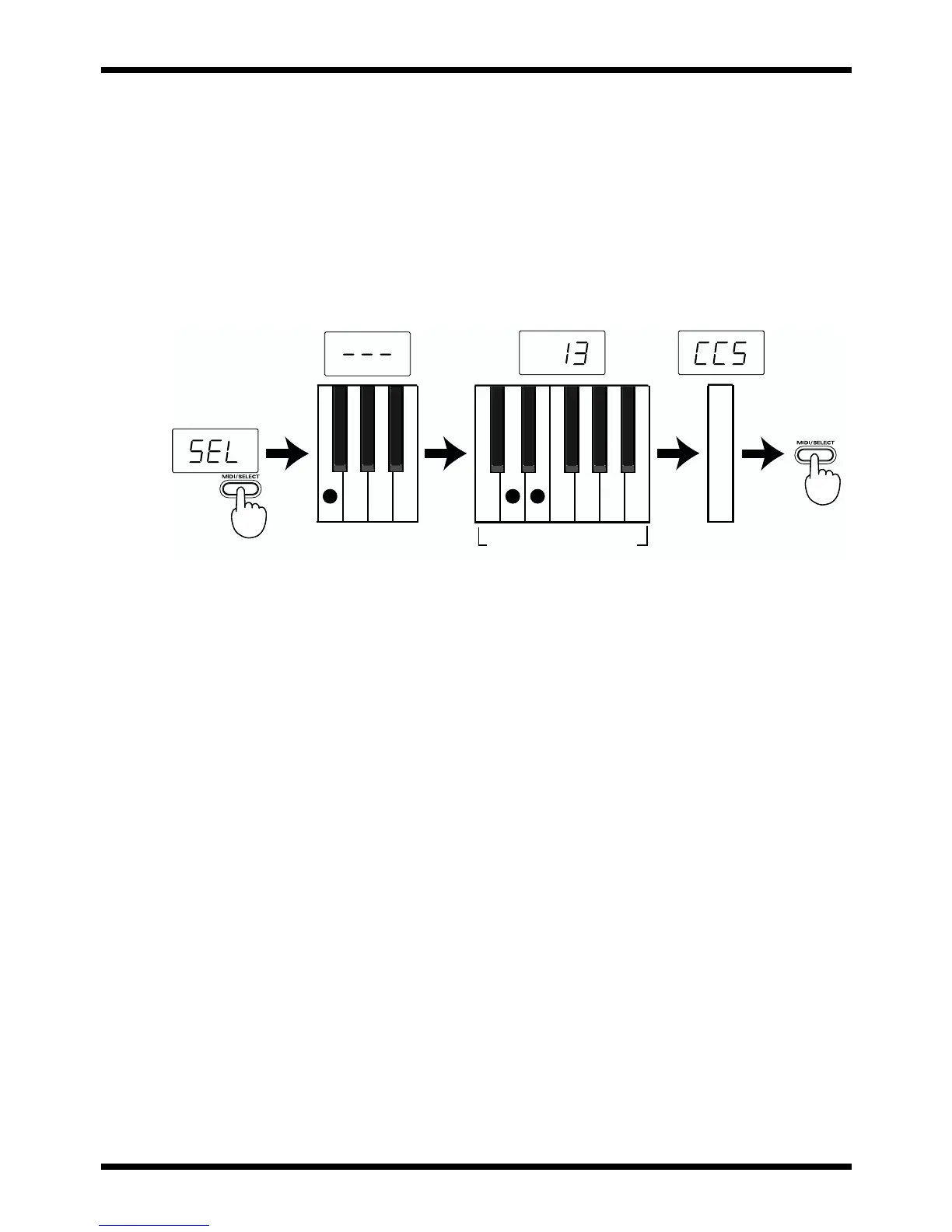
fig.controller.e
[Procedure]
1. Set the MIDI transmit channel to match that of the desired Part.
2. Press MIDI/SELECT [3] (LED will show “SEL”).
3. Press the F4 white key (CC SELECT) [13].
4. Select the Controller Number by pressing keys in the NUMERIC ENTRY section [17].
5. Press ENTER [19].
6. Press MIDI/SELECT [3] again to confirm your selection. Now you can use the DATA
ENTRY slider to transmit the value of the specified Controller Number.
Select CC Numeric Key Pad Enter



 To Next Page