Convenient Functions
9
[KEY]
knob
Parameter Value Explanation
E
External
carrier
O, On
Species whether the
vocoder eect is applied
(on) or is not applied (o)
to the carrier signal being
input via USB.
F
Formant
depth
1–4
Species the range
in which the formant
changes.
G Monitor mode O, On
Species whether the
[VOLUME] knob aects
the volume of only the
PHONES jack (on).
If this is on, the volume
of the LINE OUT jacks
is xed.
A Playback level 0–20
Adjusts the volume
balance between the USB
audio input and the mic
input.
3. Edit the setting of the parameter that you selected.
Operation Explanation
On/o setting
On Press the [HARMONY] button
O Press the [VOCODER] button
Operation Explanation
Value setting
Increase by 1 Press the [HARMONY] button
Decrease by 1 Press the [VOCODER] button
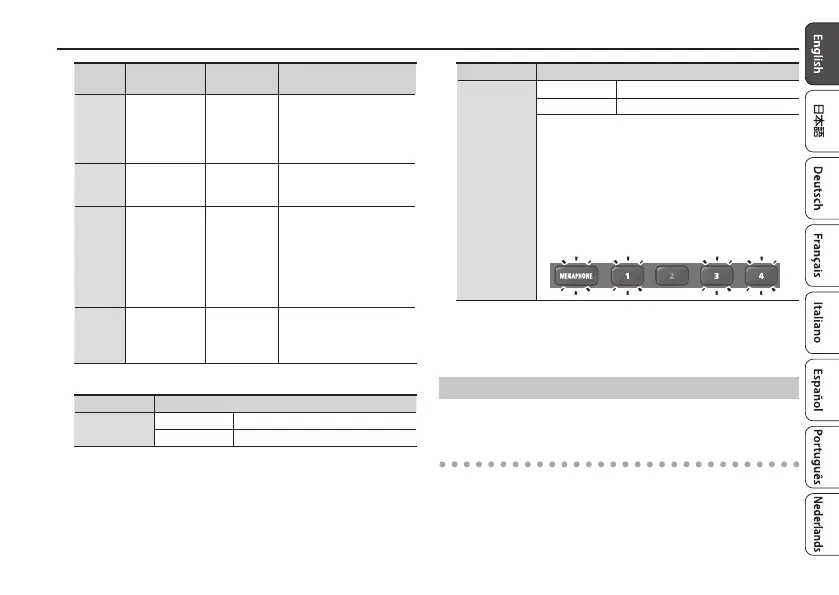
Checking the volume
The total value of the scene memory [1]–[4]
buttons that are lit indicates the “ones” place.
The [MEGAPHONE] button is lit if the value is
10–19, and the [ROBOT] button is also lit if the
value is 20.
For example, if the value is “18,” scene memory [1],
[3], and [4] buttons and the [MEGAPHONE] button
are lit.
4. When you have nished making settings, press the
[MANUAL] button.
The setting is saved and VT-4 restarts.
Backing Up or Restoring the Scene Memories
You can use your computer to back up scene memories and restore
them from your computer.
Backing up
1. With the VT-4 powered-o, connect the VT-4 to your
computer via a USB cable.


 To Next Page